The SmartAlex wallet: top-ups, auto top-up and spend cap
The wallet is a prepaid US dollar balance that pays for calls, numbers and messages. Top up by card, switch on auto top-up, and set a monthly spend cap.
Your wallet is a prepaid balance, held in US dollars. It pays for what you use: calls after your free credits, phone numbers, messages, AI replies and meetings. You top it up by card, by hand or automatically. When your free credits are used and the wallet is empty, callers are turned away until you top up. Auto top-up stops that happening.
In the app: Settings → Billing (/account?tab=billing). Wallet shows your Balance and your free credits, labelled Free tokens. Payment → Auto top-up opens Balance preferences.
What the wallet pays for
Top-ups, by hand or automatic, fill the wallet, and the wallet pays for what you use.Your plan and add-ons are not paid from the wallet. They are charged to your card. See How billing works.
Wallet limits
Wallet rule
Amount
Quick top-up amounts
$5, $10, $25, $50 or $100
Smallest top-up
$1
Largest single top-up
$10,000. For more, contact support
Balance needed to make or take a call
More than $0, unless you still have free credits
Balance needed to buy a phone number
Enough for the number’s first month
Most auto top-up can add in one day
$100
Top up by hand
1
Open your wallet
Go to Settings → Billing. In Wallet, next to your Balance, click Top up.
2
Choose an amount
Pick a quick amount, or type your own and click Add.
Pick an amount or type your own
3
Pay
Pay on the secure payment page. It opens in a new tab, or in the same tab if your browser blocks pop-ups.
4
Check the balance
You come back to SmartAlex and see “Your wallet has been topped up!” The money is in your wallet straight away.
Switch on auto top-up
1
Open Balance preferences
In Settings → Billing, open Payment, then Auto top-up.
2
Turn it on
Switch on Automatic top-up. It charges a card already saved on your account. With no saved card, nothing is charged.
3
Set the trigger and the amount
Set When my balance falls below, then Top up by. The top-up amount must be more than the trigger, or the balance would still be below it.
4
Save
Click Save preferences. You see “Balance preferences saved”.
A Daily safety ceiling stops automatic top-ups once the day’s limit has been added, until the next day. If the card fails three times in a row, auto top-up switches itself off, so check your card and switch it on again.
Get a low balance alert
In Balance preferences, set a Low balance alert. You are told when the balance falls below it. Leave it blank to turn the alert off. Without an alert of your own, SmartAlex still warns you when your balance covers about three days of your recent spending.
Set a monthly spend cap
In Balance preferences, set a Monthly spend cap: the most the workspace may spend in a calendar month. Leave it blank for no cap.
Once the month’s spend reaches the cap, new calls, chats, AI replies and messages wait until the next month.
A call or chat that started before the cap was reached can take the month’s spend just above it.
Charges already owed, such as phone numbers and connected social accounts, still apply.
When the wallet runs out
When the balance runs low, auto top-up refills it. Without auto top-up, new calls are refused once both your free credits and your balance reach zero.What people see while your free credits and wallet are both empty:
Where
What happens
Phone calls to your numbers
The call is turned away, with no message
Website widget chat
The visitor sees “This service is currently unavailable. Please contact the website owner.”
Website widget voice call
The visitor sees “Voice calls are not available right now. Please try again later.”
WhatsApp and Instagram AI replies
The reply is not sent. These replies are always paid from the wallet, never from free credits
You get a notice, at most once a day, that callers are being turned away. Outbound campaigns pause until you add money. The wallet never goes below zero.
See what you spent
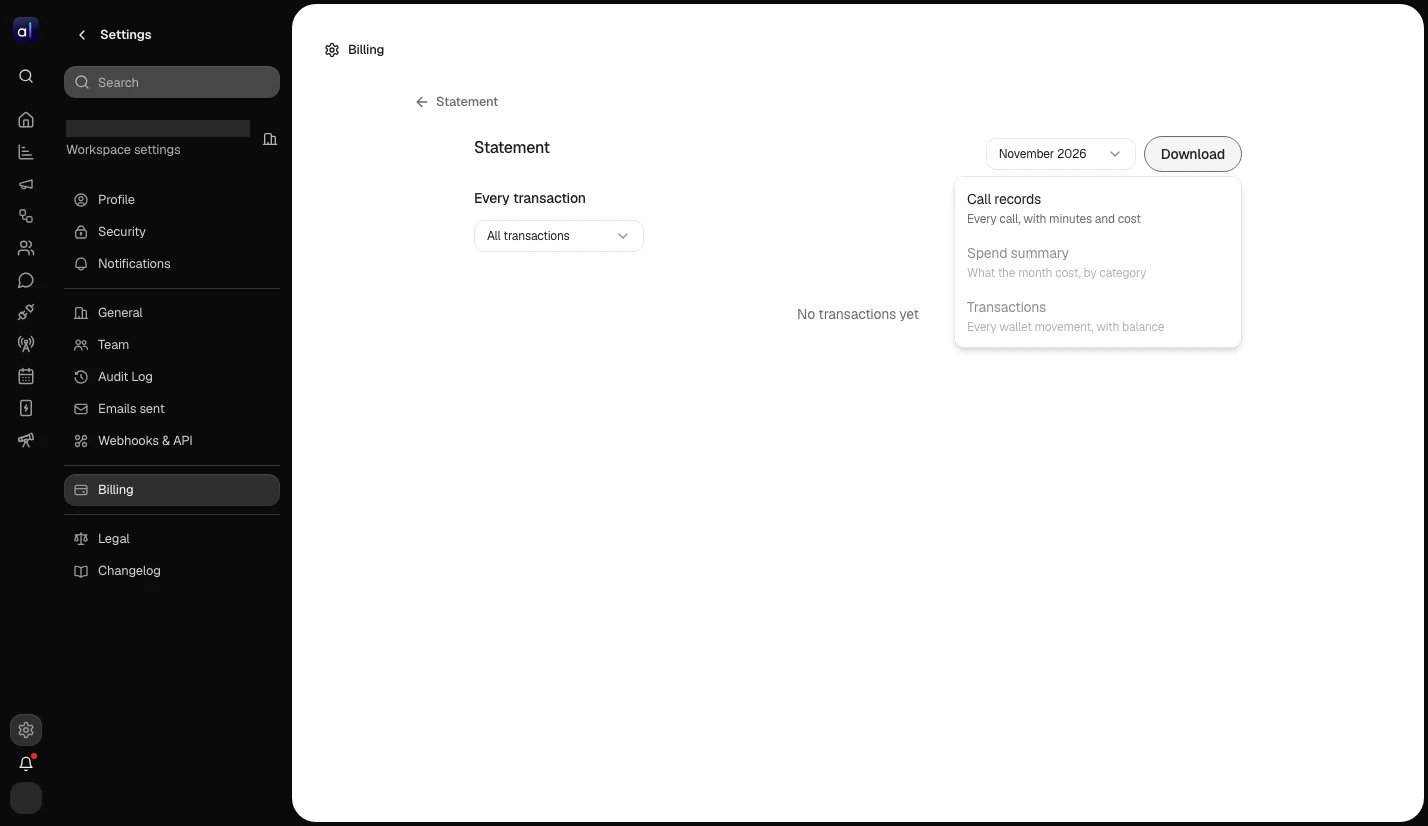
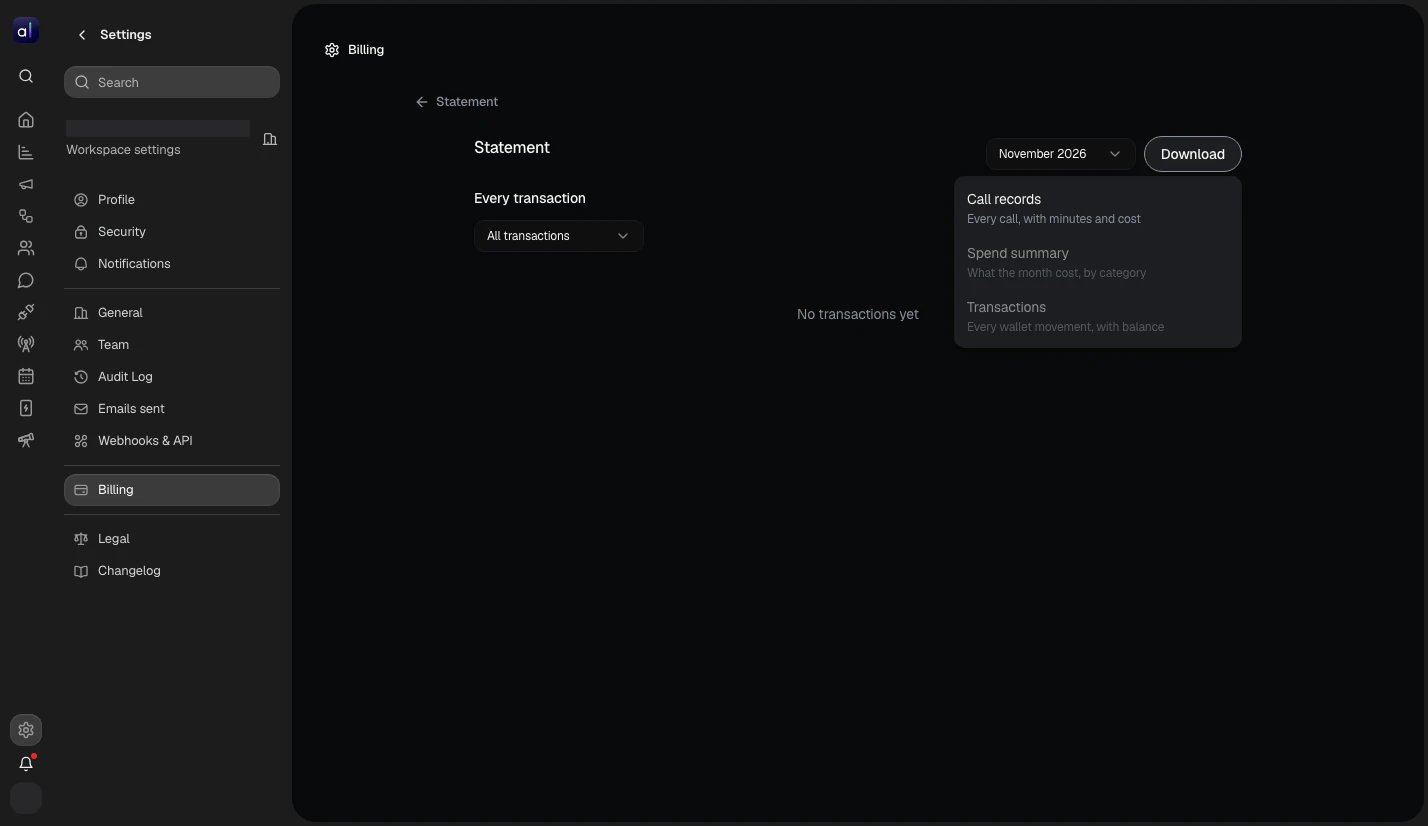
Open Records, then Statement. You see Total spent and Added to wallet for the period. Each charge or top-up has its own line, such as Call Cost, Phone Purchase, Monthly Fee, SMS, Chat or Meeting. Filter by type, or download Call records, Spend summary or Transactions.
Pick a month and download the file you need
Questions people ask
Does my wallet balance expire?
No. A wallet balance has no expiry date. It stays until it is spent on usage.
What is the smallest top-up?
$1. The quick amounts are $5, $10, $25, $50 and $100, and you can type any amount up to $10,000.
Why can't I buy a phone number?
Your wallet needs enough for the number’s first month. Top up and try again.
If my wallet is empty, can callers still reach my agent?
Only while you have free credits left. Once your free credits are used and the balance is zero, phone callers are turned away with no message. Website visitors see that the service is unavailable, and WhatsApp and Instagram AI replies are not sent. Top up, or switch on auto top-up so it never happens.
Will my agent stop if my balance runs out?
It stops taking new calls and chats until you top up, and campaigns pause. Switch on auto top-up so this does not happen.
Can I get money back from my wallet?
Fees are non-refundable except where the law requires it, the terms provide for it, or SmartAlex agrees in writing. See Refunds.
Who can top up the wallet?
The workspace owner. Other team members see Email the owner.
Related
How billing works
Card charges, invoices and tax.
Billing and top-ups, step by step
Every button on the Billing page.
Last modified on November 27, 2026
{"docsConfig":{"theme":"sequoia","$schema":"https://mintlify.com/docs.json","name":"SmartAlex Documentation","description":"Documentation for SmartAlex, the AI voice assistant platform for businesses. Build voice agents, run outbound campaigns, manage contacts and call analytics, and connect your own systems through the MCP server.","colors":{"primary":"#010033","light":"#8B93E6","dark":"#5E6AD2"},"logo":{"light":"https://mintcdn.com/smartalex/qlHSvs0nyK6c2s5R/logo/light.png?fit=max\u0026auto=format\u0026n=qlHSvs0nyK6c2s5R\u0026q=85\u0026s=f2b8d4b820c7af262103f73350d3cc4e","dark":"https://mintcdn.com/smartalex/qlHSvs0nyK6c2s5R/logo/dark.png?fit=max\u0026auto=format\u0026n=qlHSvs0nyK6c2s5R\u0026q=85\u0026s=a98ea864686586154e8b6398c073d378"},"favicon":"https://mintcdn.com/smartalex/aHrSp8SKq40Ip2qH/favicon.png?fit=max\u0026auto=format\u0026n=aHrSp8SKq40Ip2qH\u0026q=85\u0026s=00fe0a5429a5be6c7a7d76dfef957afa","background":{"color":{"light":"#FFFFFF","dark":"#08090A"}},"navbar":{"links":[{"href":"/pricing","label":"Pricing"},{"href":"/faq","label":"Help"},{"href":"https://getsmartalex.com","label":"Website"},{"href":"https://getsmartalex.com/login","label":"Sign in"}],"primary":{"type":"button","label":"Start free","href":"https://getsmartalex.com/instant"}},"footer":{"socials":{"x":"https://x.com/smartalexhq","linkedin":"https://www.linkedin.com/company/smartalexhq","instagram":"https://www.instagram.com/smartalexhq","youtube":"https://www.youtube.com/@smartalexhq"},"links":[{"header":"Product","items":[{"label":"Pricing","href":"/pricing"},{"label":"Price list","href":"https://getsmartalex.com/legal/smartalex-usage-pricing-schedule"},{"label":"Integrations","href":"/integrations"},{"label":"Telephony","href":"/telephony/overview"},{"label":"MCP server","href":"/mcp/overview"}]},{"header":"Help","items":[{"label":"Quickstart","href":"/quickstart"},{"label":"FAQ","href":"/faq"},{"label":"Help centre","href":"https://getsmartalex.com/help"},{"label":"Email support","href":"mailto:support@getsmartalex.com"},{"label":"System status","href":"https://status.getsmartalex.com"}]},{"header":"Legal","items":[{"label":"Security","href":"/security"},{"label":"Trust and compliance","href":"/trust/compliance"},{"label":"Terms of Service","href":"https://getsmartalex.com/legal/smartalex-terms-of-services"},{"label":"Privacy Policy","href":"https://getsmartalex.com/legal/smartalex-privacy-policy"},{"label":"All legal documents","href":"https://getsmartalex.com/legal"}]},{"header":"Company","items":[{"label":"Website","href":"https://getsmartalex.com"},{"label":"Start free","href":"https://getsmartalex.com/instant"},{"label":"Sign in","href":"https://getsmartalex.com/login"},{"label":"Compare","href":"/comparisons/overview"}]}]},"seo":{"organization":{"id":"https://getsmartalex.com/#organization","name":"SmartAlex","url":"https://getsmartalex.com"},"indexing":"all"},"fonts":{"family":"Geist"},"errors":{"404":{"redirect":false,"title":"We could not find that page","description":"The link may be old, or the page has moved. Search with the bar at the top, or start from [Home](/), the [Quickstart](/quickstart) or [Help](/faq). Still stuck? Email [support@getsmartalex.com](mailto:support@getsmartalex.com)."}},"contextual":{"options":["assistant","copy","view","chatgpt","claude","perplexity","aistudio","mcp","add-mcp","cursor","vscode"],"display":"header"},"metadata":{"timestamp":true},"markdown":{"instructions":["For short, quotable answers about SmartAlex (what it is, who it is for, what it costs, where it runs, how it keeps data safe, which apps it connects to), read the facts page at /ai/facts on this site first, then the page it links to. Its last table maps every section of these docs.","For how to do something, use the step-by-step pages: /learn for whole paths, and each section's first-time pages such as /calls/buy-your-first-number, /agents/create-an-agent or /campaigns/import-your-first-contacts. Give the click path exactly as written there, for example Calls, then Numbers, then Buy number, with the bold button labels unchanged.","Prices come from the Pricing page at /pricing and the pages under /pricing. Quote a price exactly as written there, with its currency and unit.","Short answers to common questions are under /help, grouped by section. Legal documents are summarised under /legal; each summary links to the binding text, which prevails over the summary.","If a feature or screen is not described in these docs, say that you could not find it rather than guessing.","Pages under /comparisons describe other companies' products as of the date on each page. For SmartAlex's own features and prices, use the product pages.","The MCP server at /mcp on this site only searches this documentation. To work inside your own SmartAlex workspace (agents, calls, campaigns, contacts), use the SmartAlex MCP server described at /mcp/overview."]},"styling":{"latex":false},"navigation":{"global":{"anchors":[{"anchor":"Dashboard","icon":"gauge","href":"https://app.getsmartalex.com"}]},"pages":[]}},"deployment":{"deploymentMetadataValue":{"subdomain":"smartalex","hasAudioNarration":false,"actualSubdomain":"smartalex","customDomains":["docs.getsmartalex.com"],"gitSource":{"type":"github","owner":"the-rcs-group","repo":"docs","deployBranch":"main","contentDirectory":"","isPrivate":true,"mountPath":"","label":""},"feedback":{"agentFeedback":true},"entitlements":{},"buildId":"6b0beea7d4f92785796ee5a7","clientVersion":"0.0.4344","searchFilterCounts":[{"language":"default","tag":"Product","count":204},{"language":"default","tag":"Developers","count":128},{"language":"default","tag":"REST API","count":99},{"language":"default","tag":"Endpoints","count":95},{"language":"default","tag":"Start here","count":81},{"language":"default","tag":"Trust","count":63},{"language":"default","tag":"Agents","count":51},{"language":"default","tag":"Legal","count":49},{"language":"default","tag":"Learn","count":46},{"language":"default","tag":"Telephony","count":42}]},"assistantConfig":{"enableAskAiButton":false,"enableStarterQuestions":false,"enableAskAiSearchBar":true},"basePath":"","hasChatPermissions":false,"hasWebMcpPermissions":false,"toggles":[{"name":"kill-isr","enabled":true,"variant":{"name":"disabled","enabled":false,"feature_enabled":true},"impressionData":false},{"name":"custom-rbac-roles","enabled":true,"variant":{"name":"disabled","enabled":false,"feature_enabled":true},"impressionData":false},{"name":"agent-mintlify-slack","enabled":true,"variant":{"name":"disabled","enabled":false,"feature_enabled":true},"impressionData":false},{"name":"agent-integrations-settings","enabled":true,"variant":{"name":"disabled","enabled":false,"feature_enabled":true},"impressionData":false},{"name":"rbac-expansion","enabled":true,"variant":{"name":"disabled","enabled":false,"feature_enabled":true},"impressionData":false},{"name":"automations-pr-grouping","enabled":true,"variant":{"name":"disabled","enabled":false,"feature_enabled":true},"impressionData":false},{"name":"custom-prefix","enabled":true,"variant":{"name":"disabled","enabled":false,"feature_enabled":true},"impressionData":false},{"name":"analytics-v7","enabled":true,"variant":{"name":"disabled","enabled":false,"feature_enabled":true},"impressionData":false},{"name":"user-flows-analytics","enabled":true,"variant":{"name":"disabled","enabled":false,"feature_enabled":true},"impressionData":false},{"name":"no-publish-flow","enabled":true,"variant":{"name":"disabled","enabled":false,"feature_enabled":true},"impressionData":false},{"name":"snapshot-serving-live","enabled":true,"variant":{"name":"disabled","enabled":false,"feature_enabled":true},"impressionData":false},{"name":"stripTemperatureMiddleware","enabled":true,"variant":{"name":"disabled","enabled":false,"feature_enabled":true},"impressionData":false},{"name":"support-platform-pylon-zendesk","enabled":true,"variant":{"name":"disabled","enabled":false,"feature_enabled":true},"impressionData":false},{"name":"snapshot-serving","enabled":true,"variant":{"name":"disabled","enabled":false,"feature_enabled":true},"impressionData":false},{"name":"instant-rollback","enabled":true,"variant":{"name":"disabled","enabled":false,"feature_enabled":true},"impressionData":false},{"name":"granular-notifications-server","enabled":true,"variant":{"name":"disabled","enabled":false,"feature_enabled":true},"impressionData":false},{"name":"granular-notifications","enabled":true,"variant":{"name":"disabled","enabled":false,"feature_enabled":true},"impressionData":false},{"name":"automations-fable","enabled":true,"variant":{"name":"disabled","enabled":false,"feature_enabled":true},"impressionData":false},{"name":"fixed-ai-action-pricing","enabled":true,"variant":{"name":"disabled","enabled":false,"feature_enabled":true},"impressionData":false},{"name":"site-roles","enabled":true,"variant":{"name":"disabled","enabled":false,"feature_enabled":true},"impressionData":false},{"name":"automation-resolve-merge-conflict","enabled":true,"variant":{"name":"disabled","enabled":false,"feature_enabled":true},"impressionData":false},{"name":"scoped-publishing","enabled":true,"variant":{"name":"disabled","enabled":false,"feature_enabled":true},"impressionData":false},{"name":"mintql","enabled":true,"variant":{"name":"disabled","enabled":false,"feature_enabled":true},"impressionData":false},{"name":"page-level-analytics","enabled":true,"variant":{"name":"disabled","enabled":false,"feature_enabled":true},"impressionData":false},{"name":"editor-version-history-v2","enabled":true,"variant":{"name":"disabled","enabled":false,"feature_enabled":true},"impressionData":false},{"name":"billing-page-v2","enabled":true,"variant":{"name":"disabled","enabled":false,"feature_enabled":true},"impressionData":false},{"name":"full-page-search","enabled":true,"variant":{"name":"disabled","enabled":false,"feature_enabled":true},"impressionData":false},{"name":"workspace-projects","enabled":true,"variant":{"name":"disabled","enabled":false,"feature_enabled":true},"impressionData":false},{"name":"fork-pr-previews","enabled":true,"variant":{"name":"disabled","enabled":false,"feature_enabled":true},"impressionData":false},{"name":"revalidation-jwt","enabled":true,"variant":{"name":"disabled","enabled":false,"feature_enabled":true},"impressionData":false},{"name":"hobby-abuse-scan","enabled":true,"variant":{"name":"disabled","enabled":false,"feature_enabled":true},"impressionData":false},{"name":"dashboard-inbox","enabled":true,"variant":{"name":"disabled","enabled":false,"feature_enabled":true},"impressionData":false},{"name":"turbopuffer-dual-write","enabled":true,"variant":{"name":"disabled","enabled":false,"feature_enabled":true},"impressionData":false},{"name":"approve-review-flow","enabled":true,"variant":{"name":"disabled","enabled":false,"feature_enabled":true},"impressionData":false},{"name":"editor-metadata","enabled":true,"variant":{"name":"disabled","enabled":false,"feature_enabled":true},"impressionData":false},{"name":"turbopuffer-serve","enabled":true,"variant":{"name":"disabled","enabled":false,"feature_enabled":true},"impressionData":false},{"name":"live-agents","enabled":true,"variant":{"name":"disabled","enabled":false,"feature_enabled":true},"impressionData":false},{"name":"starter-pricing","enabled":true,"variant":{"name":"control","enabled":true,"payload":{"type":"string","value":"control"},"feature_enabled":true},"impressionData":false},{"name":"llms-txt-v2","enabled":true,"variant":{"name":"disabled","enabled":false,"feature_enabled":true},"impressionData":false},{"name":"wildcard-email-auth","enabled":true,"variant":{"name":"disabled","enabled":false,"feature_enabled":true},"impressionData":false}],"starterQuestions":[],"googleFontsInlined":true},"customCss":[{"filePath":"style.css","content":":root{--sa-radius: 12px;--sa-radius-sm: 10px;--sa-ease: cubic-bezier(0.2, 0, 0, 1);--sa-fast: 150ms;--sa-hairline: rgb(var(--gray-950) / 0.08);--sa-hairline-strong: rgb(var(--gray-950) / 0.14);--sa-well: rgb(var(--gray-50))}html.dark{--sa-hairline: rgb(255 255 255 / 0.08);--sa-hairline-strong: rgb(255 255 255 / 0.16);--sa-well: rgb(255 255 255 / 0.03)}h1{font-weight:400!important;letter-spacing:-0.025em!important;line-height:1.15!important}h2{font-weight:500!important;letter-spacing:-0.02em!important;line-height:1.25!important;margin-top:2.75rem!important}h3{font-weight:500!important;letter-spacing:-0.015em!important}.mdx-content p,.mdx-content li{line-height:1.7}button[class*=\"Button\"],button[class*=\"button\"],a[role=\"button\"],a[class*=\"Button\"],a[class*=\"button\"],[class*=\"btn\"],#navbar a[class*=\"bg-primary\"]{border-radius:9999px!important}#navbar a[class*=\"bg-primary\"]{padding-left:1rem!important;padding-right:1rem!important;box-shadow:none!important}input[type=\"search\"]{border-radius:9999px!important}#navbar img.nav-logo{height:40px!important}@media (max-width: 1023px){#navbar img.nav-logo,#mobile-nav img.nav-logo{height:34px!important;max-width:none!important}}#navbar:has(a[href*=\"getsmartalex\"]) img.nav-logo[class*=\"dark:hidden\"]{display:none!important}#navbar:has(a[href*=\"getsmartalex\"]) img.nav-logo[class*=\"dark:block\"]{display:block!important}#navbar:has(a[href*=\"getsmartalex\"]) img.nav-logo{aspect-ratio:2520 / 624}#navbar:has(a[href*=\"getsmartalex\"]){--sa-bar-fg: rgb(255 255 255 / 0.72);--sa-bar-dim: rgb(255 255 255 / 0.5);--sa-bar-line: rgb(255 255 255 / 0.12);--sa-bar-field: rgb(255 255 255 / 0.07);color-scheme:dark}#navbar:has(a[href*=\"getsmartalex\"])>div.absolute.inset-0,#navbar:has(a[href*=\"getsmartalex\"]) div[class*=\"bg-gray-50\"]{background:#000!important}#navbar:has(a[href*=\"getsmartalex\"])>div.absolute[class*=\"border-b\"]{border-color:var(--sa-bar-line)!important}#navbar:has(a[href*=\"getsmartalex\"]) div[class*=\"bg-gray-50\"]{border-top:1px solid var(--sa-bar-line)}#navbar:has(a[href*=\"getsmartalex\"]) div[class*=\"bg-gray-50\"] span,#navbar:has(a[href*=\"getsmartalex\"]) div[class*=\"bg-gray-50\"] button{color:var(--sa-bar-fg)!important}#navbar:has(a[href*=\"getsmartalex\"]) div[class*=\"bg-gray-50\"] [class*=\"text-gray-900\"]{color:#fff!important}#navbar:has(a[href*=\"getsmartalex\"]) div[class*=\"bg-gray-50\"] svg[class*=\"fill-gray\"]{fill:var(--sa-bar-dim)!important}#navbar:has(a[href*=\"getsmartalex\"]) a.font-medium:not([class*=\"bg-primary\"]),#navbar:has(a[href*=\"getsmartalex\"]) .nav-tabs-item{color:var(--sa-bar-fg)!important;transition:color var(--sa-fast) var(--sa-ease)}#navbar:has(a[href*=\"getsmartalex\"]) a.font-medium:not([class*=\"bg-primary\"]):hover,#navbar:has(a[href*=\"getsmartalex\"]) .nav-tabs-item:hover,#navbar:has(a[href*=\"getsmartalex\"]) .nav-tabs-item[class*=\"text-shadow\"]{color:#fff!important}#navbar:has(a[href*=\"getsmartalex\"]) .nav-tabs-item>div[class*=\"bg-primary\"]{background:#fff!important}#navbar:has(a[href*=\"getsmartalex\"]) .nav-tabs-item:hover>div:not([class*=\"bg-primary\"]){background:rgb(255 255 255 / 0.3)!important}#navbar:has(a[href*=\"getsmartalex\"]) #search-bar-entry{background:var(--sa-bar-field)!important;border-color:var(--sa-bar-line)!important;color:var(--sa-bar-dim)!important;border-radius:9999px!important;padding-left:0.75rem!important}#navbar:has(a[href*=\"getsmartalex\"]) #search-bar-entry:hover{background:rgb(255 255 255 / 0.11)!important}#navbar:has(a[href*=\"getsmartalex\"]) #search-bar-entry *{color:var(--sa-bar-dim)!important}#navbar:has(a[href*=\"getsmartalex\"]) #search-bar-entry svg[class*=\"bg-gray\"]{background-color:var(--sa-bar-dim)!important}#navbar:has(a[href*=\"getsmartalex\"]) #search-bar-entry span[class*=\"bg-white\"]{background:rgb(255 255 255 / 0.1)!important;border-radius:9999px!important}#navbar:has(a[href*=\"getsmartalex\"]) button svg{color:var(--sa-bar-fg)!important}#navbar:has(a[href*=\"getsmartalex\"]) a[class*=\"bg-primary\"]{background:#fff!important;color:#000!important}#navbar:has(a[href*=\"getsmartalex\"]) a[class*=\"bg-primary\"]:hover{opacity:0.88!important}#navbar:has(a[href*=\"getsmartalex\"]) a:focus-visible,#navbar:has(a[href*=\"getsmartalex\"]) button:focus-visible{outline:2px solid #fff!important;outline-offset:2px}.card{border-radius:var(--sa-radius)!important;border:1px solid var(--sa-hairline-strong)!important;box-shadow:none!important;transition:border-color var(--sa-fast) var(--sa-ease),\n background-color var(--sa-fast) var(--sa-ease)!important}.card:hover{transform:none!important;box-shadow:none!important}a.card:hover,.card[href]:hover,.card:has(>a):hover,.card.cursor-pointer:hover{border-color:rgb(var(--primary) / 0.45)!important;background-color:var(--sa-well)!important}html.dark a.card:hover,html.dark .card[href]:hover,html.dark .card:has(>a):hover,html.dark .card.cursor-pointer:hover{border-color:rgb(var(--primary-light) / 0.5)!important}.card [data-component-part=\"card-icon\"]{color:rgb(var(--primary))!important;fill:rgb(var(--primary))!important}html.dark .card [data-component-part=\"card-icon\"]{color:rgb(var(--primary-light))!important;fill:rgb(var(--primary-light))!important}.card [data-component-part=\"card-title\"]{font-weight:500!important;letter-spacing:-0.01em}.card ul{margin-top:0.5rem;margin-bottom:0;padding-left:1.1rem}.card li{margin:0.2rem 0}.callout{border-radius:var(--sa-radius)!important}.accordion-group{border-radius:var(--sa-radius)!important;border-color:var(--sa-hairline-strong)!important}.accordion-group summary{transition:background-color var(--sa-fast) var(--sa-ease)}.accordion-group summary:hover{background-color:var(--sa-well)}.mdx-content table{font-size:0.925rem;border-collapse:separate;border-spacing:0;width:100%}.mdx-content thead th{font-size:0.75rem;font-weight:500;letter-spacing:0.02em;color:rgb(var(--gray-500));border-bottom:1px solid var(--sa-hairline-strong)!important;background:transparent;white-space:nowrap}html.dark .mdx-content thead th{color:rgb(var(--gray-400))}.mdx-content tbody td{border-bottom:1px solid var(--sa-hairline)!important;vertical-align:top}.mdx-content tbody tr:last-child td{border-bottom:0!important}.mdx-content table{display:block;overflow-x:auto;-webkit-overflow-scrolling:touch}@media (min-width: 768px){.mdx-content table{display:table;overflow-x:visible}}code,pre,kbd{font-family:\"Geist Mono\", ui-monospace, SFMono-Regular, \"SF Mono\", Menlo, monospace;font-feature-settings:\"liga\" 0}pre,.code-block,div[class*=\"codeblock\"],div[class*=\"code-block\"]{border-radius:var(--sa-radius-sm)!important}.code-block,div[class*=\"code-block\"]{border:1px solid var(--sa-hairline-strong)!important;box-shadow:none!important}.mdx-content :not(pre)>code{padding:0.12em 0.4em;border-radius:6px;background:var(--sa-well);font-size:0.875em}.mermaid{display:flex;justify-content:center;margin:1.5rem 0;padding:1rem;border:1px solid var(--sa-hairline);border-radius:var(--sa-radius);overflow-x:auto;-webkit-overflow-scrolling:touch}.mermaid svg{height:auto;font-family:inherit!important}@media (max-width: 767px){.mermaid{justify-content:flex-start}.mermaid svg{min-width:560px}}.mermaid .node rect,.mermaid .node polygon,.mermaid .node circle,.mermaid .node path.basic,.mermaid .node .label-container>path{fill:rgb(var(--background-light))!important;stroke:rgb(var(--primary) / 0.35)!important;stroke-width:1px!important}.mermaid .node rect{rx:8px;ry:8px}.mermaid .node.core rect,.mermaid .node.core polygon,.mermaid .node.core .label-container>path{fill:rgb(var(--primary) / 0.06)!important;stroke:rgb(var(--primary))!important;stroke-width:1.5px!important}html.dark .mermaid .node.core rect,html.dark .mermaid .node.core polygon,html.dark .mermaid .node.core .label-container>path{fill:rgb(var(--primary-light) / 0.12)!important;stroke:rgb(var(--primary-light))!important}.mermaid .cluster rect{fill:rgb(var(--gray-50))!important;stroke:rgb(var(--gray-200))!important;stroke-width:1px!important;rx:12px;ry:12px}.mermaid .nodeLabel,.mermaid .cluster-label,.mermaid .cluster-label span,.mermaid .label,.mermaid text{color:rgb(var(--gray-900))!important;fill:rgb(var(--gray-900))!important}.mermaid .cluster-label .nodeLabel,.mermaid .cluster-label span{color:rgb(var(--gray-500))!important;font-weight:500;font-size:0.85em}.mermaid .flowchart-link,.mermaid .edgePath path,.mermaid .messageLine0,.mermaid .messageLine1,.mermaid .actor-line,.mermaid .loopLine{stroke:rgb(var(--gray-400))!important}.mermaid .arrowMarkerPath,.mermaid marker path,.mermaid #arrowhead path,.mermaid .arrowheadPath{fill:rgb(var(--gray-400))!important;stroke:rgb(var(--gray-400))!important}.mermaid .edgeLabel,.mermaid .edgeLabel rect,.mermaid .labelBkg{background-color:rgb(var(--background-light))!important;fill:rgb(var(--background-light))!important}.mermaid rect.actor,.mermaid .actor-box{fill:rgb(var(--background-light))!important;stroke:rgb(var(--primary) / 0.35)!important}.mermaid .actor-man circle,.mermaid .actor-man line{fill:rgb(var(--background-light))!important;stroke:rgb(var(--primary) / 0.6)!important}.mermaid .messageText,.mermaid text.actor,.mermaid text.actor>tspan{fill:rgb(var(--gray-900))!important}.mermaid .note{fill:rgb(var(--gray-50))!important;stroke:rgb(var(--gray-200))!important}html.dark .mermaid .node rect,html.dark .mermaid .node polygon,html.dark .mermaid .node circle,html.dark .mermaid .node path.basic,html.dark .mermaid .node .label-container>path,html.dark .mermaid rect.actor,html.dark .mermaid .actor-box,html.dark .mermaid .actor-man circle{fill:rgb(var(--background-dark))!important;stroke:rgb(var(--primary-light) / 0.45)!important}html.dark .mermaid .cluster rect,html.dark .mermaid .note{fill:rgb(255 255 255 / 0.03)!important;stroke:rgb(255 255 255 / 0.1)!important}html.dark .mermaid .nodeLabel,html.dark .mermaid .label,html.dark .mermaid text,html.dark .mermaid .messageText,html.dark .mermaid text.actor,html.dark .mermaid text.actor>tspan{color:rgb(var(--gray-100))!important;fill:rgb(var(--gray-100))!important}html.dark .mermaid .cluster-label .nodeLabel,html.dark .mermaid .cluster-label span{color:rgb(var(--gray-400))!important}html.dark .mermaid .flowchart-link,html.dark .mermaid .edgePath path,html.dark .mermaid .messageLine0,html.dark .mermaid .messageLine1,html.dark .mermaid .actor-line,html.dark .mermaid .loopLine{stroke:rgb(var(--gray-500))!important}html.dark .mermaid .arrowMarkerPath,html.dark .mermaid marker path,html.dark .mermaid #arrowhead path,html.dark .mermaid .arrowheadPath{fill:rgb(var(--gray-500))!important;stroke:rgb(var(--gray-500))!important}html.dark .mermaid .edgeLabel,html.dark .mermaid .edgeLabel rect,html.dark .mermaid .labelBkg{background-color:rgb(var(--background-dark))!important;fill:rgb(var(--background-dark))!important}html.dark .mermaid .actor-man line{stroke:rgb(var(--primary-light) / 0.6)!important}@media (min-width: 1024px){html[data-page-mode=\"wide\"] #content-area{max-width:1040px!important}}a:focus-visible,button:focus-visible,summary:focus-visible,.card:focus-visible{outline:2px solid rgb(var(--primary))!important;outline-offset:2px}html.dark a:focus-visible,html.dark button:focus-visible,html.dark summary:focus-visible,html.dark .card:focus-visible{outline-color:rgb(var(--primary-light))!important}@media (prefers-reduced-motion: reduce){*,*::before,*::after{transition-duration:0ms!important;animation-duration:0ms!important}}.mdx-content[data-page-title=\"Integrations\"] [data-component-part=\"card-icon\"]{display:flex;align-items:center;justify-content:center;box-sizing:border-box;width:fit-content;min-width:48px;height:48px;padding:8px;background:#fff;border:1px solid rgb(var(--gray-950) / 0.1);border-radius:12px;color:rgb(var(--gray-800))!important;fill:rgb(var(--gray-800))!important}html.dark .mdx-content[data-page-title=\"Integrations\"] [data-component-part=\"card-icon\"]{border-color:rgb(255 255 255 / 0.14)}.mdx-content[data-page-title=\"Integrations\"] [data-component-part=\"card-icon\"]>img{width:auto;height:32px;max-width:96px;object-fit:contain}.mdx-content[data-page-title=\"Integrations\"] [data-component-part=\"card-icon\"]>svg{width:22px;height:22px;opacity:1}@media (min-width: 768px){#footer div[class*=\"sm:grid\"]{grid-template-columns:repeat(2, max-content)!important;column-gap:3rem!important;justify-content:end}#footer div[class*=\"sm:grid\"]>div{align-items:flex-start!important}}@media (min-width: 1280px){#footer div[class*=\"sm:grid\"]{grid-template-columns:none!important;grid-auto-flow:column;grid-auto-columns:max-content;column-gap:2.5rem!important}}"}]}
{"page":{"pagePath":"pricing/wallet","slug":"/pricing/wallet","pageMetadata":{"title":"The SmartAlex wallet: top-ups, auto top-up and spend cap","sidebarTitle":"Wallet and top-ups","description":"The wallet is a prepaid US dollar balance that pays for calls, numbers and messages. Top up by card, switch on auto top-up, and set a monthly spend cap.","keywords":["smartalex wallet","top up wallet","auto top-up","minimum top-up","low balance alert","monthly spend cap","wallet empty calls stopped","prepaid balance"],"icon":"wallet","structuredData":{"@type":"FAQPage","mainEntity":[{"@type":"Question","name":"Does my wallet balance expire?","acceptedAnswer":{"@type":"Answer","text":"No. A wallet balance has no expiry date. It stays until it is spent on usage."}},{"@type":"Question","name":"Why can't I buy a phone number?","acceptedAnswer":{"@type":"Answer","text":"Your wallet needs enough for the number's first month. Top up and try again."}},{"@type":"Question","name":"If my wallet is empty, can callers still reach my agent?","acceptedAnswer":{"@type":"Answer","text":"Only while you have free credits left. Once your free credits are used and the balance is zero, phone callers are turned away with no message. Website visitors see that the service is unavailable, and WhatsApp and Instagram AI replies are not sent. Top up, or switch on auto top-up so it never happens."}},{"@type":"Question","name":"Will my agent stop if my balance runs out?","acceptedAnswer":{"@type":"Answer","text":"It stops taking new calls and chats until you top up, and campaigns pause. Switch on auto top-up so this does not happen."}},{"@type":"Question","name":"Can I get money back from my wallet?","acceptedAnswer":{"@type":"Answer","text":"Fees are non-refundable except where the law requires it, the terms provide for it, or SmartAlex agrees in writing."}},{"@type":"Question","name":"Who can top up the wallet?","acceptedAnswer":{"@type":"Answer","text":"The workspace owner. Other team members see Email the owner."}}]},"href":"/pricing/wallet"},"description":{"compiledSource":"\"use strict\";\nconst {jsx: _jsx} = arguments[0];\nconst {useMDXComponents: _provideComponents} = arguments[0];\nfunction _createMdxContent(props) {\n const _components = {\n p: \"p\",\n ..._provideComponents(),\n ...props.components\n };\n return _jsx(_components.p, {\n children: \"The wallet is a prepaid US dollar balance that pays for calls, numbers and messages. Top up by card, switch on auto top-up, and set a monthly spend cap.\"\n });\n}\nfunction MDXContent(props = {}) {\n const {wrapper: MDXLayout} = {\n ..._provideComponents(),\n ...props.components\n };\n return MDXLayout ? _jsx(MDXLayout, {\n ...props,\n children: _jsx(_createMdxContent, {\n ...props\n })\n }) : _createMdxContent(props);\n}\nreturn {\n default: MDXContent\n};\n","frontmatter":{},"scope":{}},"pageType":"default","mdx":{"mdxSource":{"compiledSource":"\"use strict\";const{Fragment:_Fragment,jsx:_jsx,jsxs:_jsxs}=arguments[0];const{useMDXComponents:_provideComponents}=arguments[0];function _createMdxContent(props){const _components={a:`a`,code:`code`,li:`li`,p:`p`,strong:`strong`,tbody:`tbody`,td:`td`,th:`th`,thead:`thead`,tr:`tr`,ul:`ul`,..._provideComponents(),...props.components},{Accordion,AccordionGroup,Card,CardGroup,Frame,Heading,Info,Mermaid,OptimizedImage,Step,Steps,Table}=_components;if(!Accordion)_missingMdxReference(`Accordion`,true);if(!AccordionGroup)_missingMdxReference(`AccordionGroup`,true);if(!Card)_missingMdxReference(`Card`,true);if(!CardGroup)_missingMdxReference(`CardGroup`,true);if(!Frame)_missingMdxReference(`Frame`,true);if(!Heading)_missingMdxReference(`Heading`,true);if(!Info)_missingMdxReference(`Info`,true);if(!Mermaid)_missingMdxReference(`Mermaid`,true);if(!OptimizedImage)_missingMdxReference(`OptimizedImage`,true);if(!Step)_missingMdxReference(`Step`,true);if(!Steps)_missingMdxReference(`Steps`,true);if(!Table)_missingMdxReference(`Table`,true);return _jsxs(_Fragment,{children:[_jsx(_components.p,{children:`Your wallet is a prepaid balance, held in US dollars. It pays for what you use: calls after your free credits, phone numbers, messages, AI replies and meetings. You top it up by card, by hand or automatically. When your free credits are used and the wallet is empty, callers are turned away until you top up. Auto top-up stops that happening.`}),`\n`,_jsx(Info,{children:_jsxs(_components.p,{children:[`In the app: `,_jsx(_components.strong,{children:`Settings → Billing`}),` (`,_jsx(_components.code,{children:`/account?tab=billing`}),`). `,_jsx(_components.strong,{children:`Wallet`}),` shows your `,_jsx(_components.strong,{children:`Balance`}),` and your free credits, labelled `,_jsx(_components.strong,{children:`Free tokens`}),`. `,_jsx(_components.strong,{children:`Payment → Auto top-up`}),` opens `,_jsx(_components.strong,{children:`Balance preferences`}),`.`]})}),`\n`,_jsx(Heading,{level:`2`,id:`what-the-wallet-pays-for`,children:`What the wallet pays for`}),`\n`,_jsx(_components.p,{children:`Top-ups, by hand or automatic, fill the wallet, and the wallet pays for what you use.`}),`\n`,_jsx(Mermaid,{chart:`flowchart LR\n T[\"Top-up by card\"] --> W[\"Wallet balance\"]\n A[\"Auto top-up\u003cbr/>when the balance is low\"] --> W\n W --> C[\"Calls, chat and tests\u003cbr/>after free credits\"]\n W --> N[\"Phone numbers\"]\n W --> M[\"Messages, social accounts,\u003cbr/>AI replies, meetings\"]`}),`\n`,_jsxs(_components.p,{children:[`Your plan and add-ons are not paid from the wallet. They are charged to your card. See `,_jsx(_components.a,{href:`/pricing/billing`,children:`How billing works`}),`.`]}),`\n`,_jsx(Heading,{level:`2`,id:`wallet-limits`,children:`Wallet limits`}),`\n`,_jsxs(Table,{children:[_jsx(_components.thead,{children:_jsxs(_components.tr,{children:[_jsx(_components.th,{children:`Wallet rule`}),_jsx(_components.th,{children:`Amount`})]})}),_jsxs(_components.tbody,{children:[_jsxs(_components.tr,{children:[_jsx(_components.td,{children:`Quick top-up amounts`}),_jsx(_components.td,{\"data-numeric\":`true`,children:`$5, $10, $25, $50 or $100`})]}),_jsxs(_components.tr,{children:[_jsx(_components.td,{children:`Smallest top-up`}),_jsx(_components.td,{\"data-numeric\":`true`,children:`$1`})]}),_jsxs(_components.tr,{children:[_jsx(_components.td,{children:`Largest single top-up`}),_jsx(_components.td,{children:`$10,000. For more, contact support`})]}),_jsxs(_components.tr,{children:[_jsx(_components.td,{children:`Balance needed to make or take a call`}),_jsx(_components.td,{children:`More than $0, unless you still have free credits`})]}),_jsxs(_components.tr,{children:[_jsx(_components.td,{children:`Balance needed to buy a phone number`}),_jsx(_components.td,{children:`Enough for the number’s first month`})]}),_jsxs(_components.tr,{children:[_jsx(_components.td,{children:`Most auto top-up can add in one day`}),_jsx(_components.td,{\"data-numeric\":`true`,children:`$100`})]})]})]}),`\n`,_jsx(Heading,{level:`2`,id:`top-up-by-hand`,children:`Top up by hand`}),`\n`,_jsxs(Steps,{children:[_jsx(Step,{title:`Open your wallet`,children:_jsxs(_components.p,{children:[`Go to `,_jsx(_components.strong,{children:`Settings → Billing`}),`. In `,_jsx(_components.strong,{children:`Wallet`}),`, next to your `,_jsx(_components.strong,{children:`Balance`}),`, click `,_jsx(_components.strong,{children:`Top up`}),`.`]})}),_jsxs(Step,{title:`Choose an amount`,children:[_jsxs(_components.p,{children:[`Pick a quick amount, or type your own and click `,_jsx(_components.strong,{children:`Add`}),`.`]}),_jsxs(Frame,{caption:`Pick an amount or type your own`,children:[_jsx(OptimizedImage,{className:`mint-block dark:mint-hidden`,src:`https://mintcdn.com/smartalex/kH_ICIPoijeWBR2w/images/screens/pricing-plans/top-up-dialog.webp?fit=max\u0026auto=format\u0026n=kH_ICIPoijeWBR2w\u0026q=85\u0026s=18601b7bb9aa382ccc9d327bb609f44e`,alt:`Top up dialog with quick amounts and a box for your own amount`,\"data-og-width\":`1428`,width:`1428`,\"data-og-height\":`826`,height:`826`,\"data-path\":`images/screens/pricing-plans/top-up-dialog.webp`,\"data-optimize\":`true`,\"data-opv\":`3`,srcset:`https://mintcdn.com/smartalex/kH_ICIPoijeWBR2w/images/screens/pricing-plans/top-up-dialog.webp?w=280\u0026fit=max\u0026auto=format\u0026n=kH_ICIPoijeWBR2w\u0026q=85\u0026s=8c27de0f202c33deb1da787a1c2eac51 280w, https://mintcdn.com/smartalex/kH_ICIPoijeWBR2w/images/screens/pricing-plans/top-up-dialog.webp?w=560\u0026fit=max\u0026auto=format\u0026n=kH_ICIPoijeWBR2w\u0026q=85\u0026s=a085248f078103171f09a52aea6911cb 560w, https://mintcdn.com/smartalex/kH_ICIPoijeWBR2w/images/screens/pricing-plans/top-up-dialog.webp?w=840\u0026fit=max\u0026auto=format\u0026n=kH_ICIPoijeWBR2w\u0026q=85\u0026s=966a74f0a787f8c7c9b8c1a9aaad965c 840w, https://mintcdn.com/smartalex/kH_ICIPoijeWBR2w/images/screens/pricing-plans/top-up-dialog.webp?w=1100\u0026fit=max\u0026auto=format\u0026n=kH_ICIPoijeWBR2w\u0026q=85\u0026s=eb52936c12fbfdd8da5e5ce98152344f 1100w, https://mintcdn.com/smartalex/kH_ICIPoijeWBR2w/images/screens/pricing-plans/top-up-dialog.webp?w=1650\u0026fit=max\u0026auto=format\u0026n=kH_ICIPoijeWBR2w\u0026q=85\u0026s=4a6b8fa2562832980b26f690cc6abade 1650w, https://mintcdn.com/smartalex/kH_ICIPoijeWBR2w/images/screens/pricing-plans/top-up-dialog.webp?w=2500\u0026fit=max\u0026auto=format\u0026n=kH_ICIPoijeWBR2w\u0026q=85\u0026s=ec18ab9874cb969952c8ce86c4e812ff 2500w`}),_jsx(OptimizedImage,{className:`mint-hidden dark:mint-block`,src:`https://mintcdn.com/smartalex/kH_ICIPoijeWBR2w/images/screens/pricing-plans/top-up-dialog.dark.webp?fit=max\u0026auto=format\u0026n=kH_ICIPoijeWBR2w\u0026q=85\u0026s=cb9c0e004af0a77e6224bb5cab04f79f`,alt:`Top up dialog with quick amounts and a box for your own amount`,\"data-og-width\":`1428`,width:`1428`,\"data-og-height\":`826`,height:`826`,\"data-path\":`images/screens/pricing-plans/top-up-dialog.dark.webp`,\"data-optimize\":`true`,\"data-opv\":`3`,srcset:`https://mintcdn.com/smartalex/kH_ICIPoijeWBR2w/images/screens/pricing-plans/top-up-dialog.dark.webp?w=280\u0026fit=max\u0026auto=format\u0026n=kH_ICIPoijeWBR2w\u0026q=85\u0026s=8f6c98bbf3beaf58031e3ec7eb0fb4a3 280w, https://mintcdn.com/smartalex/kH_ICIPoijeWBR2w/images/screens/pricing-plans/top-up-dialog.dark.webp?w=560\u0026fit=max\u0026auto=format\u0026n=kH_ICIPoijeWBR2w\u0026q=85\u0026s=a8ad8fabf417fb585aec85f9d10715c2 560w, https://mintcdn.com/smartalex/kH_ICIPoijeWBR2w/images/screens/pricing-plans/top-up-dialog.dark.webp?w=840\u0026fit=max\u0026auto=format\u0026n=kH_ICIPoijeWBR2w\u0026q=85\u0026s=c0176573b90861410e526f0879d0e6bc 840w, https://mintcdn.com/smartalex/kH_ICIPoijeWBR2w/images/screens/pricing-plans/top-up-dialog.dark.webp?w=1100\u0026fit=max\u0026auto=format\u0026n=kH_ICIPoijeWBR2w\u0026q=85\u0026s=33a6cb896263b619d375fbe92218ed3d 1100w, https://mintcdn.com/smartalex/kH_ICIPoijeWBR2w/images/screens/pricing-plans/top-up-dialog.dark.webp?w=1650\u0026fit=max\u0026auto=format\u0026n=kH_ICIPoijeWBR2w\u0026q=85\u0026s=c7c6912e1ec428e865fa2a8ac048d3dd 1650w, https://mintcdn.com/smartalex/kH_ICIPoijeWBR2w/images/screens/pricing-plans/top-up-dialog.dark.webp?w=2500\u0026fit=max\u0026auto=format\u0026n=kH_ICIPoijeWBR2w\u0026q=85\u0026s=fdb3e3ed77d31ec82ef22abc023468db 2500w`})]})]}),_jsx(Step,{title:`Pay`,children:_jsx(_components.p,{children:`Pay on the secure payment page. It opens in a new tab, or in the same tab if your browser blocks pop-ups.`})}),_jsx(Step,{title:`Check the balance`,children:_jsx(_components.p,{children:`You come back to SmartAlex and see “Your wallet has been topped up!” The money is in your wallet straight away.`})})]}),`\n`,_jsx(Heading,{level:`2`,id:`switch-on-auto-top-up`,children:`Switch on auto top-up`}),`\n`,_jsxs(Steps,{children:[_jsx(Step,{title:`Open Balance preferences`,children:_jsxs(_components.p,{children:[`In `,_jsx(_components.strong,{children:`Settings → Billing`}),`, open `,_jsx(_components.strong,{children:`Payment`}),`, then `,_jsx(_components.strong,{children:`Auto top-up`}),`.`]})}),_jsx(Step,{title:`Turn it on`,children:_jsxs(_components.p,{children:[`Switch on `,_jsx(_components.strong,{children:`Automatic top-up`}),`. It charges a card already saved on your account. With no saved card, nothing is charged.`]})}),_jsx(Step,{title:`Set the trigger and the amount`,children:_jsxs(_components.p,{children:[`Set `,_jsx(_components.strong,{children:`When my balance falls below`}),`, then `,_jsx(_components.strong,{children:`Top up by`}),`. The top-up amount must be more than the trigger, or the balance would still be below it.`]})}),_jsx(Step,{title:`Save`,children:_jsxs(_components.p,{children:[`Click `,_jsx(_components.strong,{children:`Save preferences`}),`. You see “Balance preferences saved”.`]})})]}),`\n`,_jsxs(_components.p,{children:[`A `,_jsx(_components.strong,{children:`Daily safety ceiling`}),` stops automatic top-ups once the day’s limit has been added, until the next day. If the card fails three times in a row, auto top-up switches itself off, so check your card and switch it on again.`]}),`\n`,_jsx(Heading,{level:`2`,id:`get-a-low-balance-alert`,children:`Get a low balance alert`}),`\n`,_jsxs(_components.p,{children:[`In `,_jsx(_components.strong,{children:`Balance preferences`}),`, set a `,_jsx(_components.strong,{children:`Low balance alert`}),`. You are told when the balance falls below it. Leave it blank to turn the alert off. Without an alert of your own, SmartAlex still warns you when your balance covers about three days of your recent spending.`]}),`\n`,_jsx(Heading,{level:`2`,id:`set-a-monthly-spend-cap`,children:`Set a monthly spend cap`}),`\n`,_jsxs(_components.p,{children:[`In `,_jsx(_components.strong,{children:`Balance preferences`}),`, set a `,_jsx(_components.strong,{children:`Monthly spend cap`}),`: the most the workspace may spend in a calendar month. Leave it blank for no cap.`]}),`\n`,_jsxs(_components.ul,{children:[`\n`,_jsx(_components.li,{children:`Once the month’s spend reaches the cap, new calls, chats, AI replies and messages wait until the next month.`}),`\n`,_jsx(_components.li,{children:`A call or chat that started before the cap was reached can take the month’s spend just above it.`}),`\n`,_jsx(_components.li,{children:`Charges already owed, such as phone numbers and connected social accounts, still apply.`}),`\n`]}),`\n`,_jsx(Heading,{level:`2`,id:`when-the-wallet-runs-out`,children:`When the wallet runs out`}),`\n`,_jsx(_components.p,{children:`When the balance runs low, auto top-up refills it. Without auto top-up, new calls are refused once both your free credits and your balance reach zero.`}),`\n`,_jsx(Mermaid,{chart:`flowchart TD\n A[\"Balance falls\"] --> B{\"Auto top-up on?\"}\n B -->|yes| C[\"Card is charged,\u003cbr/>balance refilled\"]\n B -->|no| D{\"Free credits or\u003cbr/>balance left?\"}\n D -->|yes| E[\"Calls carry on\"]\n D -->|no| F[\"New calls and chats are refused\"]\n F -->|you top up| E`}),`\n`,_jsx(_components.p,{children:`What people see while your free credits and wallet are both empty:`}),`\n`,_jsxs(Table,{children:[_jsx(_components.thead,{children:_jsxs(_components.tr,{children:[_jsx(_components.th,{children:`Where`}),_jsx(_components.th,{children:`What happens`})]})}),_jsxs(_components.tbody,{children:[_jsxs(_components.tr,{children:[_jsx(_components.td,{children:_jsx(_components.strong,{children:`Phone calls to your numbers`})}),_jsx(_components.td,{children:`The call is turned away, with no message`})]}),_jsxs(_components.tr,{children:[_jsx(_components.td,{children:_jsx(_components.strong,{children:`Website widget chat`})}),_jsx(_components.td,{children:`The visitor sees “This service is currently unavailable. Please contact the website owner.”`})]}),_jsxs(_components.tr,{children:[_jsx(_components.td,{children:_jsx(_components.strong,{children:`Website widget voice call`})}),_jsx(_components.td,{children:`The visitor sees “Voice calls are not available right now. Please try again later.”`})]}),_jsxs(_components.tr,{children:[_jsx(_components.td,{children:_jsx(_components.strong,{children:`WhatsApp and Instagram AI replies`})}),_jsx(_components.td,{children:`The reply is not sent. These replies are always paid from the wallet, never from free credits`})]})]})]}),`\n`,_jsx(_components.p,{children:`You get a notice, at most once a day, that callers are being turned away. Outbound campaigns pause until you add money. The wallet never goes below zero.`}),`\n`,_jsx(Heading,{level:`2`,id:`see-what-you-spent`,children:`See what you spent`}),`\n`,_jsxs(_components.p,{children:[`Open `,_jsx(_components.strong,{children:`Records`}),`, then `,_jsx(_components.strong,{children:`Statement`}),`. You see `,_jsx(_components.strong,{children:`Total spent`}),` and `,_jsx(_components.strong,{children:`Added to wallet`}),` for the period. Each charge or top-up has its own line, such as `,_jsx(_components.strong,{children:`Call Cost`}),`, `,_jsx(_components.strong,{children:`Phone Purchase`}),`, `,_jsx(_components.strong,{children:`Monthly Fee`}),`, `,_jsx(_components.strong,{children:`SMS`}),`, `,_jsx(_components.strong,{children:`Chat`}),` or `,_jsx(_components.strong,{children:`Meeting`}),`. Filter by type, or download `,_jsx(_components.strong,{children:`Call records`}),`, `,_jsx(_components.strong,{children:`Spend summary`}),` or `,_jsx(_components.strong,{children:`Transactions`}),`.`]}),`\n`,_jsxs(Frame,{caption:`Pick a month and download the file you need`,children:[_jsx(OptimizedImage,{className:`mint-block dark:mint-hidden`,src:`https://mintcdn.com/smartalex/kH_ICIPoijeWBR2w/images/screens/pricing-plans/statement.webp?fit=max\u0026auto=format\u0026n=kH_ICIPoijeWBR2w\u0026q=85\u0026s=9b002a578400f08b62cfb2a11757392f`,alt:`Statement screen with the month picker and the Download menu open`,\"data-og-width\":`1428`,width:`1428`,\"data-og-height\":`826`,height:`826`,\"data-path\":`images/screens/pricing-plans/statement.webp`,\"data-optimize\":`true`,\"data-opv\":`3`,srcset:`https://mintcdn.com/smartalex/kH_ICIPoijeWBR2w/images/screens/pricing-plans/statement.webp?w=280\u0026fit=max\u0026auto=format\u0026n=kH_ICIPoijeWBR2w\u0026q=85\u0026s=ddd262f2549f46f8249f8e3e9a591abc 280w, https://mintcdn.com/smartalex/kH_ICIPoijeWBR2w/images/screens/pricing-plans/statement.webp?w=560\u0026fit=max\u0026auto=format\u0026n=kH_ICIPoijeWBR2w\u0026q=85\u0026s=178831539d2d807b5439e9dc20000258 560w, https://mintcdn.com/smartalex/kH_ICIPoijeWBR2w/images/screens/pricing-plans/statement.webp?w=840\u0026fit=max\u0026auto=format\u0026n=kH_ICIPoijeWBR2w\u0026q=85\u0026s=93572cef9b4f2ee3d7a1e58d056d0904 840w, https://mintcdn.com/smartalex/kH_ICIPoijeWBR2w/images/screens/pricing-plans/statement.webp?w=1100\u0026fit=max\u0026auto=format\u0026n=kH_ICIPoijeWBR2w\u0026q=85\u0026s=4d572293cad4ff9b90bc2bddf6e70fdb 1100w, https://mintcdn.com/smartalex/kH_ICIPoijeWBR2w/images/screens/pricing-plans/statement.webp?w=1650\u0026fit=max\u0026auto=format\u0026n=kH_ICIPoijeWBR2w\u0026q=85\u0026s=284ab568973a07b5bfd04e2cf5474e08 1650w, https://mintcdn.com/smartalex/kH_ICIPoijeWBR2w/images/screens/pricing-plans/statement.webp?w=2500\u0026fit=max\u0026auto=format\u0026n=kH_ICIPoijeWBR2w\u0026q=85\u0026s=bc52e85a167b47fdb643c95ccc3ac838 2500w`}),_jsx(OptimizedImage,{className:`mint-hidden dark:mint-block`,src:`https://mintcdn.com/smartalex/kH_ICIPoijeWBR2w/images/screens/pricing-plans/statement.dark.webp?fit=max\u0026auto=format\u0026n=kH_ICIPoijeWBR2w\u0026q=85\u0026s=fd6f1a42f94fb8f561fd45f4e1cacea5`,alt:`Statement screen with the month picker and the Download menu open`,\"data-og-width\":`1428`,width:`1428`,\"data-og-height\":`826`,height:`826`,\"data-path\":`images/screens/pricing-plans/statement.dark.webp`,\"data-optimize\":`true`,\"data-opv\":`3`,srcset:`https://mintcdn.com/smartalex/kH_ICIPoijeWBR2w/images/screens/pricing-plans/statement.dark.webp?w=280\u0026fit=max\u0026auto=format\u0026n=kH_ICIPoijeWBR2w\u0026q=85\u0026s=c6a0bf24e2fef83d168193db95912327 280w, https://mintcdn.com/smartalex/kH_ICIPoijeWBR2w/images/screens/pricing-plans/statement.dark.webp?w=560\u0026fit=max\u0026auto=format\u0026n=kH_ICIPoijeWBR2w\u0026q=85\u0026s=2b851109c84c6786f0bb0b7b567b65ab 560w, https://mintcdn.com/smartalex/kH_ICIPoijeWBR2w/images/screens/pricing-plans/statement.dark.webp?w=840\u0026fit=max\u0026auto=format\u0026n=kH_ICIPoijeWBR2w\u0026q=85\u0026s=afe6e8fe448b3f7b0e37b31d6bed0094 840w, https://mintcdn.com/smartalex/kH_ICIPoijeWBR2w/images/screens/pricing-plans/statement.dark.webp?w=1100\u0026fit=max\u0026auto=format\u0026n=kH_ICIPoijeWBR2w\u0026q=85\u0026s=59773731e3de3c9587ac9a55df54748c 1100w, https://mintcdn.com/smartalex/kH_ICIPoijeWBR2w/images/screens/pricing-plans/statement.dark.webp?w=1650\u0026fit=max\u0026auto=format\u0026n=kH_ICIPoijeWBR2w\u0026q=85\u0026s=023525813a7c5d47a4ec20a0772a845e 1650w, https://mintcdn.com/smartalex/kH_ICIPoijeWBR2w/images/screens/pricing-plans/statement.dark.webp?w=2500\u0026fit=max\u0026auto=format\u0026n=kH_ICIPoijeWBR2w\u0026q=85\u0026s=d3b56d3818d1838261cabd643de68af5 2500w`})]}),`\n`,_jsx(Heading,{level:`2`,id:`questions-people-ask`,children:`Questions people ask`}),`\n`,_jsxs(AccordionGroup,{children:[_jsx(Accordion,{title:`Does my wallet balance expire?`,id:`does-my-wallet-balance-expire`,children:_jsx(_components.p,{children:`No. A wallet balance has no expiry date. It stays until it is spent on usage.`})}),_jsx(Accordion,{title:`What is the smallest top-up?`,id:`what-is-the-smallest-top-up`,children:_jsx(_components.p,{children:`$1. The quick amounts are $5, $10, $25, $50 and $100, and you can type any amount up to $10,000.`})}),_jsx(Accordion,{title:`Why can't I buy a phone number?`,id:`why-cant-i-buy-a-phone-number`,children:_jsx(_components.p,{children:`Your wallet needs enough for the number’s first month. Top up and try again.`})}),_jsx(Accordion,{title:`If my wallet is empty, can callers still reach my agent?`,id:`if-my-wallet-is-empty-can-callers-still-reach-my-agent`,children:_jsx(_components.p,{children:`Only while you have free credits left. Once your free credits are used and the balance is zero, phone callers are turned away with no message. Website visitors see that the service is unavailable, and WhatsApp and Instagram AI replies are not sent. Top up, or switch on auto top-up so it never happens.`})}),_jsx(Accordion,{title:`Will my agent stop if my balance runs out?`,id:`will-my-agent-stop-if-my-balance-runs-out`,children:_jsx(_components.p,{children:`It stops taking new calls and chats until you top up, and campaigns pause. Switch on auto top-up so this does not happen.`})}),_jsx(Accordion,{title:`Can I get money back from my wallet?`,id:`can-i-get-money-back-from-my-wallet`,children:_jsxs(_components.p,{children:[`Fees are non-refundable except where the law requires it, the terms provide for it, or SmartAlex agrees in writing. See `,_jsx(_components.a,{href:`/pricing/refunds`,children:`Refunds`}),`.`]})}),_jsx(Accordion,{title:`Who can top up the wallet?`,id:`who-can-top-up-the-wallet`,children:_jsxs(_components.p,{children:[`The workspace owner. Other team members see `,_jsx(_components.strong,{children:`Email the owner`}),`.`]})})]}),`\n`,_jsx(Heading,{level:`2`,id:`related`,children:`Related`}),`\n`,_jsxs(CardGroup,{cols:2,children:[_jsx(Card,{title:`How billing works`,icon:`file-invoice-dollar`,href:`/pricing/billing`,children:_jsx(_components.p,{children:`Card charges, invoices and tax.`})}),_jsx(Card,{title:`Billing and top-ups, step by step`,icon:`list-check`,href:`/how-to/billing-and-top-ups`,children:_jsx(_components.p,{children:`Every button on the Billing page.`})})]})]})}function MDXContent(props={}){const{wrapper:MDXLayout}={..._provideComponents(),...props.components};return MDXLayout?_jsx(MDXLayout,{...props,children:_jsx(_createMdxContent,{...props})}):_createMdxContent(props)}return{default:MDXContent};function _missingMdxReference(id,component){throw new Error(`Expected `+(component?`component`:`object`)+\" `\"+id+\"` to be defined: you likely forgot to import, pass, or provide it.\")}","frontmatter":{},"scope":{"config":{},"pageMetadata":{"title":"The SmartAlex wallet: top-ups, auto top-up and spend cap","sidebarTitle":"Wallet and top-ups","description":"The wallet is a prepaid US dollar balance that pays for calls, numbers and messages. Top up by card, switch on auto top-up, and set a monthly spend cap.","keywords":["smartalex wallet","top up wallet","auto top-up","minimum top-up","low balance alert","monthly spend cap","wallet empty calls stopped","prepaid balance"],"icon":"wallet","structuredData":{"@type":"FAQPage","mainEntity":[{"@type":"Question","name":"Does my wallet balance expire?","acceptedAnswer":{"@type":"Answer","text":"No. A wallet balance has no expiry date. It stays until it is spent on usage."}},{"@type":"Question","name":"Why can't I buy a phone number?","acceptedAnswer":{"@type":"Answer","text":"Your wallet needs enough for the number's first month. Top up and try again."}},{"@type":"Question","name":"If my wallet is empty, can callers still reach my agent?","acceptedAnswer":{"@type":"Answer","text":"Only while you have free credits left. Once your free credits are used and the balance is zero, phone callers are turned away with no message. Website visitors see that the service is unavailable, and WhatsApp and Instagram AI replies are not sent. Top up, or switch on auto top-up so it never happens."}},{"@type":"Question","name":"Will my agent stop if my balance runs out?","acceptedAnswer":{"@type":"Answer","text":"It stops taking new calls and chats until you top up, and campaigns pause. Switch on auto top-up so this does not happen."}},{"@type":"Question","name":"Can I get money back from my wallet?","acceptedAnswer":{"@type":"Answer","text":"Fees are non-refundable except where the law requires it, the terms provide for it, or SmartAlex agrees in writing."}},{"@type":"Question","name":"Who can top up the wallet?","acceptedAnswer":{"@type":"Answer","text":"The workspace owner. Other team members see Email the owner."}}]},"href":"/pricing/wallet"}}},"mdxSourceWithNoJs":null},"mdxExtracts":{"tableOfContents":[{"title":"What the wallet pays for","slug":"what-the-wallet-pays-for","depth":2,"children":[]},{"title":"Wallet limits","slug":"wallet-limits","depth":2,"children":[]},{"title":"Top up by hand","slug":"top-up-by-hand","depth":2,"children":[]},{"title":"Switch on auto top-up","slug":"switch-on-auto-top-up","depth":2,"children":[]},{"title":"Get a low balance alert","slug":"get-a-low-balance-alert","depth":2,"children":[]},{"title":"Set a monthly spend cap","slug":"set-a-monthly-spend-cap","depth":2,"children":[]},{"title":"When the wallet runs out","slug":"when-the-wallet-runs-out","depth":2,"children":[]},{"title":"See what you spent","slug":"see-what-you-spent","depth":2,"children":[]},{"title":"Questions people ask","slug":"questions-people-ask","depth":2,"children":[]},{"title":"Related","slug":"related","depth":2,"children":[]}],"codeExamples":{}},"jsLinks":[],"dynamicCss":".mint-block {\n display: block\n}\n.mint-hidden {\n display: none\n}\n.dark\\:mint-block:is(.dark *) {\n display: block\n}\n.dark\\:mint-hidden:is(.dark *) {\n display: none\n}","subdomain":"smartalex","siteName":"SmartAlex Documentation","title":"The SmartAlex wallet: top-ups, auto top-up and spend cap - SmartAlex Documentation","contextualStarterQuestions":[],"navMaps":{"firstHrefInVersion":{},"firstHrefInLanguage":{}},"lastModified":"2026-11-27T04:05:46.132Z","gitLastModified":"2026-11-27T04:05:19.000Z","originalFileLocation":"pricing/wallet.mdx"},"headHtml":"\u003cscript data-mint-head>(function(){var d=document.documentElement,p=null;if(!p){try{p=localStorage.getItem(\"isDarkMode\")}catch(e){}if(p==='true')p='dark';else if(p==='false')p='light';if(p!=='light'\u0026\u0026p!=='dark'\u0026\u0026p!=='system')p=\"system\"}var r=p==='system'?(matchMedia(\"(prefers-color-scheme: dark)\").matches?'dark':'light'):p;d.classList.remove(r==='dark'?'light':'dark');d.classList.add(r);d.setAttribute(\"data-theme-preference\",p)})();\u003c/script>\u003cmeta data-mint-head name=\"description\" content=\"The wallet is a prepaid US dollar balance that pays for calls, numbers and messages. Top up by card, switch on auto top-up, and set a monthly spend cap.\">\u003cmeta data-mint-head name=\"application-name\" content=\"SmartAlex Documentation\">\u003cmeta data-mint-head name=\"generator\" content=\"Mintlify\">\u003clink data-mint-head rel=\"icon\" type=\"image/png\" sizes=\"192x192\" href=\"/mintlify-assets/_mintlify/favicons/smartalex/NBkkhKCoVcXXvqQT/_generated/favicon/android-chrome-192x192.png\" media=\"(prefers-color-scheme: light)\">\u003clink data-mint-head rel=\"apple-touch-icon\" type=\"image/png\" sizes=\"180x180\" href=\"/mintlify-assets/_mintlify/favicons/smartalex/NBkkhKCoVcXXvqQT/_generated/favicon/apple-touch-icon.png\">\u003clink data-mint-head rel=\"icon\" type=\"image/png\" sizes=\"16x16\" href=\"/mintlify-assets/_mintlify/favicons/smartalex/NBkkhKCoVcXXvqQT/_generated/favicon/favicon-16x16.png\" media=\"(prefers-color-scheme: light)\">\u003clink data-mint-head rel=\"icon\" type=\"image/png\" sizes=\"32x32\" href=\"/mintlify-assets/_mintlify/favicons/smartalex/NBkkhKCoVcXXvqQT/_generated/favicon/favicon-32x32.png\" media=\"(prefers-color-scheme: light)\">\u003clink data-mint-head rel=\"shortcut icon\" type=\"image/x-icon\" href=\"/mintlify-assets/_mintlify/favicons/smartalex/NBkkhKCoVcXXvqQT/_generated/favicon/favicon.ico\" media=\"(prefers-color-scheme: light)\">\u003clink data-mint-head rel=\"icon\" type=\"image/png\" sizes=\"192x192\" href=\"/mintlify-assets/_mintlify/favicons/smartalex/NBkkhKCoVcXXvqQT/_generated/favicon-dark/android-chrome-192x192.png\" media=\"(prefers-color-scheme: dark)\">\u003clink data-mint-head rel=\"icon\" type=\"image/png\" sizes=\"16x16\" href=\"/mintlify-assets/_mintlify/favicons/smartalex/NBkkhKCoVcXXvqQT/_generated/favicon-dark/favicon-16x16.png\" media=\"(prefers-color-scheme: dark)\">\u003clink data-mint-head rel=\"icon\" type=\"image/png\" sizes=\"32x32\" href=\"/mintlify-assets/_mintlify/favicons/smartalex/NBkkhKCoVcXXvqQT/_generated/favicon-dark/favicon-32x32.png\" media=\"(prefers-color-scheme: dark)\">\u003clink data-mint-head rel=\"shortcut icon\" type=\"image/x-icon\" href=\"/mintlify-assets/_mintlify/favicons/smartalex/NBkkhKCoVcXXvqQT/_generated/favicon-dark/favicon.ico\" media=\"(prefers-color-scheme: dark)\">\u003cmeta data-mint-head property=\"og:title\" content=\"The SmartAlex wallet: top-ups, auto top-up and spend cap - SmartAlex Documentation\">\u003cmeta data-mint-head property=\"og:description\" content=\"The wallet is a prepaid US dollar balance that pays for calls, numbers and messages. Top up by card, switch on auto top-up, and set a monthly spend cap.\">\u003cmeta data-mint-head property=\"og:site_name\" content=\"SmartAlex Documentation\">\u003cmeta data-mint-head property=\"og:url\" content=\"https://docs.getsmartalex.com/pricing/wallet\">\u003cmeta data-mint-head property=\"og:type\" content=\"website\">\u003cmeta data-mint-head property=\"og:image\" content=\"https://smartalex.mintlify.site/_mintlify/api/og/v2?division=Usage\u0026amp;title=The+SmartAlex+wallet%3A+top-ups%2C+auto+top-up+and+spend+cap\u0026amp;description=The+wallet+is+a+prepaid+US+dollar+balance+that+pays+for+calls%2C+numbers+and+messages.+Top+up+by+card%2C+switch+on+auto+top-up%2C+and+set+a+monthly+spend+cap.\u0026amp;theme=179d14681dde27b354098b2e\u0026amp;signature=06dd967dd2995833f1fc1923650501fb9a9fd5bf07232ee544369d52b963af69\">\u003cmeta data-mint-head property=\"og:image:width\" content=\"1200\">\u003cmeta data-mint-head property=\"og:image:height\" content=\"630\">\u003cmeta data-mint-head name=\"twitter:card\" content=\"summary_large_image\">\u003cmeta data-mint-head name=\"twitter:title\" content=\"The SmartAlex wallet: top-ups, auto top-up and spend cap - SmartAlex Documentation\">\u003cmeta data-mint-head name=\"twitter:description\" content=\"The wallet is a prepaid US dollar balance that pays for calls, numbers and messages. Top up by card, switch on auto top-up, and set a monthly spend cap.\">\u003cmeta data-mint-head name=\"twitter:image\" content=\"https://smartalex.mintlify.site/_mintlify/api/og/v2?division=Usage\u0026amp;title=The+SmartAlex+wallet%3A+top-ups%2C+auto+top-up+and+spend+cap\u0026amp;description=The+wallet+is+a+prepaid+US+dollar+balance+that+pays+for+calls%2C+numbers+and+messages.+Top+up+by+card%2C+switch+on+auto+top-up%2C+and+set+a+monthly+spend+cap.\u0026amp;theme=179d14681dde27b354098b2e\u0026amp;signature=06dd967dd2995833f1fc1923650501fb9a9fd5bf07232ee544369d52b963af69\">\u003cmeta data-mint-head name=\"twitter:image:width\" content=\"1200\">\u003cmeta data-mint-head name=\"twitter:image:height\" content=\"630\">\u003cmeta data-mint-head name=\"msapplication-config\" content=\"/mintlify-assets/_mintlify/favicons/smartalex/NBkkhKCoVcXXvqQT/_generated/favicon/browserconfig.xml\">\u003cmeta data-mint-head name=\"apple-mobile-web-app-title\" content=\"SmartAlex Documentation\">\u003cmeta data-mint-head name=\"msapplication-TileColor\" content=\"#010033\">\u003clink data-mint-head rel=\"canonical\" href=\"https://docs.getsmartalex.com/pricing/wallet\">\u003clink data-mint-head rel=\"alternate\" type=\"application/xml\" href=\"/sitemap.xml\">\u003clink data-mint-head rel=\"alternate\" type=\"text/markdown\" href=\"/pricing/wallet.md\">\u003cscript data-mint-head type=\"application/ld+json\">{\"@context\":\"https://schema.org\",\"@graph\":[{\"@type\":\"Organization\",\"@id\":\"https://getsmartalex.com/#organization\",\"name\":\"SmartAlex\",\"url\":\"https://getsmartalex.com\",\"logo\":{\"@type\":\"ImageObject\",\"url\":\"https://mintcdn.com/smartalex/qlHSvs0nyK6c2s5R/logo/light.png?fit=max\u0026auto=format\u0026n=qlHSvs0nyK6c2s5R\u0026q=85\u0026s=f2b8d4b820c7af262103f73350d3cc4e\"}},{\"@type\":\"WebSite\",\"@id\":\"https://docs.getsmartalex.com#website\",\"name\":\"SmartAlex Documentation\",\"url\":\"https://docs.getsmartalex.com\",\"publisher\":{\"@id\":\"https://getsmartalex.com/#organization\"}},{\"@type\":\"WebPage\",\"@id\":\"https://docs.getsmartalex.com/pricing/wallet#webpage\",\"url\":\"https://docs.getsmartalex.com/pricing/wallet\",\"name\":\"The SmartAlex wallet: top-ups, auto top-up and spend cap\",\"description\":\"The wallet is a prepaid US dollar balance that pays for calls, numbers and messages. Top up by card, switch on auto top-up, and set a monthly spend cap.\",\"dateModified\":\"2026-11-27T04:05:19.000Z\",\"isPartOf\":{\"@id\":\"https://docs.getsmartalex.com#website\"},\"breadcrumb\":{\"@id\":\"https://docs.getsmartalex.com/pricing/wallet#breadcrumb\"}},{\"@type\":\"BreadcrumbList\",\"@id\":\"https://docs.getsmartalex.com/pricing/wallet#breadcrumb\",\"itemListElement\":[{\"@type\":\"ListItem\",\"position\":1,\"name\":\"Usage\",\"item\":\"https://docs.getsmartalex.com/pricing/call-pricing\"},{\"@type\":\"ListItem\",\"position\":2,\"name\":\"The SmartAlex wallet: top-ups, auto top-up and spend cap\",\"item\":\"https://docs.getsmartalex.com/pricing/wallet\"}]},{\"@type\":[\"Article\",\"TechArticle\"],\"@id\":\"https://docs.getsmartalex.com/pricing/wallet#article\",\"headline\":\"The SmartAlex wallet: top-ups, auto top-up and spend cap\",\"name\":\"The SmartAlex wallet: top-ups, auto top-up and spend cap\",\"description\":\"The wallet is a prepaid US dollar balance that pays for calls, numbers and messages. Top up by card, switch on auto top-up, and set a monthly spend cap.\",\"url\":\"https://docs.getsmartalex.com/pricing/wallet\",\"mainEntityOfPage\":{\"@id\":\"https://docs.getsmartalex.com/pricing/wallet#webpage\"},\"dateModified\":\"2026-11-27T04:05:19.000Z\",\"keywords\":\"smartalex wallet, top up wallet, auto top-up, minimum top-up, low balance alert, monthly spend cap, wallet empty calls stopped, prepaid balance\",\"publisher\":{\"@id\":\"https://getsmartalex.com/#organization\"},\"isPartOf\":{\"@id\":\"https://docs.getsmartalex.com#website\"}},{\"@type\":\"FAQPage\",\"mainEntity\":[{\"@type\":\"Question\",\"name\":\"Does my wallet balance expire?\",\"acceptedAnswer\":{\"@type\":\"Answer\",\"text\":\"No. A wallet balance has no expiry date. It stays until it is spent on usage.\"}},{\"@type\":\"Question\",\"name\":\"Why can't I buy a phone number?\",\"acceptedAnswer\":{\"@type\":\"Answer\",\"text\":\"Your wallet needs enough for the number's first month. Top up and try again.\"}},{\"@type\":\"Question\",\"name\":\"If my wallet is empty, can callers still reach my agent?\",\"acceptedAnswer\":{\"@type\":\"Answer\",\"text\":\"Only while you have free credits left. Once your free credits are used and the balance is zero, phone callers are turned away with no message. Website visitors see that the service is unavailable, and WhatsApp and Instagram AI replies are not sent. Top up, or switch on auto top-up so it never happens.\"}},{\"@type\":\"Question\",\"name\":\"Will my agent stop if my balance runs out?\",\"acceptedAnswer\":{\"@type\":\"Answer\",\"text\":\"It stops taking new calls and chats until you top up, and campaigns pause. Switch on auto top-up so this does not happen.\"}},{\"@type\":\"Question\",\"name\":\"Can I get money back from my wallet?\",\"acceptedAnswer\":{\"@type\":\"Answer\",\"text\":\"Fees are non-refundable except where the law requires it, the terms provide for it, or SmartAlex agrees in writing.\"}},{\"@type\":\"Question\",\"name\":\"Who can top up the wallet?\",\"acceptedAnswer\":{\"@type\":\"Answer\",\"text\":\"The workspace owner. Other team members see Email the owner.\"}}]}]}\u003c/script>\u003cscript data-mint-head type=\"application/ld+json\">{\"@context\":\"https://schema.org\",\"@type\":\"WebSite\",\"name\":\"SmartAlex Documentation\",\"publisher\":{\"@type\":\"Organization\",\"name\":\"SmartAlex\"},\"provider\":{\"@type\":\"Organization\",\"name\":\"Mintlify\",\"url\":\"https://mintlify.com\"}}\u003c/script>","agentPointerHref":"/pricing/wallet.md","siteName":"SmartAlex Documentation","nav":{"global":{"anchors":[{"anchor":"Dashboard","icon":"gauge","href":"https://app.getsmartalex.com"}]},"tabs":[{"tab":"Product","icon":"cube","pages":[{"title":"Product","href":""}]},{"tab":"Pricing","icon":"tag","groups":[{"group":"Start here","icon":"flag-checkered","pages":[{"title":"Start your SmartAlex free trial","sidebarTitle":"Start your free trial","icon":"gift","href":"/pricing/start/start-your-free-trial"},{"title":"Choose or change your SmartAlex plan","sidebarTitle":"Choose a plan","icon":"layer-group","href":"/pricing/start/choose-a-plan"},{"title":"Add an add-on, extra agent or extra calls","sidebarTitle":"Add an add-on","icon":"puzzle-piece","href":"/pricing/start/add-an-add-on"},{"title":"Top up your SmartAlex wallet","sidebarTitle":"Top up your wallet","icon":"wallet","href":"/pricing/start/top-up-your-wallet"},{"title":"Download a SmartAlex invoice","sidebarTitle":"Download an invoice","icon":"file-arrow-down","href":"/pricing/start/download-an-invoice"},{"title":"Cancel your SmartAlex plan","sidebarTitle":"Cancel your plan","icon":"circle-xmark","href":"/pricing/start/cancel-your-plan"}]},{"group":"Pricing","icon":"tags","pages":[{"title":"SmartAlex pricing","sidebarTitle":"Pricing overview","icon":"tags","href":"/pricing"},{"title":"SmartAlex plans and prices","sidebarTitle":"Plans","icon":"layer-group","href":"/pricing/plans"},{"title":"SmartAlex price sheet: every price in one table","sidebarTitle":"Full price sheet","icon":"table","href":"/pricing/price-sheet"},{"title":"What SmartAlex costs: every cost, with a worked example","sidebarTitle":"Every cost, worked out","icon":"calculator","href":"/pricing/what-you-pay"}]},{"group":"Free plan and trial","icon":"gift","pages":[{"title":"The SmartAlex Free plan","sidebarTitle":"Free plan","icon":"seedling","href":"/pricing/free-plan"},{"title":"SmartAlex free trial: what you get and what happens after","sidebarTitle":"Free trial","icon":"gift","href":"/pricing/free-trial"},{"title":"Free credits and allowances on each plan","sidebarTitle":"Free credits","icon":"coins","href":"/pricing/free-credits"}]},{"group":"Add-ons and capacity","icon":"puzzle-piece","pages":[{"title":"Add-ons","icon":"puzzle-piece","href":"/essentials/add-ons"},{"title":"Outbound Campaigns add-on: price and what it unlocks","sidebarTitle":"Outbound Campaigns","icon":"bullhorn","href":"/pricing/outbound-campaigns"},{"title":"Unified Inbox add-on: price and what it unlocks","sidebarTitle":"Unified Inbox","icon":"inbox","href":"/pricing/unified-inbox"},{"title":"Power Tools add-on: price and what it unlocks","sidebarTitle":"Power Tools","icon":"screwdriver-wrench","href":"/pricing/power-tools"},{"title":"Meeting Assistant add-on: price and what it unlocks","sidebarTitle":"Meeting Assistant","icon":"video","href":"/pricing/meeting-assistant"},{"title":"Extra agents and extra calls at the same time","sidebarTitle":"Extra agents and calls","icon":"users","href":"/pricing/extra-agents-and-calls"}]},{"group":"Usage","icon":"phone","pages":[{"title":"How a SmartAlex call is billed","sidebarTitle":"How calls are billed","description":"Calls are billed by the second once answered, on the AI and the phone line together, usually $0.07 to $0.12 a minute. Ringing and missed calls are free.","icon":"phone","href":"/pricing/call-pricing"},{"title":"The SmartAlex wallet: top-ups, auto top-up and spend cap","sidebarTitle":"Wallet and top-ups","icon":"wallet","href":"/pricing/wallet"}]},{"group":"Billing","icon":"file-invoice-dollar","pages":[{"title":"How SmartAlex billing works","sidebarTitle":"How billing works","description":"Your plan and add-ons are charged to your card in advance each month or year. Usage comes from a prepaid wallet. Prices are in US dollars and exclude tax.","icon":"file-invoice-dollar","href":"/pricing/billing"},{"title":"The Billing page","sidebarTitle":"Billing","icon":"credit-card","href":"/account/billing"},{"title":"Pay for SmartAlex: your plan, wallet, top-ups and invoices","sidebarTitle":"Billing and top-ups","icon":"list-check","href":"/how-to/billing-and-top-ups"},{"title":"Upgrade, downgrade or cancel your SmartAlex plan","sidebarTitle":"Change or cancel","icon":"arrow-right-arrow-left","href":"/pricing/change-or-cancel"},{"title":"SmartAlex refunds: what the terms say","sidebarTitle":"Refunds","icon":"rotate-left","href":"/pricing/refunds"}]}]},{"tab":"Help","icon":"circle-question","pages":[{"title":"Help","href":"/faq"}]},{"tab":"Social","icon":"comments","pages":[{"title":"Social","href":"/meta/overview"}]},{"tab":"Telephony","icon":"tower-broadcast","pages":[{"title":"Telephony","href":"/telephony/connect-your-first-phone-system"}]},{"tab":"Developers","icon":"code","pages":[{"title":"Developers","href":"/mcp/overview"}]},{"tab":"Build","icon":"hammer","pages":[{"title":"Build","href":"/build-with/overview"}]},{"tab":"Trust","icon":"shield-check","pages":[{"title":"Trust","href":"/trust/find-a-legal-document"}]},{"tab":"Learn","icon":"graduation-cap","pages":[{"title":"Learn","href":"/learn"}]},{"tab":"Compare","icon":"scale-balanced","pages":[{"title":"Compare","href":"/comparisons/overview"}]}]},"basePath":"","title":"The SmartAlex wallet: top-ups, auto top-up and spend cap - SmartAlex Documentation","deploymentId":"dpl_EwfxjeKENdVkfzdag8rM6mKzcTUJ","buildId":"dpl_EwfxjeKENdVkfzdag8rM6mKzcTUJ","dynamics":["07c022d89b","a74be98ba7"],"chunks":["Frame-CG7QalVD.js","DynamicMarkdown-B_9ywLDq.js","zoom-image-lightbox-uS0aI388.js","lightbox-handle-r17bVUz3.js"]}