Pick the SmartAlex plan you pay for, start paying before your trial ends, or switch plan, from Settings, Billing, Plans in about 2 minutes.
You choose or change your plan in Settings → Billing, under Plans, in about 2 minutes. Pick monthly or yearly, click the button on the plan you want, and check the amount in the dialog before you confirm. During a trial you can start paying straight away or switch plan and keep the trial.
In the app: Sidebar → Settings → Billing (/account?tab=billing), then Choose plan, View plans or Change plan (/account?tab=plans).
Before you start
You will have
The plan you want, billed monthly or yearly
Time
About 2 minutes
You need
To be the workspace owner, with a card saved on the account
Free
Professional
Real Estate
Enterprise
Monthly
$0
$99 a month
$3,000 a month
Agreed in your contract
Yearly
$0
$990 a year
$28,800 a year
Agreed in your contract
Yearly, per month
$0
$82.50
$2,400
Agreed
You save by paying yearly
$198
$7,200
Agreed
AI agents included
1
1
1
Agreed
Free call credits
900, once (15 minutes in the browser)
15,000 for each agent, once
18,000 every calendar month for the account
Agreed
Calls at the same time
Browser only
5
20
Up to 20, or as agreed
Phone numbers
No
Yes, priced by country
Yes, priced by country
Yes
Team members
1
3
Unlimited
Unlimited
Add-ons
No
Buy the ones you need
All four included
All four included
Card needed
No
Yes
Yes
Invoice or card
Choose your plan
1
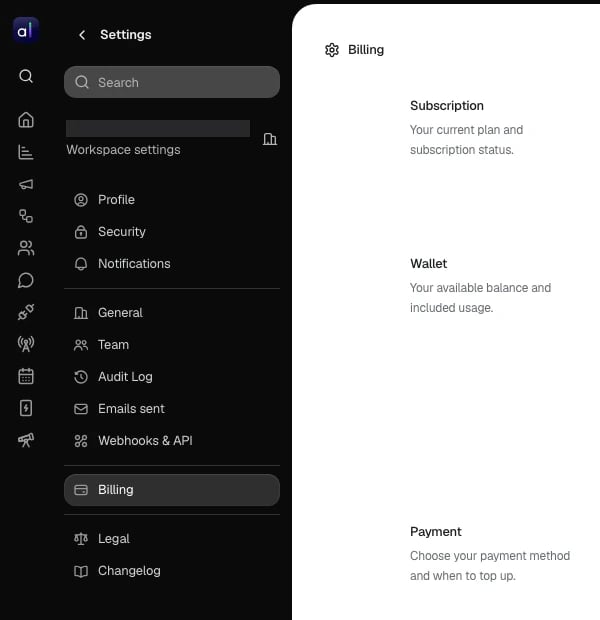
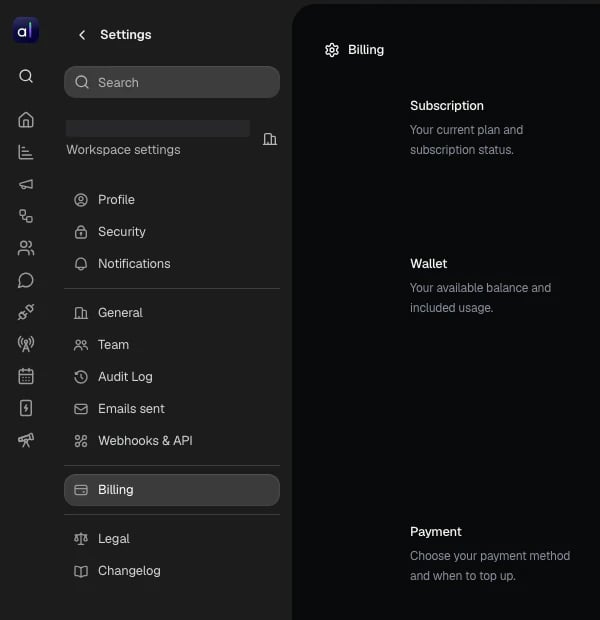
Open Settings
At the bottom of the sidebar, click Settings. The Settings page opens (/account).
Click Billing in the list on the left
2
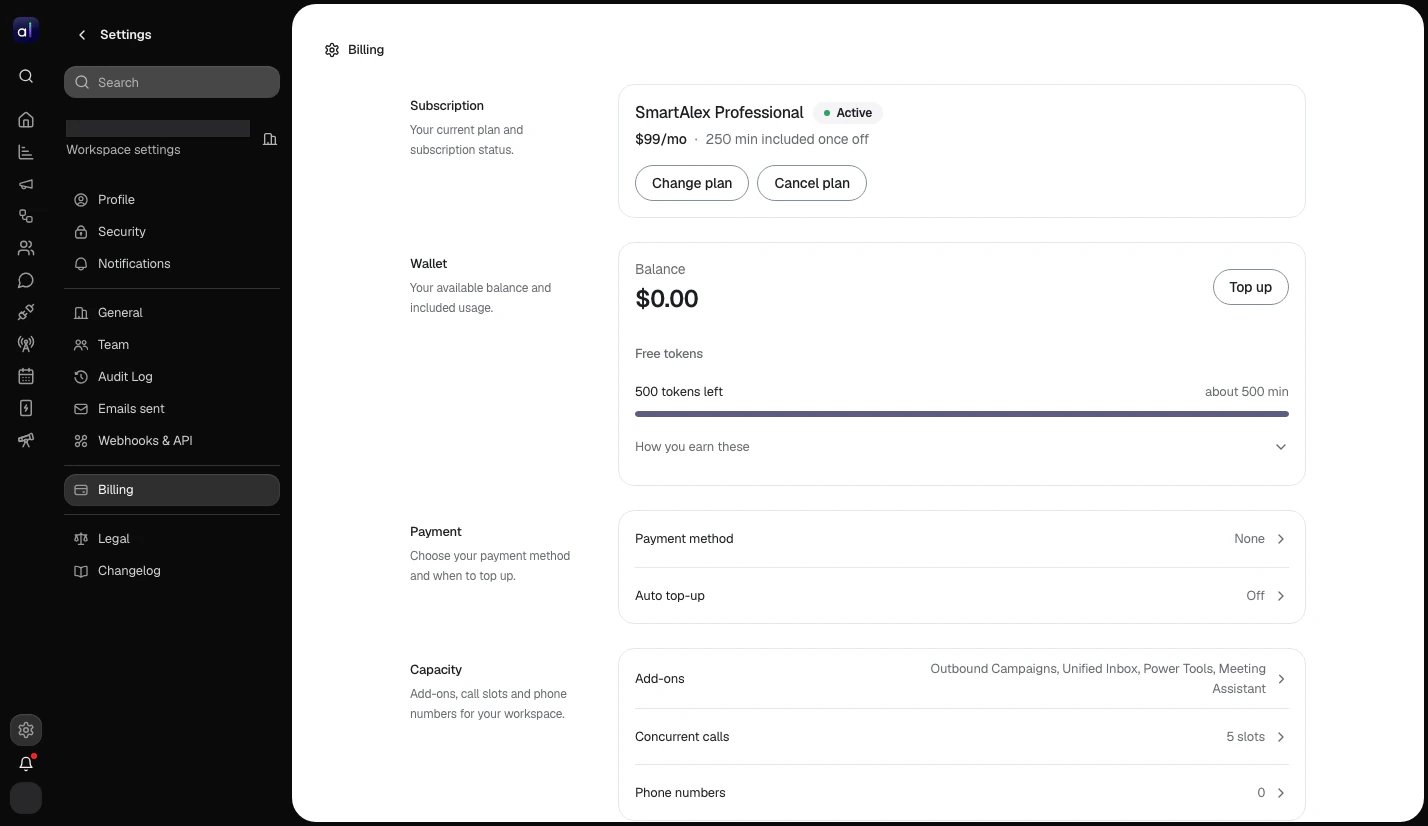
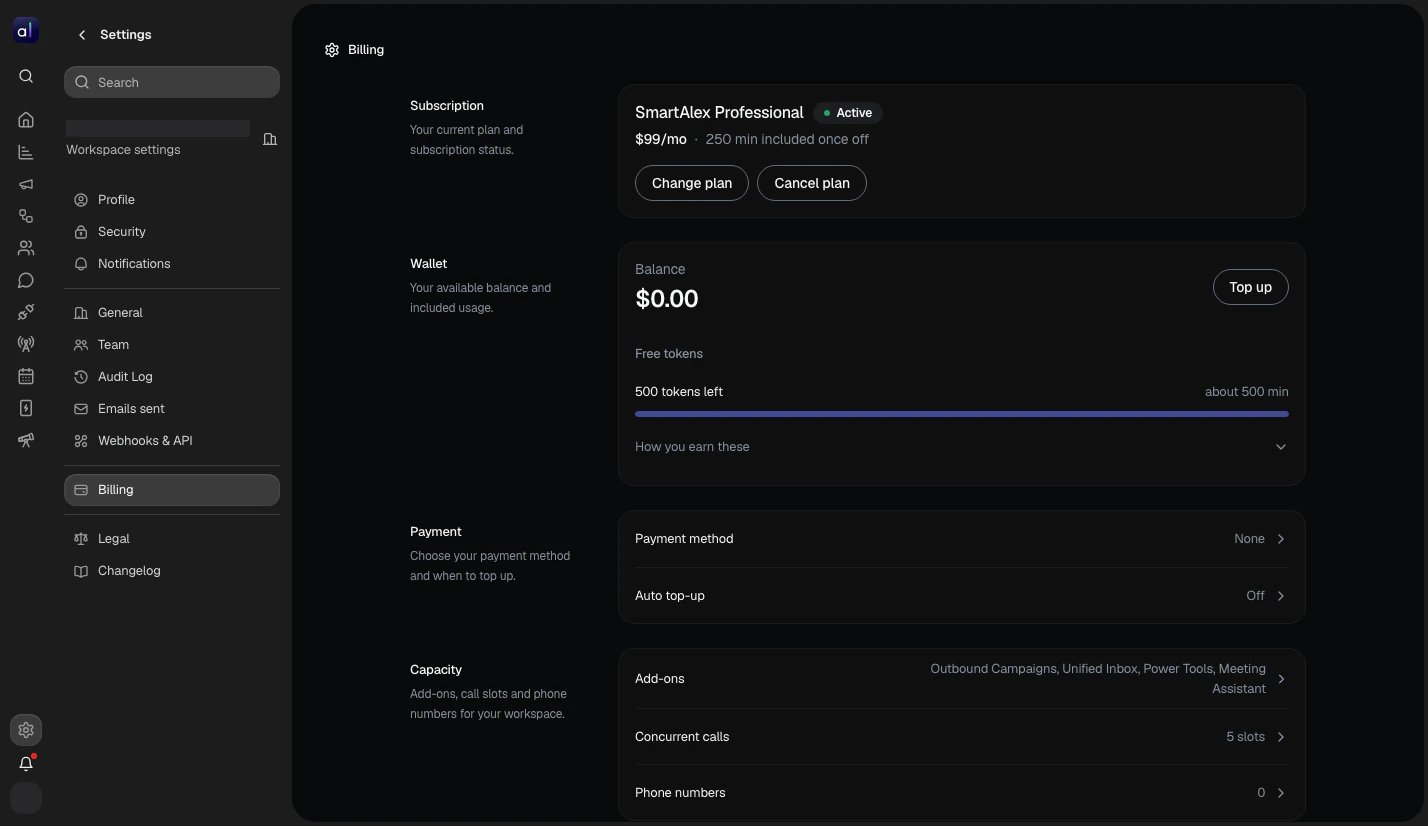
Open Billing
In the list on the left, under Billing, click Billing (/account?tab=billing).
Everything about paying for SmartAlex is on one page
3
Open Plans
In Subscription, click the plan button. It reads Choose plan if you have no plan, View plans during a trial, and Change plan on a paid plan. Plans opens (/account?tab=plans).
Click the button on the plan you want
4
Choose monthly or yearly
Set Save with yearly billing: off for monthly, on for yearly.
5
Click the button on the plan you want
Start paying now on the plan you are trialling ends the trial and starts the paid plan.
Book a call on Enterprise opens a booking page to talk to SmartAlex.
Current plan marks the plan you already pay for.
6
Check the dialog
The dialog shows what changes and what you pay. What you see depends on where you are:
You clicked Start paying now on the plan you are trialling: it shows the price, “Charged today” and the renewal date.
You picked another plan during the trial: it opens as Start your subscription with Pay now chosen, which ends the trial and charges today. Choose Keep trial instead to switch plan with no charge now and be billed when the trial ends. The title then changes to Switch trial plan. For some plans there is no Pay now: the dialog opens as Switch trial plan and moves you to that plan’s trial.
You are on a paid plan: it opens as Change plan. It shows Due now or your Credit, the new price from the next renewal, and when the change applies.
7
Confirm
Click Upgrade & Pay Now, Switch Plan or Confirm, whichever the dialog shows. To back out, click Cancel.
Settings on these screens
Setting
What it does
Default
When to change it
Save with yearly billing (Plans)
Shows and charges the yearly price instead of the monthly one
Off (monthly)
Switch it on to pay for a year at once and get two months free on Professional
Pay now or Keep trial (dialog when you pick another plan during the trial)
Pay now ends the trial and charges today. Keep trial switches plan and bills you when the trial ends
Pay now
Choose Keep trial to keep testing for free on the new plan
Check it worked
You see “Your SmartAlex Professional subscription is now active.”, “You’ve switched to” the plan, or “Your upgrade is being processed. This page will update automatically.” In Subscription, the plan name and price have changed and the badge reads Active, or Trial if you kept the trial.
Next
Add an add-on: switch on Outbound Campaigns, Unified Inbox, Power Tools or Meeting Assistant.
Can I switch from monthly to yearly on the same plan?
Not from Plans: your own plan shows Current plan whichever billing you pick. Contact support to move the same plan between monthly and yearly.
My trial minutes ran out. How do I keep calling?
End the trial early. Click View plans, then Start paying now on your plan, then Upgrade & Pay Now. You can also click Upgrade now in Subscription.
Why was my card declined?
The dialog says “Your card was declined. Please update your payment method and try again.” Add another card under Payment → Payment method, make it the default, and try again.
Last modified on November 27, 2026
{"docsConfig":{"theme":"sequoia","$schema":"https://mintlify.com/docs.json","name":"SmartAlex Documentation","description":"Documentation for SmartAlex, the AI voice assistant platform for businesses. Build voice agents, run outbound campaigns, manage contacts and call analytics, and connect your own systems through the MCP server.","colors":{"primary":"#010033","light":"#8B93E6","dark":"#5E6AD2"},"logo":{"light":"https://mintcdn.com/smartalex/qlHSvs0nyK6c2s5R/logo/light.png?fit=max\u0026auto=format\u0026n=qlHSvs0nyK6c2s5R\u0026q=85\u0026s=f2b8d4b820c7af262103f73350d3cc4e","dark":"https://mintcdn.com/smartalex/qlHSvs0nyK6c2s5R/logo/dark.png?fit=max\u0026auto=format\u0026n=qlHSvs0nyK6c2s5R\u0026q=85\u0026s=a98ea864686586154e8b6398c073d378"},"favicon":"https://mintcdn.com/smartalex/aHrSp8SKq40Ip2qH/favicon.png?fit=max\u0026auto=format\u0026n=aHrSp8SKq40Ip2qH\u0026q=85\u0026s=00fe0a5429a5be6c7a7d76dfef957afa","background":{"color":{"light":"#FFFFFF","dark":"#08090A"}},"navbar":{"links":[{"href":"/pricing","label":"Pricing"},{"href":"/faq","label":"Help"},{"href":"https://getsmartalex.com","label":"Website"},{"href":"https://getsmartalex.com/login","label":"Sign in"}],"primary":{"type":"button","label":"Start free","href":"https://getsmartalex.com/instant"}},"footer":{"socials":{"x":"https://x.com/smartalexhq","linkedin":"https://www.linkedin.com/company/smartalexhq","instagram":"https://www.instagram.com/smartalexhq","youtube":"https://www.youtube.com/@smartalexhq"},"links":[{"header":"Product","items":[{"label":"Pricing","href":"/pricing"},{"label":"Price list","href":"https://getsmartalex.com/legal/smartalex-usage-pricing-schedule"},{"label":"Integrations","href":"/integrations"},{"label":"Telephony","href":"/telephony/overview"},{"label":"MCP server","href":"/mcp/overview"}]},{"header":"Help","items":[{"label":"Quickstart","href":"/quickstart"},{"label":"FAQ","href":"/faq"},{"label":"Help centre","href":"https://getsmartalex.com/help"},{"label":"Email support","href":"mailto:support@getsmartalex.com"},{"label":"System status","href":"https://status.getsmartalex.com"}]},{"header":"Legal","items":[{"label":"Security","href":"/security"},{"label":"Trust and compliance","href":"/trust/compliance"},{"label":"Terms of Service","href":"https://getsmartalex.com/legal/smartalex-terms-of-services"},{"label":"Privacy Policy","href":"https://getsmartalex.com/legal/smartalex-privacy-policy"},{"label":"All legal documents","href":"https://getsmartalex.com/legal"}]},{"header":"Company","items":[{"label":"Website","href":"https://getsmartalex.com"},{"label":"Start free","href":"https://getsmartalex.com/instant"},{"label":"Sign in","href":"https://getsmartalex.com/login"},{"label":"Compare","href":"/comparisons/overview"}]}]},"seo":{"organization":{"id":"https://getsmartalex.com/#organization","name":"SmartAlex","url":"https://getsmartalex.com"},"indexing":"all"},"fonts":{"family":"Geist"},"errors":{"404":{"redirect":false,"title":"We could not find that page","description":"The link may be old, or the page has moved. Search with the bar at the top, or start from [Home](/), the [Quickstart](/quickstart) or [Help](/faq). Still stuck? Email [support@getsmartalex.com](mailto:support@getsmartalex.com)."}},"contextual":{"options":["assistant","copy","view","chatgpt","claude","perplexity","aistudio","mcp","add-mcp","cursor","vscode"],"display":"header"},"metadata":{"timestamp":true},"markdown":{"instructions":["For short, quotable answers about SmartAlex (what it is, who it is for, what it costs, where it runs, how it keeps data safe, which apps it connects to), read the facts page at /ai/facts on this site first, then the page it links to. Its last table maps every section of these docs.","For how to do something, use the step-by-step pages: /learn for whole paths, and each section's first-time pages such as /calls/buy-your-first-number, /agents/create-an-agent or /campaigns/import-your-first-contacts. Give the click path exactly as written there, for example Calls, then Numbers, then Buy number, with the bold button labels unchanged.","Prices come from the Pricing page at /pricing and the pages under /pricing. Quote a price exactly as written there, with its currency and unit.","Short answers to common questions are under /help, grouped by section. Legal documents are summarised under /legal; each summary links to the binding text, which prevails over the summary.","If a feature or screen is not described in these docs, say that you could not find it rather than guessing.","Pages under /comparisons describe other companies' products as of the date on each page. For SmartAlex's own features and prices, use the product pages.","The MCP server at /mcp on this site only searches this documentation. To work inside your own SmartAlex workspace (agents, calls, campaigns, contacts), use the SmartAlex MCP server described at /mcp/overview."]},"styling":{"latex":false},"navigation":{"global":{"anchors":[{"anchor":"Dashboard","icon":"gauge","href":"https://app.getsmartalex.com"}]},"pages":[]}},"deployment":{"deploymentMetadataValue":{"subdomain":"smartalex","hasAudioNarration":false,"actualSubdomain":"smartalex","customDomains":["docs.getsmartalex.com"],"gitSource":{"type":"github","owner":"the-rcs-group","repo":"docs","deployBranch":"main","contentDirectory":"","isPrivate":true,"mountPath":"","label":""},"feedback":{"agentFeedback":true},"entitlements":{},"buildId":"6b0beea7d4f92785796ee5a7","clientVersion":"0.0.4344","searchFilterCounts":[{"language":"default","tag":"Product","count":204},{"language":"default","tag":"Developers","count":128},{"language":"default","tag":"REST API","count":99},{"language":"default","tag":"Endpoints","count":95},{"language":"default","tag":"Start here","count":81},{"language":"default","tag":"Trust","count":63},{"language":"default","tag":"Agents","count":51},{"language":"default","tag":"Legal","count":49},{"language":"default","tag":"Learn","count":46},{"language":"default","tag":"Telephony","count":42}]},"assistantConfig":{"enableAskAiButton":false,"enableStarterQuestions":false,"enableAskAiSearchBar":true},"basePath":"","hasChatPermissions":false,"hasWebMcpPermissions":false,"toggles":[{"name":"kill-isr","enabled":true,"variant":{"name":"disabled","enabled":false,"feature_enabled":true},"impressionData":false},{"name":"custom-rbac-roles","enabled":true,"variant":{"name":"disabled","enabled":false,"feature_enabled":true},"impressionData":false},{"name":"agent-mintlify-slack","enabled":true,"variant":{"name":"disabled","enabled":false,"feature_enabled":true},"impressionData":false},{"name":"agent-integrations-settings","enabled":true,"variant":{"name":"disabled","enabled":false,"feature_enabled":true},"impressionData":false},{"name":"rbac-expansion","enabled":true,"variant":{"name":"disabled","enabled":false,"feature_enabled":true},"impressionData":false},{"name":"automations-pr-grouping","enabled":true,"variant":{"name":"disabled","enabled":false,"feature_enabled":true},"impressionData":false},{"name":"custom-prefix","enabled":true,"variant":{"name":"disabled","enabled":false,"feature_enabled":true},"impressionData":false},{"name":"analytics-v7","enabled":true,"variant":{"name":"disabled","enabled":false,"feature_enabled":true},"impressionData":false},{"name":"user-flows-analytics","enabled":true,"variant":{"name":"disabled","enabled":false,"feature_enabled":true},"impressionData":false},{"name":"no-publish-flow","enabled":true,"variant":{"name":"disabled","enabled":false,"feature_enabled":true},"impressionData":false},{"name":"snapshot-serving-live","enabled":true,"variant":{"name":"disabled","enabled":false,"feature_enabled":true},"impressionData":false},{"name":"stripTemperatureMiddleware","enabled":true,"variant":{"name":"disabled","enabled":false,"feature_enabled":true},"impressionData":false},{"name":"support-platform-pylon-zendesk","enabled":true,"variant":{"name":"disabled","enabled":false,"feature_enabled":true},"impressionData":false},{"name":"snapshot-serving","enabled":true,"variant":{"name":"disabled","enabled":false,"feature_enabled":true},"impressionData":false},{"name":"instant-rollback","enabled":true,"variant":{"name":"disabled","enabled":false,"feature_enabled":true},"impressionData":false},{"name":"granular-notifications-server","enabled":true,"variant":{"name":"disabled","enabled":false,"feature_enabled":true},"impressionData":false},{"name":"granular-notifications","enabled":true,"variant":{"name":"disabled","enabled":false,"feature_enabled":true},"impressionData":false},{"name":"automations-fable","enabled":true,"variant":{"name":"disabled","enabled":false,"feature_enabled":true},"impressionData":false},{"name":"fixed-ai-action-pricing","enabled":true,"variant":{"name":"disabled","enabled":false,"feature_enabled":true},"impressionData":false},{"name":"site-roles","enabled":true,"variant":{"name":"disabled","enabled":false,"feature_enabled":true},"impressionData":false},{"name":"automation-resolve-merge-conflict","enabled":true,"variant":{"name":"disabled","enabled":false,"feature_enabled":true},"impressionData":false},{"name":"scoped-publishing","enabled":true,"variant":{"name":"disabled","enabled":false,"feature_enabled":true},"impressionData":false},{"name":"mintql","enabled":true,"variant":{"name":"disabled","enabled":false,"feature_enabled":true},"impressionData":false},{"name":"page-level-analytics","enabled":true,"variant":{"name":"disabled","enabled":false,"feature_enabled":true},"impressionData":false},{"name":"editor-version-history-v2","enabled":true,"variant":{"name":"disabled","enabled":false,"feature_enabled":true},"impressionData":false},{"name":"billing-page-v2","enabled":true,"variant":{"name":"disabled","enabled":false,"feature_enabled":true},"impressionData":false},{"name":"full-page-search","enabled":true,"variant":{"name":"disabled","enabled":false,"feature_enabled":true},"impressionData":false},{"name":"workspace-projects","enabled":true,"variant":{"name":"disabled","enabled":false,"feature_enabled":true},"impressionData":false},{"name":"fork-pr-previews","enabled":true,"variant":{"name":"disabled","enabled":false,"feature_enabled":true},"impressionData":false},{"name":"revalidation-jwt","enabled":true,"variant":{"name":"disabled","enabled":false,"feature_enabled":true},"impressionData":false},{"name":"hobby-abuse-scan","enabled":true,"variant":{"name":"disabled","enabled":false,"feature_enabled":true},"impressionData":false},{"name":"dashboard-inbox","enabled":true,"variant":{"name":"disabled","enabled":false,"feature_enabled":true},"impressionData":false},{"name":"turbopuffer-dual-write","enabled":true,"variant":{"name":"disabled","enabled":false,"feature_enabled":true},"impressionData":false},{"name":"approve-review-flow","enabled":true,"variant":{"name":"disabled","enabled":false,"feature_enabled":true},"impressionData":false},{"name":"editor-metadata","enabled":true,"variant":{"name":"disabled","enabled":false,"feature_enabled":true},"impressionData":false},{"name":"turbopuffer-serve","enabled":true,"variant":{"name":"disabled","enabled":false,"feature_enabled":true},"impressionData":false},{"name":"live-agents","enabled":true,"variant":{"name":"disabled","enabled":false,"feature_enabled":true},"impressionData":false},{"name":"starter-pricing","enabled":true,"variant":{"name":"treatment","enabled":true,"payload":{"type":"string","value":"treatment"},"feature_enabled":true},"impressionData":false},{"name":"llms-txt-v2","enabled":true,"variant":{"name":"disabled","enabled":false,"feature_enabled":true},"impressionData":false},{"name":"wildcard-email-auth","enabled":true,"variant":{"name":"disabled","enabled":false,"feature_enabled":true},"impressionData":false}],"starterQuestions":[],"googleFontsInlined":true},"customCss":[{"filePath":"style.css","content":":root{--sa-radius: 12px;--sa-radius-sm: 10px;--sa-ease: cubic-bezier(0.2, 0, 0, 1);--sa-fast: 150ms;--sa-hairline: rgb(var(--gray-950) / 0.08);--sa-hairline-strong: rgb(var(--gray-950) / 0.14);--sa-well: rgb(var(--gray-50))}html.dark{--sa-hairline: rgb(255 255 255 / 0.08);--sa-hairline-strong: rgb(255 255 255 / 0.16);--sa-well: rgb(255 255 255 / 0.03)}h1{font-weight:400!important;letter-spacing:-0.025em!important;line-height:1.15!important}h2{font-weight:500!important;letter-spacing:-0.02em!important;line-height:1.25!important;margin-top:2.75rem!important}h3{font-weight:500!important;letter-spacing:-0.015em!important}.mdx-content p,.mdx-content li{line-height:1.7}button[class*=\"Button\"],button[class*=\"button\"],a[role=\"button\"],a[class*=\"Button\"],a[class*=\"button\"],[class*=\"btn\"],#navbar a[class*=\"bg-primary\"]{border-radius:9999px!important}#navbar a[class*=\"bg-primary\"]{padding-left:1rem!important;padding-right:1rem!important;box-shadow:none!important}input[type=\"search\"]{border-radius:9999px!important}#navbar img.nav-logo{height:40px!important}@media (max-width: 1023px){#navbar img.nav-logo,#mobile-nav img.nav-logo{height:34px!important;max-width:none!important}}#navbar:has(a[href*=\"getsmartalex\"]) img.nav-logo[class*=\"dark:hidden\"]{display:none!important}#navbar:has(a[href*=\"getsmartalex\"]) img.nav-logo[class*=\"dark:block\"]{display:block!important}#navbar:has(a[href*=\"getsmartalex\"]) img.nav-logo{aspect-ratio:2520 / 624}#navbar:has(a[href*=\"getsmartalex\"]){--sa-bar-fg: rgb(255 255 255 / 0.72);--sa-bar-dim: rgb(255 255 255 / 0.5);--sa-bar-line: rgb(255 255 255 / 0.12);--sa-bar-field: rgb(255 255 255 / 0.07);color-scheme:dark}#navbar:has(a[href*=\"getsmartalex\"])>div.absolute.inset-0,#navbar:has(a[href*=\"getsmartalex\"]) div[class*=\"bg-gray-50\"]{background:#000!important}#navbar:has(a[href*=\"getsmartalex\"])>div.absolute[class*=\"border-b\"]{border-color:var(--sa-bar-line)!important}#navbar:has(a[href*=\"getsmartalex\"]) div[class*=\"bg-gray-50\"]{border-top:1px solid var(--sa-bar-line)}#navbar:has(a[href*=\"getsmartalex\"]) div[class*=\"bg-gray-50\"] span,#navbar:has(a[href*=\"getsmartalex\"]) div[class*=\"bg-gray-50\"] button{color:var(--sa-bar-fg)!important}#navbar:has(a[href*=\"getsmartalex\"]) div[class*=\"bg-gray-50\"] [class*=\"text-gray-900\"]{color:#fff!important}#navbar:has(a[href*=\"getsmartalex\"]) div[class*=\"bg-gray-50\"] svg[class*=\"fill-gray\"]{fill:var(--sa-bar-dim)!important}#navbar:has(a[href*=\"getsmartalex\"]) a.font-medium:not([class*=\"bg-primary\"]),#navbar:has(a[href*=\"getsmartalex\"]) .nav-tabs-item{color:var(--sa-bar-fg)!important;transition:color var(--sa-fast) var(--sa-ease)}#navbar:has(a[href*=\"getsmartalex\"]) a.font-medium:not([class*=\"bg-primary\"]):hover,#navbar:has(a[href*=\"getsmartalex\"]) .nav-tabs-item:hover,#navbar:has(a[href*=\"getsmartalex\"]) .nav-tabs-item[class*=\"text-shadow\"]{color:#fff!important}#navbar:has(a[href*=\"getsmartalex\"]) .nav-tabs-item>div[class*=\"bg-primary\"]{background:#fff!important}#navbar:has(a[href*=\"getsmartalex\"]) .nav-tabs-item:hover>div:not([class*=\"bg-primary\"]){background:rgb(255 255 255 / 0.3)!important}#navbar:has(a[href*=\"getsmartalex\"]) #search-bar-entry{background:var(--sa-bar-field)!important;border-color:var(--sa-bar-line)!important;color:var(--sa-bar-dim)!important;border-radius:9999px!important;padding-left:0.75rem!important}#navbar:has(a[href*=\"getsmartalex\"]) #search-bar-entry:hover{background:rgb(255 255 255 / 0.11)!important}#navbar:has(a[href*=\"getsmartalex\"]) #search-bar-entry *{color:var(--sa-bar-dim)!important}#navbar:has(a[href*=\"getsmartalex\"]) #search-bar-entry svg[class*=\"bg-gray\"]{background-color:var(--sa-bar-dim)!important}#navbar:has(a[href*=\"getsmartalex\"]) #search-bar-entry span[class*=\"bg-white\"]{background:rgb(255 255 255 / 0.1)!important;border-radius:9999px!important}#navbar:has(a[href*=\"getsmartalex\"]) button svg{color:var(--sa-bar-fg)!important}#navbar:has(a[href*=\"getsmartalex\"]) a[class*=\"bg-primary\"]{background:#fff!important;color:#000!important}#navbar:has(a[href*=\"getsmartalex\"]) a[class*=\"bg-primary\"]:hover{opacity:0.88!important}#navbar:has(a[href*=\"getsmartalex\"]) a:focus-visible,#navbar:has(a[href*=\"getsmartalex\"]) button:focus-visible{outline:2px solid #fff!important;outline-offset:2px}.card{border-radius:var(--sa-radius)!important;border:1px solid var(--sa-hairline-strong)!important;box-shadow:none!important;transition:border-color var(--sa-fast) var(--sa-ease),\n background-color var(--sa-fast) var(--sa-ease)!important}.card:hover{transform:none!important;box-shadow:none!important}a.card:hover,.card[href]:hover,.card:has(>a):hover,.card.cursor-pointer:hover{border-color:rgb(var(--primary) / 0.45)!important;background-color:var(--sa-well)!important}html.dark a.card:hover,html.dark .card[href]:hover,html.dark .card:has(>a):hover,html.dark .card.cursor-pointer:hover{border-color:rgb(var(--primary-light) / 0.5)!important}.card [data-component-part=\"card-icon\"]{color:rgb(var(--primary))!important;fill:rgb(var(--primary))!important}html.dark .card [data-component-part=\"card-icon\"]{color:rgb(var(--primary-light))!important;fill:rgb(var(--primary-light))!important}.card [data-component-part=\"card-title\"]{font-weight:500!important;letter-spacing:-0.01em}.card ul{margin-top:0.5rem;margin-bottom:0;padding-left:1.1rem}.card li{margin:0.2rem 0}.callout{border-radius:var(--sa-radius)!important}.accordion-group{border-radius:var(--sa-radius)!important;border-color:var(--sa-hairline-strong)!important}.accordion-group summary{transition:background-color var(--sa-fast) var(--sa-ease)}.accordion-group summary:hover{background-color:var(--sa-well)}.mdx-content table{font-size:0.925rem;border-collapse:separate;border-spacing:0;width:100%}.mdx-content thead th{font-size:0.75rem;font-weight:500;letter-spacing:0.02em;color:rgb(var(--gray-500));border-bottom:1px solid var(--sa-hairline-strong)!important;background:transparent;white-space:nowrap}html.dark .mdx-content thead th{color:rgb(var(--gray-400))}.mdx-content tbody td{border-bottom:1px solid var(--sa-hairline)!important;vertical-align:top}.mdx-content tbody tr:last-child td{border-bottom:0!important}.mdx-content table{display:block;overflow-x:auto;-webkit-overflow-scrolling:touch}@media (min-width: 768px){.mdx-content table{display:table;overflow-x:visible}}code,pre,kbd{font-family:\"Geist Mono\", ui-monospace, SFMono-Regular, \"SF Mono\", Menlo, monospace;font-feature-settings:\"liga\" 0}pre,.code-block,div[class*=\"codeblock\"],div[class*=\"code-block\"]{border-radius:var(--sa-radius-sm)!important}.code-block,div[class*=\"code-block\"]{border:1px solid var(--sa-hairline-strong)!important;box-shadow:none!important}.mdx-content :not(pre)>code{padding:0.12em 0.4em;border-radius:6px;background:var(--sa-well);font-size:0.875em}.mermaid{display:flex;justify-content:center;margin:1.5rem 0;padding:1rem;border:1px solid var(--sa-hairline);border-radius:var(--sa-radius);overflow-x:auto;-webkit-overflow-scrolling:touch}.mermaid svg{height:auto;font-family:inherit!important}@media (max-width: 767px){.mermaid{justify-content:flex-start}.mermaid svg{min-width:560px}}.mermaid .node rect,.mermaid .node polygon,.mermaid .node circle,.mermaid .node path.basic,.mermaid .node .label-container>path{fill:rgb(var(--background-light))!important;stroke:rgb(var(--primary) / 0.35)!important;stroke-width:1px!important}.mermaid .node rect{rx:8px;ry:8px}.mermaid .node.core rect,.mermaid .node.core polygon,.mermaid .node.core .label-container>path{fill:rgb(var(--primary) / 0.06)!important;stroke:rgb(var(--primary))!important;stroke-width:1.5px!important}html.dark .mermaid .node.core rect,html.dark .mermaid .node.core polygon,html.dark .mermaid .node.core .label-container>path{fill:rgb(var(--primary-light) / 0.12)!important;stroke:rgb(var(--primary-light))!important}.mermaid .cluster rect{fill:rgb(var(--gray-50))!important;stroke:rgb(var(--gray-200))!important;stroke-width:1px!important;rx:12px;ry:12px}.mermaid .nodeLabel,.mermaid .cluster-label,.mermaid .cluster-label span,.mermaid .label,.mermaid text{color:rgb(var(--gray-900))!important;fill:rgb(var(--gray-900))!important}.mermaid .cluster-label .nodeLabel,.mermaid .cluster-label span{color:rgb(var(--gray-500))!important;font-weight:500;font-size:0.85em}.mermaid .flowchart-link,.mermaid .edgePath path,.mermaid .messageLine0,.mermaid .messageLine1,.mermaid .actor-line,.mermaid .loopLine{stroke:rgb(var(--gray-400))!important}.mermaid .arrowMarkerPath,.mermaid marker path,.mermaid #arrowhead path,.mermaid .arrowheadPath{fill:rgb(var(--gray-400))!important;stroke:rgb(var(--gray-400))!important}.mermaid .edgeLabel,.mermaid .edgeLabel rect,.mermaid .labelBkg{background-color:rgb(var(--background-light))!important;fill:rgb(var(--background-light))!important}.mermaid rect.actor,.mermaid .actor-box{fill:rgb(var(--background-light))!important;stroke:rgb(var(--primary) / 0.35)!important}.mermaid .actor-man circle,.mermaid .actor-man line{fill:rgb(var(--background-light))!important;stroke:rgb(var(--primary) / 0.6)!important}.mermaid .messageText,.mermaid text.actor,.mermaid text.actor>tspan{fill:rgb(var(--gray-900))!important}.mermaid .note{fill:rgb(var(--gray-50))!important;stroke:rgb(var(--gray-200))!important}html.dark .mermaid .node rect,html.dark .mermaid .node polygon,html.dark .mermaid .node circle,html.dark .mermaid .node path.basic,html.dark .mermaid .node .label-container>path,html.dark .mermaid rect.actor,html.dark .mermaid .actor-box,html.dark .mermaid .actor-man circle{fill:rgb(var(--background-dark))!important;stroke:rgb(var(--primary-light) / 0.45)!important}html.dark .mermaid .cluster rect,html.dark .mermaid .note{fill:rgb(255 255 255 / 0.03)!important;stroke:rgb(255 255 255 / 0.1)!important}html.dark .mermaid .nodeLabel,html.dark .mermaid .label,html.dark .mermaid text,html.dark .mermaid .messageText,html.dark .mermaid text.actor,html.dark .mermaid text.actor>tspan{color:rgb(var(--gray-100))!important;fill:rgb(var(--gray-100))!important}html.dark .mermaid .cluster-label .nodeLabel,html.dark .mermaid .cluster-label span{color:rgb(var(--gray-400))!important}html.dark .mermaid .flowchart-link,html.dark .mermaid .edgePath path,html.dark .mermaid .messageLine0,html.dark .mermaid .messageLine1,html.dark .mermaid .actor-line,html.dark .mermaid .loopLine{stroke:rgb(var(--gray-500))!important}html.dark .mermaid .arrowMarkerPath,html.dark .mermaid marker path,html.dark .mermaid #arrowhead path,html.dark .mermaid .arrowheadPath{fill:rgb(var(--gray-500))!important;stroke:rgb(var(--gray-500))!important}html.dark .mermaid .edgeLabel,html.dark .mermaid .edgeLabel rect,html.dark .mermaid .labelBkg{background-color:rgb(var(--background-dark))!important;fill:rgb(var(--background-dark))!important}html.dark .mermaid .actor-man line{stroke:rgb(var(--primary-light) / 0.6)!important}@media (min-width: 1024px){html[data-page-mode=\"wide\"] #content-area{max-width:1040px!important}}a:focus-visible,button:focus-visible,summary:focus-visible,.card:focus-visible{outline:2px solid rgb(var(--primary))!important;outline-offset:2px}html.dark a:focus-visible,html.dark button:focus-visible,html.dark summary:focus-visible,html.dark .card:focus-visible{outline-color:rgb(var(--primary-light))!important}@media (prefers-reduced-motion: reduce){*,*::before,*::after{transition-duration:0ms!important;animation-duration:0ms!important}}.mdx-content[data-page-title=\"Integrations\"] [data-component-part=\"card-icon\"]{display:flex;align-items:center;justify-content:center;box-sizing:border-box;width:fit-content;min-width:48px;height:48px;padding:8px;background:#fff;border:1px solid rgb(var(--gray-950) / 0.1);border-radius:12px;color:rgb(var(--gray-800))!important;fill:rgb(var(--gray-800))!important}html.dark .mdx-content[data-page-title=\"Integrations\"] [data-component-part=\"card-icon\"]{border-color:rgb(255 255 255 / 0.14)}.mdx-content[data-page-title=\"Integrations\"] [data-component-part=\"card-icon\"]>img{width:auto;height:32px;max-width:96px;object-fit:contain}.mdx-content[data-page-title=\"Integrations\"] [data-component-part=\"card-icon\"]>svg{width:22px;height:22px;opacity:1}@media (min-width: 768px){#footer div[class*=\"sm:grid\"]{grid-template-columns:repeat(2, max-content)!important;column-gap:3rem!important;justify-content:end}#footer div[class*=\"sm:grid\"]>div{align-items:flex-start!important}}@media (min-width: 1280px){#footer div[class*=\"sm:grid\"]{grid-template-columns:none!important;grid-auto-flow:column;grid-auto-columns:max-content;column-gap:2.5rem!important}}"}]}
{"page":{"pagePath":"pricing/start/choose-a-plan","slug":"/pricing/start/choose-a-plan","pageMetadata":{"title":"Choose or change your SmartAlex plan","sidebarTitle":"Choose a plan","description":"Pick the SmartAlex plan you pay for, start paying before your trial ends, or switch plan, from Settings, Billing, Plans in about 2 minutes.","keywords":["choose a plan","change plan","upgrade smartalex","start paying","switch plan during trial","end trial early","pick monthly or yearly"],"icon":"layer-group","structuredData":{"@type":"FAQPage","mainEntity":[{"@type":"Question","name":"Can I switch from monthly to yearly on the same plan?","acceptedAnswer":{"@type":"Answer","text":"Not from Plans: your own plan shows Current plan whichever billing you pick. Contact support to move the same plan between monthly and yearly."}},{"@type":"Question","name":"My trial minutes ran out. How do I keep calling?","acceptedAnswer":{"@type":"Answer","text":"End the trial early. Click View plans, then Start paying now on your plan, then Upgrade \u0026 Pay Now. You can also click Upgrade now in Subscription."}},{"@type":"Question","name":"Why was my card declined?","acceptedAnswer":{"@type":"Answer","text":"The dialog says 'Your card was declined. Please update your payment method and try again.' Add another card under Payment → Payment method, make it the default, and try again."}}]},"href":"/pricing/start/choose-a-plan"},"description":{"compiledSource":"\"use strict\";\nconst {jsx: _jsx} = arguments[0];\nconst {useMDXComponents: _provideComponents} = arguments[0];\nfunction _createMdxContent(props) {\n const _components = {\n p: \"p\",\n ..._provideComponents(),\n ...props.components\n };\n return _jsx(_components.p, {\n children: \"Pick the SmartAlex plan you pay for, start paying before your trial ends, or switch plan, from Settings, Billing, Plans in about 2 minutes.\"\n });\n}\nfunction MDXContent(props = {}) {\n const {wrapper: MDXLayout} = {\n ..._provideComponents(),\n ...props.components\n };\n return MDXLayout ? _jsx(MDXLayout, {\n ...props,\n children: _jsx(_createMdxContent, {\n ...props\n })\n }) : _createMdxContent(props);\n}\nreturn {\n default: MDXContent\n};\n","frontmatter":{},"scope":{}},"pageType":"default","mdx":{"mdxSource":{"compiledSource":"\"use strict\";const{Fragment:_Fragment,jsx:_jsx,jsxs:_jsxs}=arguments[0];const{useMDXComponents:_provideComponents}=arguments[0];function _createMdxContent(props){const _components={a:`a`,code:`code`,li:`li`,p:`p`,strong:`strong`,tbody:`tbody`,td:`td`,th:`th`,thead:`thead`,tr:`tr`,ul:`ul`,..._provideComponents(),...props.components},{Accordion,AccordionGroup,Frame,Heading,Info,OptimizedImage,Step,Steps,Table}=_components;if(!Accordion)_missingMdxReference(`Accordion`,true);if(!AccordionGroup)_missingMdxReference(`AccordionGroup`,true);if(!Frame)_missingMdxReference(`Frame`,true);if(!Heading)_missingMdxReference(`Heading`,true);if(!Info)_missingMdxReference(`Info`,true);if(!OptimizedImage)_missingMdxReference(`OptimizedImage`,true);if(!Step)_missingMdxReference(`Step`,true);if(!Steps)_missingMdxReference(`Steps`,true);if(!Table)_missingMdxReference(`Table`,true);return _jsxs(_Fragment,{children:[_jsxs(_components.p,{children:[`You choose or change your plan in `,_jsx(_components.strong,{children:`Settings → Billing`}),`, under `,_jsx(_components.strong,{children:`Plans`}),`, in about 2 minutes. Pick monthly or yearly, click the button on the plan you want, and check the amount in the dialog before you confirm. During a trial you can start paying straight away or switch plan and keep the trial.`]}),`\n`,_jsx(Info,{children:_jsxs(_components.p,{children:[`In the app: `,_jsx(_components.strong,{children:`Sidebar → Settings → Billing`}),` (`,_jsx(_components.code,{children:`/account?tab=billing`}),`), then `,_jsx(_components.strong,{children:`Choose plan`}),`, `,_jsx(_components.strong,{children:`View plans`}),` or `,_jsx(_components.strong,{children:`Change plan`}),` (`,_jsx(_components.code,{children:`/account?tab=plans`}),`).`]})}),`\n`,_jsx(Heading,{level:`2`,id:`before-you-start`,children:`Before you start`}),`\n`,_jsxs(Table,{children:[_jsx(_components.thead,{children:_jsxs(_components.tr,{children:[_jsx(_components.th,{}),_jsx(_components.th,{})]})}),_jsxs(_components.tbody,{children:[_jsxs(_components.tr,{children:[_jsx(_components.td,{children:_jsx(_components.strong,{children:`You will have`})}),_jsx(_components.td,{children:`The plan you want, billed monthly or yearly`})]}),_jsxs(_components.tr,{children:[_jsx(_components.td,{children:_jsx(_components.strong,{children:`Time`})}),_jsx(_components.td,{children:`About 2 minutes`})]}),_jsxs(_components.tr,{children:[_jsx(_components.td,{children:_jsx(_components.strong,{children:`You need`})}),_jsx(_components.td,{children:`To be the workspace owner, with a card saved on the account`})]})]})]}),`\n`,_jsxs(Table,{children:[_jsx(_components.thead,{children:_jsxs(_components.tr,{children:[_jsx(_components.th,{}),_jsx(_components.th,{children:`Free`}),_jsx(_components.th,{children:`Professional`}),_jsx(_components.th,{children:`Real Estate`}),_jsx(_components.th,{children:`Enterprise`})]})}),_jsxs(_components.tbody,{children:[_jsxs(_components.tr,{children:[_jsx(_components.td,{children:_jsx(_components.strong,{children:`Monthly`})}),_jsx(_components.td,{\"data-numeric\":`true`,children:`$0`}),_jsx(_components.td,{children:`$99 a month`}),_jsx(_components.td,{children:`$3,000 a month`}),_jsx(_components.td,{children:`Agreed in your contract`})]}),_jsxs(_components.tr,{children:[_jsx(_components.td,{children:_jsx(_components.strong,{children:`Yearly`})}),_jsx(_components.td,{\"data-numeric\":`true`,children:`$0`}),_jsx(_components.td,{children:`$990 a year`}),_jsx(_components.td,{children:`$28,800 a year`}),_jsx(_components.td,{children:`Agreed in your contract`})]}),_jsxs(_components.tr,{children:[_jsx(_components.td,{children:_jsx(_components.strong,{children:`Yearly, per month`})}),_jsx(_components.td,{\"data-numeric\":`true`,children:`$0`}),_jsx(_components.td,{\"data-numeric\":`true`,children:`$82.50`}),_jsx(_components.td,{\"data-numeric\":`true`,children:`$2,400`}),_jsx(_components.td,{children:`Agreed`})]}),_jsxs(_components.tr,{children:[_jsx(_components.td,{children:_jsx(_components.strong,{children:`You save by paying yearly`})}),_jsx(_components.td,{}),_jsx(_components.td,{\"data-numeric\":`true`,children:`$198`}),_jsx(_components.td,{\"data-numeric\":`true`,children:`$7,200`}),_jsx(_components.td,{children:`Agreed`})]}),_jsxs(_components.tr,{children:[_jsx(_components.td,{children:_jsx(_components.strong,{children:`AI agents included`})}),_jsx(_components.td,{\"data-numeric\":`true`,children:`1`}),_jsx(_components.td,{\"data-numeric\":`true`,children:`1`}),_jsx(_components.td,{\"data-numeric\":`true`,children:`1`}),_jsx(_components.td,{children:`Agreed`})]}),_jsxs(_components.tr,{children:[_jsx(_components.td,{children:_jsx(_components.strong,{children:`Free call credits`})}),_jsx(_components.td,{children:`900, once (15 minutes in the browser)`}),_jsx(_components.td,{children:`15,000 for each agent, once`}),_jsx(_components.td,{children:`18,000 every calendar month for the account`}),_jsx(_components.td,{children:`Agreed`})]}),_jsxs(_components.tr,{children:[_jsx(_components.td,{children:_jsx(_components.strong,{children:`Calls at the same time`})}),_jsx(_components.td,{children:`Browser only`}),_jsx(_components.td,{\"data-numeric\":`true`,children:`5`}),_jsx(_components.td,{\"data-numeric\":`true`,children:`20`}),_jsx(_components.td,{children:`Up to 20, or as agreed`})]}),_jsxs(_components.tr,{children:[_jsx(_components.td,{children:_jsx(_components.strong,{children:`Phone numbers`})}),_jsx(_components.td,{children:`No`}),_jsx(_components.td,{children:`Yes, priced by country`}),_jsx(_components.td,{children:`Yes, priced by country`}),_jsx(_components.td,{children:`Yes`})]}),_jsxs(_components.tr,{children:[_jsx(_components.td,{children:_jsx(_components.strong,{children:`Team members`})}),_jsx(_components.td,{\"data-numeric\":`true`,children:`1`}),_jsx(_components.td,{\"data-numeric\":`true`,children:`3`}),_jsx(_components.td,{children:`Unlimited`}),_jsx(_components.td,{children:`Unlimited`})]}),_jsxs(_components.tr,{children:[_jsx(_components.td,{children:_jsx(_components.strong,{children:`Add-ons`})}),_jsx(_components.td,{children:`No`}),_jsx(_components.td,{children:`Buy the ones you need`}),_jsx(_components.td,{children:`All four included`}),_jsx(_components.td,{children:`All four included`})]}),_jsxs(_components.tr,{children:[_jsx(_components.td,{children:_jsx(_components.strong,{children:`Card needed`})}),_jsx(_components.td,{children:`No`}),_jsx(_components.td,{children:`Yes`}),_jsx(_components.td,{children:`Yes`}),_jsx(_components.td,{children:`Invoice or card`})]})]})]}),`\n`,_jsx(Heading,{level:`2`,id:`choose-your-plan`,children:`Choose your plan`}),`\n`,_jsxs(Steps,{children:[_jsxs(Step,{title:`Open Settings`,children:[_jsxs(_components.p,{children:[`At the bottom of the sidebar, click `,_jsx(_components.strong,{children:`Settings`}),`. The Settings page opens (`,_jsx(_components.code,{children:`/account`}),`).`]}),_jsxs(Frame,{caption:`Click Billing in the list on the left`,children:[_jsx(OptimizedImage,{className:`mint-block dark:mint-hidden`,src:`https://mintcdn.com/smartalex/kH_ICIPoijeWBR2w/images/screens/pricing-plans/settings-billing-rail.webp?fit=max\u0026auto=format\u0026n=kH_ICIPoijeWBR2w\u0026q=85\u0026s=e4bbea52ff5683f45bf28c0885b44a3c`,alt:`Settings page with Billing in the list on the left`,\"data-og-width\":`600`,width:`600`,\"data-og-height\":`620`,height:`620`,\"data-path\":`images/screens/pricing-plans/settings-billing-rail.webp`,\"data-optimize\":`true`,\"data-opv\":`3`,srcset:`https://mintcdn.com/smartalex/kH_ICIPoijeWBR2w/images/screens/pricing-plans/settings-billing-rail.webp?w=280\u0026fit=max\u0026auto=format\u0026n=kH_ICIPoijeWBR2w\u0026q=85\u0026s=7562af410dfe659c417e9e988c5fecde 280w, https://mintcdn.com/smartalex/kH_ICIPoijeWBR2w/images/screens/pricing-plans/settings-billing-rail.webp?w=560\u0026fit=max\u0026auto=format\u0026n=kH_ICIPoijeWBR2w\u0026q=85\u0026s=519517545300aba34cf00890045e050f 560w, https://mintcdn.com/smartalex/kH_ICIPoijeWBR2w/images/screens/pricing-plans/settings-billing-rail.webp?w=840\u0026fit=max\u0026auto=format\u0026n=kH_ICIPoijeWBR2w\u0026q=85\u0026s=f3ceb139ee1b7f21ce8a4c565e596d9b 840w, https://mintcdn.com/smartalex/kH_ICIPoijeWBR2w/images/screens/pricing-plans/settings-billing-rail.webp?w=1100\u0026fit=max\u0026auto=format\u0026n=kH_ICIPoijeWBR2w\u0026q=85\u0026s=d91a25bc5a209d567ed934c798a97df5 1100w, https://mintcdn.com/smartalex/kH_ICIPoijeWBR2w/images/screens/pricing-plans/settings-billing-rail.webp?w=1650\u0026fit=max\u0026auto=format\u0026n=kH_ICIPoijeWBR2w\u0026q=85\u0026s=cdf5bd300ef9162af1453c0d3db3b2a2 1650w, https://mintcdn.com/smartalex/kH_ICIPoijeWBR2w/images/screens/pricing-plans/settings-billing-rail.webp?w=2500\u0026fit=max\u0026auto=format\u0026n=kH_ICIPoijeWBR2w\u0026q=85\u0026s=80cf1d4730f225f02e38fc7bfa26b437 2500w`}),_jsx(OptimizedImage,{className:`mint-hidden dark:mint-block`,src:`https://mintcdn.com/smartalex/kH_ICIPoijeWBR2w/images/screens/pricing-plans/settings-billing-rail.dark.webp?fit=max\u0026auto=format\u0026n=kH_ICIPoijeWBR2w\u0026q=85\u0026s=6bbf99bd18ae36a045364f2949e64b79`,alt:`Settings page with Billing in the list on the left`,\"data-og-width\":`600`,width:`600`,\"data-og-height\":`620`,height:`620`,\"data-path\":`images/screens/pricing-plans/settings-billing-rail.dark.webp`,\"data-optimize\":`true`,\"data-opv\":`3`,srcset:`https://mintcdn.com/smartalex/kH_ICIPoijeWBR2w/images/screens/pricing-plans/settings-billing-rail.dark.webp?w=280\u0026fit=max\u0026auto=format\u0026n=kH_ICIPoijeWBR2w\u0026q=85\u0026s=4ba074e9d03461046483bae11d0f2ff0 280w, https://mintcdn.com/smartalex/kH_ICIPoijeWBR2w/images/screens/pricing-plans/settings-billing-rail.dark.webp?w=560\u0026fit=max\u0026auto=format\u0026n=kH_ICIPoijeWBR2w\u0026q=85\u0026s=013ebc9614f2910acaeaab2867da3631 560w, https://mintcdn.com/smartalex/kH_ICIPoijeWBR2w/images/screens/pricing-plans/settings-billing-rail.dark.webp?w=840\u0026fit=max\u0026auto=format\u0026n=kH_ICIPoijeWBR2w\u0026q=85\u0026s=dbd7b5801504c548c8d73ec3a845766a 840w, https://mintcdn.com/smartalex/kH_ICIPoijeWBR2w/images/screens/pricing-plans/settings-billing-rail.dark.webp?w=1100\u0026fit=max\u0026auto=format\u0026n=kH_ICIPoijeWBR2w\u0026q=85\u0026s=5d57699a7eb22ab4d1f0f6c78d0dc1e1 1100w, https://mintcdn.com/smartalex/kH_ICIPoijeWBR2w/images/screens/pricing-plans/settings-billing-rail.dark.webp?w=1650\u0026fit=max\u0026auto=format\u0026n=kH_ICIPoijeWBR2w\u0026q=85\u0026s=a73f3fa6e4f670a6a965de156d6a189f 1650w, https://mintcdn.com/smartalex/kH_ICIPoijeWBR2w/images/screens/pricing-plans/settings-billing-rail.dark.webp?w=2500\u0026fit=max\u0026auto=format\u0026n=kH_ICIPoijeWBR2w\u0026q=85\u0026s=281142f19616fd810b8fb06376e436c4 2500w`})]})]}),_jsxs(Step,{title:`Open Billing`,children:[_jsxs(_components.p,{children:[`In the list on the left, under `,_jsx(_components.strong,{children:`Billing`}),`, click `,_jsx(_components.strong,{children:`Billing`}),` (`,_jsx(_components.code,{children:`/account?tab=billing`}),`).`]}),_jsxs(Frame,{caption:`Everything about paying for SmartAlex is on one page`,children:[_jsx(OptimizedImage,{className:`mint-block dark:mint-hidden`,src:`https://mintcdn.com/smartalex/kH_ICIPoijeWBR2w/images/screens/pricing-plans/billing-page.webp?fit=max\u0026auto=format\u0026n=kH_ICIPoijeWBR2w\u0026q=85\u0026s=ef4c790b57c145af13b4548497917e49`,alt:`Billing page with the Subscription, Wallet, Payment, Capacity and Records panels`,\"data-og-width\":`1428`,width:`1428`,\"data-og-height\":`826`,height:`826`,\"data-path\":`images/screens/pricing-plans/billing-page.webp`,\"data-optimize\":`true`,\"data-opv\":`3`,srcset:`https://mintcdn.com/smartalex/kH_ICIPoijeWBR2w/images/screens/pricing-plans/billing-page.webp?w=280\u0026fit=max\u0026auto=format\u0026n=kH_ICIPoijeWBR2w\u0026q=85\u0026s=0d23914b779478e35032c416785bb547 280w, https://mintcdn.com/smartalex/kH_ICIPoijeWBR2w/images/screens/pricing-plans/billing-page.webp?w=560\u0026fit=max\u0026auto=format\u0026n=kH_ICIPoijeWBR2w\u0026q=85\u0026s=faeccd883e2afbf2f83cf07f8eaeead8 560w, https://mintcdn.com/smartalex/kH_ICIPoijeWBR2w/images/screens/pricing-plans/billing-page.webp?w=840\u0026fit=max\u0026auto=format\u0026n=kH_ICIPoijeWBR2w\u0026q=85\u0026s=ec6b340819179b378b979132ab38b659 840w, https://mintcdn.com/smartalex/kH_ICIPoijeWBR2w/images/screens/pricing-plans/billing-page.webp?w=1100\u0026fit=max\u0026auto=format\u0026n=kH_ICIPoijeWBR2w\u0026q=85\u0026s=ff5e7cbe1be4fd1a47456294f93cfbb6 1100w, https://mintcdn.com/smartalex/kH_ICIPoijeWBR2w/images/screens/pricing-plans/billing-page.webp?w=1650\u0026fit=max\u0026auto=format\u0026n=kH_ICIPoijeWBR2w\u0026q=85\u0026s=138a2dd4c2bda12c7fbd4f557a5549a9 1650w, https://mintcdn.com/smartalex/kH_ICIPoijeWBR2w/images/screens/pricing-plans/billing-page.webp?w=2500\u0026fit=max\u0026auto=format\u0026n=kH_ICIPoijeWBR2w\u0026q=85\u0026s=d577022a6fd6ba052f34f30c976aab42 2500w`}),_jsx(OptimizedImage,{className:`mint-hidden dark:mint-block`,src:`https://mintcdn.com/smartalex/kH_ICIPoijeWBR2w/images/screens/pricing-plans/billing-page.dark.webp?fit=max\u0026auto=format\u0026n=kH_ICIPoijeWBR2w\u0026q=85\u0026s=796f8884d42528e89a9ddf7427ad3b23`,alt:`Billing page with the Subscription, Wallet, Payment, Capacity and Records panels`,\"data-og-width\":`1428`,width:`1428`,\"data-og-height\":`826`,height:`826`,\"data-path\":`images/screens/pricing-plans/billing-page.dark.webp`,\"data-optimize\":`true`,\"data-opv\":`3`,srcset:`https://mintcdn.com/smartalex/kH_ICIPoijeWBR2w/images/screens/pricing-plans/billing-page.dark.webp?w=280\u0026fit=max\u0026auto=format\u0026n=kH_ICIPoijeWBR2w\u0026q=85\u0026s=74b0791000d21a9a3bccd1edc329b800 280w, https://mintcdn.com/smartalex/kH_ICIPoijeWBR2w/images/screens/pricing-plans/billing-page.dark.webp?w=560\u0026fit=max\u0026auto=format\u0026n=kH_ICIPoijeWBR2w\u0026q=85\u0026s=d454840da192d17c265f900fe0a93dfd 560w, https://mintcdn.com/smartalex/kH_ICIPoijeWBR2w/images/screens/pricing-plans/billing-page.dark.webp?w=840\u0026fit=max\u0026auto=format\u0026n=kH_ICIPoijeWBR2w\u0026q=85\u0026s=36592ad6d196f68091e57030426f4b44 840w, https://mintcdn.com/smartalex/kH_ICIPoijeWBR2w/images/screens/pricing-plans/billing-page.dark.webp?w=1100\u0026fit=max\u0026auto=format\u0026n=kH_ICIPoijeWBR2w\u0026q=85\u0026s=b4ad7b8abb4daabe86cd429082d70998 1100w, https://mintcdn.com/smartalex/kH_ICIPoijeWBR2w/images/screens/pricing-plans/billing-page.dark.webp?w=1650\u0026fit=max\u0026auto=format\u0026n=kH_ICIPoijeWBR2w\u0026q=85\u0026s=d90d7b44adf7027de662c25c136582c8 1650w, https://mintcdn.com/smartalex/kH_ICIPoijeWBR2w/images/screens/pricing-plans/billing-page.dark.webp?w=2500\u0026fit=max\u0026auto=format\u0026n=kH_ICIPoijeWBR2w\u0026q=85\u0026s=e4a7f48c583e09bfdce6e4094233c5ba 2500w`})]})]}),_jsxs(Step,{title:`Open Plans`,children:[_jsxs(_components.p,{children:[`In `,_jsx(_components.strong,{children:`Subscription`}),`, click the plan button. It reads `,_jsx(_components.strong,{children:`Choose plan`}),` if you have no plan, `,_jsx(_components.strong,{children:`View plans`}),` during a trial, and `,_jsx(_components.strong,{children:`Change plan`}),` on a paid plan. `,_jsx(_components.strong,{children:`Plans`}),` opens (`,_jsx(_components.code,{children:`/account?tab=plans`}),`).`]}),_jsxs(Frame,{caption:`Click the button on the plan you want`,children:[_jsx(OptimizedImage,{className:`mint-block dark:mint-hidden`,src:`https://mintcdn.com/smartalex/kH_ICIPoijeWBR2w/images/screens/pricing-plans/plans-grid-paid.webp?fit=max\u0026auto=format\u0026n=kH_ICIPoijeWBR2w\u0026q=85\u0026s=85a041279d705b15b2bb5501cfd757ff`,alt:`Plans screen with Current plan on Professional and Select plan on Real Estate`,\"data-og-width\":`1428`,width:`1428`,\"data-og-height\":`1430`,height:`1430`,\"data-path\":`images/screens/pricing-plans/plans-grid-paid.webp`,\"data-optimize\":`true`,\"data-opv\":`3`,srcset:`https://mintcdn.com/smartalex/kH_ICIPoijeWBR2w/images/screens/pricing-plans/plans-grid-paid.webp?w=280\u0026fit=max\u0026auto=format\u0026n=kH_ICIPoijeWBR2w\u0026q=85\u0026s=6516d2b0243d72a5fabeffa26d66af29 280w, https://mintcdn.com/smartalex/kH_ICIPoijeWBR2w/images/screens/pricing-plans/plans-grid-paid.webp?w=560\u0026fit=max\u0026auto=format\u0026n=kH_ICIPoijeWBR2w\u0026q=85\u0026s=30f5e3f36a1c3febdbad956a3aa84a56 560w, https://mintcdn.com/smartalex/kH_ICIPoijeWBR2w/images/screens/pricing-plans/plans-grid-paid.webp?w=840\u0026fit=max\u0026auto=format\u0026n=kH_ICIPoijeWBR2w\u0026q=85\u0026s=3c1b983dc6ac5391465ce7bae4ce7b8d 840w, https://mintcdn.com/smartalex/kH_ICIPoijeWBR2w/images/screens/pricing-plans/plans-grid-paid.webp?w=1100\u0026fit=max\u0026auto=format\u0026n=kH_ICIPoijeWBR2w\u0026q=85\u0026s=be6dc215714bcc996716578767ddc315 1100w, https://mintcdn.com/smartalex/kH_ICIPoijeWBR2w/images/screens/pricing-plans/plans-grid-paid.webp?w=1650\u0026fit=max\u0026auto=format\u0026n=kH_ICIPoijeWBR2w\u0026q=85\u0026s=30f2fb2877ad5c28384ae135915a66b7 1650w, https://mintcdn.com/smartalex/kH_ICIPoijeWBR2w/images/screens/pricing-plans/plans-grid-paid.webp?w=2500\u0026fit=max\u0026auto=format\u0026n=kH_ICIPoijeWBR2w\u0026q=85\u0026s=7335ac8bcd17f74eddb0d395c7f68f5a 2500w`}),_jsx(OptimizedImage,{className:`mint-hidden dark:mint-block`,src:`https://mintcdn.com/smartalex/kH_ICIPoijeWBR2w/images/screens/pricing-plans/plans-grid-paid.dark.webp?fit=max\u0026auto=format\u0026n=kH_ICIPoijeWBR2w\u0026q=85\u0026s=b3d1b13595e1b7aedced068770daf16b`,alt:`Plans screen with Current plan on Professional and Select plan on Real Estate`,\"data-og-width\":`1428`,width:`1428`,\"data-og-height\":`1430`,height:`1430`,\"data-path\":`images/screens/pricing-plans/plans-grid-paid.dark.webp`,\"data-optimize\":`true`,\"data-opv\":`3`,srcset:`https://mintcdn.com/smartalex/kH_ICIPoijeWBR2w/images/screens/pricing-plans/plans-grid-paid.dark.webp?w=280\u0026fit=max\u0026auto=format\u0026n=kH_ICIPoijeWBR2w\u0026q=85\u0026s=df618f5b21c828970f33027a3c7c3256 280w, https://mintcdn.com/smartalex/kH_ICIPoijeWBR2w/images/screens/pricing-plans/plans-grid-paid.dark.webp?w=560\u0026fit=max\u0026auto=format\u0026n=kH_ICIPoijeWBR2w\u0026q=85\u0026s=5f33ff32fe823fd37b821eaab21f7e8b 560w, https://mintcdn.com/smartalex/kH_ICIPoijeWBR2w/images/screens/pricing-plans/plans-grid-paid.dark.webp?w=840\u0026fit=max\u0026auto=format\u0026n=kH_ICIPoijeWBR2w\u0026q=85\u0026s=d8750d8f0a5887e65afcc81f8263fb64 840w, https://mintcdn.com/smartalex/kH_ICIPoijeWBR2w/images/screens/pricing-plans/plans-grid-paid.dark.webp?w=1100\u0026fit=max\u0026auto=format\u0026n=kH_ICIPoijeWBR2w\u0026q=85\u0026s=85fd6cd6824c4760536548b27bcc13ae 1100w, https://mintcdn.com/smartalex/kH_ICIPoijeWBR2w/images/screens/pricing-plans/plans-grid-paid.dark.webp?w=1650\u0026fit=max\u0026auto=format\u0026n=kH_ICIPoijeWBR2w\u0026q=85\u0026s=7402750b93f8f2056bd596b084477e35 1650w, https://mintcdn.com/smartalex/kH_ICIPoijeWBR2w/images/screens/pricing-plans/plans-grid-paid.dark.webp?w=2500\u0026fit=max\u0026auto=format\u0026n=kH_ICIPoijeWBR2w\u0026q=85\u0026s=c21cda4b69113b094a5635aa6a7919be 2500w`})]})]}),_jsx(Step,{title:`Choose monthly or yearly`,children:_jsxs(_components.p,{children:[`Set `,_jsx(_components.strong,{children:`Save with yearly billing`}),`: off for monthly, on for yearly.`]})}),_jsxs(Step,{title:`Click the button on the plan you want`,children:[_jsxs(_components.ul,{children:[`\n`,_jsxs(_components.li,{children:[_jsx(_components.strong,{children:`Start paying now`}),` on the plan you are trialling ends the trial and starts the paid plan.`]}),`\n`,_jsxs(_components.li,{children:[_jsx(_components.strong,{children:`Select plan`}),` on any other plan switches to it.`]}),`\n`,_jsxs(_components.li,{children:[_jsx(_components.strong,{children:`Start free trial`}),` appears if you have never had a trial. See `,_jsx(_components.a,{href:`/pricing/start/start-your-free-trial`,children:`Start your free trial`}),`.`]}),`\n`,_jsxs(_components.li,{children:[_jsx(_components.strong,{children:`Book a call`}),` on Enterprise opens a booking page to talk to SmartAlex.`]}),`\n`]}),_jsxs(_components.p,{children:[_jsx(_components.strong,{children:`Current plan`}),` marks the plan you already pay for.`]})]}),_jsxs(Step,{title:`Check the dialog`,children:[_jsx(_components.p,{children:`The dialog shows what changes and what you pay. What you see depends on where you are:`}),_jsxs(_components.ul,{children:[`\n`,_jsxs(_components.li,{children:[_jsx(_components.strong,{children:`You clicked Start paying now on the plan you are trialling:`}),` it shows the price, “Charged today” and the renewal date.`]}),`\n`,_jsxs(_components.li,{children:[_jsx(_components.strong,{children:`You picked another plan during the trial:`}),` it opens as `,_jsx(_components.strong,{children:`Start your subscription`}),` with `,_jsx(_components.strong,{children:`Pay now`}),` chosen, which ends the trial and charges today. Choose `,_jsx(_components.strong,{children:`Keep trial`}),` instead to switch plan with no charge now and be billed when the trial ends. The title then changes to `,_jsx(_components.strong,{children:`Switch trial plan`}),`. For some plans there is no Pay now: the dialog opens as `,_jsx(_components.strong,{children:`Switch trial plan`}),` and moves you to that plan’s trial.`]}),`\n`,_jsxs(_components.li,{children:[_jsx(_components.strong,{children:`You are on a paid plan:`}),` it opens as `,_jsx(_components.strong,{children:`Change plan`}),`. It shows `,_jsx(_components.strong,{children:`Due now`}),` or your `,_jsx(_components.strong,{children:`Credit`}),`, the new price from the next renewal, and when the change applies.`]}),`\n`]})]}),_jsx(Step,{title:`Confirm`,children:_jsxs(_components.p,{children:[`Click `,_jsx(_components.strong,{children:`Upgrade \u0026 Pay Now`}),`, `,_jsx(_components.strong,{children:`Switch Plan`}),` or `,_jsx(_components.strong,{children:`Confirm`}),`, whichever the dialog shows. To back out, click `,_jsx(_components.strong,{children:`Cancel`}),`.`]})})]}),`\n`,_jsx(Heading,{level:`2`,id:`settings-on-these-screens`,children:`Settings on these screens`}),`\n`,_jsxs(Table,{children:[_jsx(_components.thead,{children:_jsxs(_components.tr,{children:[_jsx(_components.th,{children:`Setting`}),_jsx(_components.th,{children:`What it does`}),_jsx(_components.th,{children:`Default`}),_jsx(_components.th,{children:`When to change it`})]})}),_jsxs(_components.tbody,{children:[_jsxs(_components.tr,{children:[_jsxs(_components.td,{children:[_jsx(_components.strong,{children:`Save with yearly billing`}),` (Plans)`]}),_jsx(_components.td,{children:`Shows and charges the yearly price instead of the monthly one`}),_jsx(_components.td,{children:`Off (monthly)`}),_jsx(_components.td,{children:`Switch it on to pay for a year at once and get two months free on Professional`})]}),_jsxs(_components.tr,{children:[_jsxs(_components.td,{children:[_jsx(_components.strong,{children:`Pay now`}),` or `,_jsx(_components.strong,{children:`Keep trial`}),` (dialog when you pick another plan during the trial)`]}),_jsx(_components.td,{children:`Pay now ends the trial and charges today. Keep trial switches plan and bills you when the trial ends`}),_jsx(_components.td,{children:`Pay now`}),_jsx(_components.td,{children:`Choose Keep trial to keep testing for free on the new plan`})]})]})]}),`\n`,_jsx(Heading,{level:`2`,id:`check-it-worked`,children:`Check it worked`}),`\n`,_jsxs(_components.p,{children:[`You see “Your SmartAlex Professional subscription is now active.”, “You’ve switched to” the plan, or “Your upgrade is being processed. This page will update automatically.” In `,_jsx(_components.strong,{children:`Subscription`}),`, the plan name and price have changed and the badge reads `,_jsx(_components.strong,{children:`Active`}),`, or `,_jsx(_components.strong,{children:`Trial`}),` if you kept the trial.`]}),`\n`,_jsx(Heading,{level:`2`,id:`next`,children:`Next`}),`\n`,_jsxs(_components.ul,{children:[`\n`,_jsxs(_components.li,{children:[_jsx(_components.a,{href:`/pricing/start/add-an-add-on`,children:`Add an add-on`}),`: switch on Outbound Campaigns, Unified Inbox, Power Tools or Meeting Assistant.`]}),`\n`,_jsxs(_components.li,{children:[_jsx(_components.a,{href:`/pricing/start/download-an-invoice`,children:`Download an invoice`}),`: get the invoice for what you just paid.`]}),`\n`]}),`\n`,_jsx(Heading,{level:`2`,id:`questions-people-ask`,children:`Questions people ask`}),`\n`,_jsxs(AccordionGroup,{children:[_jsx(Accordion,{title:`Can I switch from monthly to yearly on the same plan?`,id:`can-i-switch-from-monthly-to-yearly-on-the-same-plan`,children:_jsxs(_components.p,{children:[`Not from `,_jsx(_components.strong,{children:`Plans`}),`: your own plan shows `,_jsx(_components.strong,{children:`Current plan`}),` whichever billing you pick. Contact support to move the same plan between monthly and yearly.`]})}),_jsx(Accordion,{title:`My trial minutes ran out. How do I keep calling?`,id:`my-trial-minutes-ran-out-how-do-i-keep-calling`,children:_jsxs(_components.p,{children:[`End the trial early. Click `,_jsx(_components.strong,{children:`View plans`}),`, then `,_jsx(_components.strong,{children:`Start paying now`}),` on your plan, then `,_jsx(_components.strong,{children:`Upgrade \u0026 Pay Now`}),`. You can also click `,_jsx(_components.strong,{children:`Upgrade now`}),` in `,_jsx(_components.strong,{children:`Subscription`}),`.`]})}),_jsx(Accordion,{title:`Why was my card declined?`,id:`why-was-my-card-declined`,children:_jsxs(_components.p,{children:[`The dialog says “Your card was declined. Please update your payment method and try again.” Add another card under `,_jsx(_components.strong,{children:`Payment → Payment method`}),`, make it the default, and try again.`]})})]})]})}function MDXContent(props={}){const{wrapper:MDXLayout}={..._provideComponents(),...props.components};return MDXLayout?_jsx(MDXLayout,{...props,children:_jsx(_createMdxContent,{...props})}):_createMdxContent(props)}return{default:MDXContent};function _missingMdxReference(id,component){throw new Error(`Expected `+(component?`component`:`object`)+\" `\"+id+\"` to be defined: you likely forgot to import, pass, or provide it.\")}","frontmatter":{},"scope":{"config":{},"pageMetadata":{"title":"Choose or change your SmartAlex plan","sidebarTitle":"Choose a plan","description":"Pick the SmartAlex plan you pay for, start paying before your trial ends, or switch plan, from Settings, Billing, Plans in about 2 minutes.","keywords":["choose a plan","change plan","upgrade smartalex","start paying","switch plan during trial","end trial early","pick monthly or yearly"],"icon":"layer-group","structuredData":{"@type":"FAQPage","mainEntity":[{"@type":"Question","name":"Can I switch from monthly to yearly on the same plan?","acceptedAnswer":{"@type":"Answer","text":"Not from Plans: your own plan shows Current plan whichever billing you pick. Contact support to move the same plan between monthly and yearly."}},{"@type":"Question","name":"My trial minutes ran out. How do I keep calling?","acceptedAnswer":{"@type":"Answer","text":"End the trial early. Click View plans, then Start paying now on your plan, then Upgrade \u0026 Pay Now. You can also click Upgrade now in Subscription."}},{"@type":"Question","name":"Why was my card declined?","acceptedAnswer":{"@type":"Answer","text":"The dialog says 'Your card was declined. Please update your payment method and try again.' Add another card under Payment → Payment method, make it the default, and try again."}}]},"href":"/pricing/start/choose-a-plan"}}},"mdxSourceWithNoJs":null},"mdxExtracts":{"tableOfContents":[{"title":"Before you start","slug":"before-you-start","depth":2,"children":[]},{"title":"Choose your plan","slug":"choose-your-plan","depth":2,"children":[]},{"title":"Settings on these screens","slug":"settings-on-these-screens","depth":2,"children":[]},{"title":"Check it worked","slug":"check-it-worked","depth":2,"children":[]},{"title":"Next","slug":"next","depth":2,"children":[]},{"title":"Questions people ask","slug":"questions-people-ask","depth":2,"children":[]}],"codeExamples":{}},"jsLinks":[],"dynamicCss":".mint-block {\n display: block\n}\n.mint-hidden {\n display: none\n}\n.dark\\:mint-block:is(.dark *) {\n display: block\n}\n.dark\\:mint-hidden:is(.dark *) {\n display: none\n}","subdomain":"smartalex","siteName":"SmartAlex Documentation","title":"Choose or change your SmartAlex plan - SmartAlex Documentation","contextualStarterQuestions":[],"navMaps":{"firstHrefInVersion":{},"firstHrefInLanguage":{}},"lastModified":"2026-11-27T04:05:46.132Z","gitLastModified":"2026-11-27T04:05:19.000Z","originalFileLocation":"pricing/start/choose-a-plan.mdx"},"headHtml":"\u003cscript data-mint-head>(function(){var d=document.documentElement,p=null;if(!p){try{p=localStorage.getItem(\"isDarkMode\")}catch(e){}if(p==='true')p='dark';else if(p==='false')p='light';if(p!=='light'\u0026\u0026p!=='dark'\u0026\u0026p!=='system')p=\"system\"}var r=p==='system'?(matchMedia(\"(prefers-color-scheme: dark)\").matches?'dark':'light'):p;d.classList.remove(r==='dark'?'light':'dark');d.classList.add(r);d.setAttribute(\"data-theme-preference\",p)})();\u003c/script>\u003cmeta data-mint-head name=\"description\" content=\"Pick the SmartAlex plan you pay for, start paying before your trial ends, or switch plan, from Settings, Billing, Plans in about 2 minutes.\">\u003cmeta data-mint-head name=\"application-name\" content=\"SmartAlex Documentation\">\u003cmeta data-mint-head name=\"generator\" content=\"Mintlify\">\u003clink data-mint-head rel=\"icon\" type=\"image/png\" sizes=\"192x192\" href=\"/mintlify-assets/_mintlify/favicons/smartalex/NBkkhKCoVcXXvqQT/_generated/favicon/android-chrome-192x192.png\" media=\"(prefers-color-scheme: light)\">\u003clink data-mint-head rel=\"apple-touch-icon\" type=\"image/png\" sizes=\"180x180\" href=\"/mintlify-assets/_mintlify/favicons/smartalex/NBkkhKCoVcXXvqQT/_generated/favicon/apple-touch-icon.png\">\u003clink data-mint-head rel=\"icon\" type=\"image/png\" sizes=\"16x16\" href=\"/mintlify-assets/_mintlify/favicons/smartalex/NBkkhKCoVcXXvqQT/_generated/favicon/favicon-16x16.png\" media=\"(prefers-color-scheme: light)\">\u003clink data-mint-head rel=\"icon\" type=\"image/png\" sizes=\"32x32\" href=\"/mintlify-assets/_mintlify/favicons/smartalex/NBkkhKCoVcXXvqQT/_generated/favicon/favicon-32x32.png\" media=\"(prefers-color-scheme: light)\">\u003clink data-mint-head rel=\"shortcut icon\" type=\"image/x-icon\" href=\"/mintlify-assets/_mintlify/favicons/smartalex/NBkkhKCoVcXXvqQT/_generated/favicon/favicon.ico\" media=\"(prefers-color-scheme: light)\">\u003clink data-mint-head rel=\"icon\" type=\"image/png\" sizes=\"192x192\" href=\"/mintlify-assets/_mintlify/favicons/smartalex/NBkkhKCoVcXXvqQT/_generated/favicon-dark/android-chrome-192x192.png\" media=\"(prefers-color-scheme: dark)\">\u003clink data-mint-head rel=\"icon\" type=\"image/png\" sizes=\"16x16\" href=\"/mintlify-assets/_mintlify/favicons/smartalex/NBkkhKCoVcXXvqQT/_generated/favicon-dark/favicon-16x16.png\" media=\"(prefers-color-scheme: dark)\">\u003clink data-mint-head rel=\"icon\" type=\"image/png\" sizes=\"32x32\" href=\"/mintlify-assets/_mintlify/favicons/smartalex/NBkkhKCoVcXXvqQT/_generated/favicon-dark/favicon-32x32.png\" media=\"(prefers-color-scheme: dark)\">\u003clink data-mint-head rel=\"shortcut icon\" type=\"image/x-icon\" href=\"/mintlify-assets/_mintlify/favicons/smartalex/NBkkhKCoVcXXvqQT/_generated/favicon-dark/favicon.ico\" media=\"(prefers-color-scheme: dark)\">\u003cmeta data-mint-head property=\"og:title\" content=\"Choose or change your SmartAlex plan - SmartAlex Documentation\">\u003cmeta data-mint-head property=\"og:description\" content=\"Pick the SmartAlex plan you pay for, start paying before your trial ends, or switch plan, from Settings, Billing, Plans in about 2 minutes.\">\u003cmeta data-mint-head property=\"og:site_name\" content=\"SmartAlex Documentation\">\u003cmeta data-mint-head property=\"og:url\" content=\"https://docs.getsmartalex.com/pricing/start/choose-a-plan\">\u003cmeta data-mint-head property=\"og:type\" content=\"website\">\u003cmeta data-mint-head property=\"og:image\" content=\"https://smartalex.mintlify.site/_mintlify/api/og/v2?division=Start+here\u0026amp;title=Choose+or+change+your+SmartAlex+plan\u0026amp;description=Pick+the+SmartAlex+plan+you+pay+for%2C+start+paying+before+your+trial+ends%2C+or+switch+plan%2C+from+Settings%2C+Billing%2C+Plans+in+about+2+minutes.\u0026amp;theme=179d14681dde27b354098b2e\u0026amp;signature=15fa6ce90fa87cc5a23b160fe4ae0e71d6e22b6b23e7ab9d1d75edbecc02b236\">\u003cmeta data-mint-head property=\"og:image:width\" content=\"1200\">\u003cmeta data-mint-head property=\"og:image:height\" content=\"630\">\u003cmeta data-mint-head name=\"twitter:card\" content=\"summary_large_image\">\u003cmeta data-mint-head name=\"twitter:title\" content=\"Choose or change your SmartAlex plan - SmartAlex Documentation\">\u003cmeta data-mint-head name=\"twitter:description\" content=\"Pick the SmartAlex plan you pay for, start paying before your trial ends, or switch plan, from Settings, Billing, Plans in about 2 minutes.\">\u003cmeta data-mint-head name=\"twitter:image\" content=\"https://smartalex.mintlify.site/_mintlify/api/og/v2?division=Start+here\u0026amp;title=Choose+or+change+your+SmartAlex+plan\u0026amp;description=Pick+the+SmartAlex+plan+you+pay+for%2C+start+paying+before+your+trial+ends%2C+or+switch+plan%2C+from+Settings%2C+Billing%2C+Plans+in+about+2+minutes.\u0026amp;theme=179d14681dde27b354098b2e\u0026amp;signature=15fa6ce90fa87cc5a23b160fe4ae0e71d6e22b6b23e7ab9d1d75edbecc02b236\">\u003cmeta data-mint-head name=\"twitter:image:width\" content=\"1200\">\u003cmeta data-mint-head name=\"twitter:image:height\" content=\"630\">\u003cmeta data-mint-head name=\"msapplication-config\" content=\"/mintlify-assets/_mintlify/favicons/smartalex/NBkkhKCoVcXXvqQT/_generated/favicon/browserconfig.xml\">\u003cmeta data-mint-head name=\"apple-mobile-web-app-title\" content=\"SmartAlex Documentation\">\u003cmeta data-mint-head name=\"msapplication-TileColor\" content=\"#010033\">\u003clink data-mint-head rel=\"canonical\" href=\"https://docs.getsmartalex.com/pricing/start/choose-a-plan\">\u003clink data-mint-head rel=\"alternate\" type=\"application/xml\" href=\"/sitemap.xml\">\u003clink data-mint-head rel=\"alternate\" type=\"text/markdown\" href=\"/pricing/start/choose-a-plan.md\">\u003cscript data-mint-head type=\"application/ld+json\">{\"@context\":\"https://schema.org\",\"@graph\":[{\"@type\":\"Organization\",\"@id\":\"https://getsmartalex.com/#organization\",\"name\":\"SmartAlex\",\"url\":\"https://getsmartalex.com\",\"logo\":{\"@type\":\"ImageObject\",\"url\":\"https://mintcdn.com/smartalex/qlHSvs0nyK6c2s5R/logo/light.png?fit=max\u0026auto=format\u0026n=qlHSvs0nyK6c2s5R\u0026q=85\u0026s=f2b8d4b820c7af262103f73350d3cc4e\"}},{\"@type\":\"WebSite\",\"@id\":\"https://docs.getsmartalex.com#website\",\"name\":\"SmartAlex Documentation\",\"url\":\"https://docs.getsmartalex.com\",\"publisher\":{\"@id\":\"https://getsmartalex.com/#organization\"}},{\"@type\":\"WebPage\",\"@id\":\"https://docs.getsmartalex.com/pricing/start/choose-a-plan#webpage\",\"url\":\"https://docs.getsmartalex.com/pricing/start/choose-a-plan\",\"name\":\"Choose or change your SmartAlex plan\",\"description\":\"Pick the SmartAlex plan you pay for, start paying before your trial ends, or switch plan, from Settings, Billing, Plans in about 2 minutes.\",\"dateModified\":\"2026-11-27T04:05:19.000Z\",\"isPartOf\":{\"@id\":\"https://docs.getsmartalex.com#website\"},\"breadcrumb\":{\"@id\":\"https://docs.getsmartalex.com/pricing/start/choose-a-plan#breadcrumb\"}},{\"@type\":\"BreadcrumbList\",\"@id\":\"https://docs.getsmartalex.com/pricing/start/choose-a-plan#breadcrumb\",\"itemListElement\":[{\"@type\":\"ListItem\",\"position\":1,\"name\":\"Start here\",\"item\":\"https://docs.getsmartalex.com/pricing/start/start-your-free-trial\"},{\"@type\":\"ListItem\",\"position\":2,\"name\":\"Choose or change your SmartAlex plan\",\"item\":\"https://docs.getsmartalex.com/pricing/start/choose-a-plan\"}]},{\"@type\":[\"Article\",\"TechArticle\"],\"@id\":\"https://docs.getsmartalex.com/pricing/start/choose-a-plan#article\",\"headline\":\"Choose or change your SmartAlex plan\",\"name\":\"Choose or change your SmartAlex plan\",\"description\":\"Pick the SmartAlex plan you pay for, start paying before your trial ends, or switch plan, from Settings, Billing, Plans in about 2 minutes.\",\"url\":\"https://docs.getsmartalex.com/pricing/start/choose-a-plan\",\"mainEntityOfPage\":{\"@id\":\"https://docs.getsmartalex.com/pricing/start/choose-a-plan#webpage\"},\"dateModified\":\"2026-11-27T04:05:19.000Z\",\"keywords\":\"choose a plan, change plan, upgrade smartalex, start paying, switch plan during trial, end trial early, pick monthly or yearly\",\"publisher\":{\"@id\":\"https://getsmartalex.com/#organization\"},\"isPartOf\":{\"@id\":\"https://docs.getsmartalex.com#website\"}},{\"@type\":\"FAQPage\",\"mainEntity\":[{\"@type\":\"Question\",\"name\":\"Can I switch from monthly to yearly on the same plan?\",\"acceptedAnswer\":{\"@type\":\"Answer\",\"text\":\"Not from Plans: your own plan shows Current plan whichever billing you pick. Contact support to move the same plan between monthly and yearly.\"}},{\"@type\":\"Question\",\"name\":\"My trial minutes ran out. How do I keep calling?\",\"acceptedAnswer\":{\"@type\":\"Answer\",\"text\":\"End the trial early. Click View plans, then Start paying now on your plan, then Upgrade \u0026 Pay Now. You can also click Upgrade now in Subscription.\"}},{\"@type\":\"Question\",\"name\":\"Why was my card declined?\",\"acceptedAnswer\":{\"@type\":\"Answer\",\"text\":\"The dialog says 'Your card was declined. Please update your payment method and try again.' Add another card under Payment → Payment method, make it the default, and try again.\"}}]}]}\u003c/script>\u003cscript data-mint-head type=\"application/ld+json\">{\"@context\":\"https://schema.org\",\"@type\":\"WebSite\",\"name\":\"SmartAlex Documentation\",\"publisher\":{\"@type\":\"Organization\",\"name\":\"SmartAlex\"},\"provider\":{\"@type\":\"Organization\",\"name\":\"Mintlify\",\"url\":\"https://mintlify.com\"}}\u003c/script>","agentPointerHref":"/pricing/start/choose-a-plan.md","siteName":"SmartAlex Documentation","nav":{"global":{"anchors":[{"anchor":"Dashboard","icon":"gauge","href":"https://app.getsmartalex.com"}]},"tabs":[{"tab":"Product","icon":"cube","pages":[{"title":"Product","href":""}]},{"tab":"Pricing","icon":"tag","groups":[{"group":"Start here","icon":"flag-checkered","pages":[{"title":"Start your SmartAlex free trial","sidebarTitle":"Start your free trial","description":"Start the 7 day Professional free trial from Settings, Billing in about 3 minutes. Add a card, pay nothing today, and cancel any time before it ends.","icon":"gift","href":"/pricing/start/start-your-free-trial"},{"title":"Choose or change your SmartAlex plan","sidebarTitle":"Choose a plan","icon":"layer-group","href":"/pricing/start/choose-a-plan"},{"title":"Add an add-on, extra agent or extra calls","sidebarTitle":"Add an add-on","description":"Switch on Outbound Campaigns, Unified Inbox, Power Tools or Meeting Assistant from Settings, Billing, Add-ons in about a minute. It starts straight away.","icon":"puzzle-piece","href":"/pricing/start/add-an-add-on"},{"title":"Top up your SmartAlex wallet","sidebarTitle":"Top up your wallet","icon":"wallet","href":"/pricing/start/top-up-your-wallet"},{"title":"Download a SmartAlex invoice","sidebarTitle":"Download an invoice","icon":"file-arrow-down","href":"/pricing/start/download-an-invoice"},{"title":"Cancel your SmartAlex plan","sidebarTitle":"Cancel your plan","icon":"circle-xmark","href":"/pricing/start/cancel-your-plan"}]},{"group":"Pricing","icon":"tags","pages":[{"title":"SmartAlex pricing","sidebarTitle":"Pricing overview","icon":"tags","href":"/pricing"},{"title":"SmartAlex plans and prices","sidebarTitle":"Plans","icon":"layer-group","href":"/pricing/plans"},{"title":"SmartAlex price sheet: every price in one table","sidebarTitle":"Full price sheet","icon":"table","href":"/pricing/price-sheet"},{"title":"What SmartAlex costs: every cost, with a worked example","sidebarTitle":"Every cost, worked out","icon":"calculator","href":"/pricing/what-you-pay"}]},{"group":"Free plan and trial","icon":"gift","pages":[{"title":"The SmartAlex Free plan","sidebarTitle":"Free plan","icon":"seedling","href":"/pricing/free-plan"},{"title":"SmartAlex free trial: what you get and what happens after","sidebarTitle":"Free trial","icon":"gift","href":"/pricing/free-trial"},{"title":"Free credits and allowances on each plan","sidebarTitle":"Free credits","icon":"coins","href":"/pricing/free-credits"}]},{"group":"Add-ons and capacity","icon":"puzzle-piece","pages":[{"title":"Add-ons","icon":"puzzle-piece","href":"/essentials/add-ons"},{"title":"Outbound Campaigns add-on: price and what it unlocks","sidebarTitle":"Outbound Campaigns","icon":"bullhorn","href":"/pricing/outbound-campaigns"},{"title":"Unified Inbox add-on: price and what it unlocks","sidebarTitle":"Unified Inbox","icon":"inbox","href":"/pricing/unified-inbox"},{"title":"Power Tools add-on: price and what it unlocks","sidebarTitle":"Power Tools","icon":"screwdriver-wrench","href":"/pricing/power-tools"},{"title":"Meeting Assistant add-on: price and what it unlocks","sidebarTitle":"Meeting Assistant","icon":"video","href":"/pricing/meeting-assistant"},{"title":"Extra agents and extra calls at the same time","sidebarTitle":"Extra agents and calls","icon":"users","href":"/pricing/extra-agents-and-calls"}]},{"group":"Usage","icon":"phone","pages":[{"title":"How a SmartAlex call is billed","sidebarTitle":"How calls are billed","icon":"phone","href":"/pricing/call-pricing"},{"title":"The SmartAlex wallet: top-ups, auto top-up and spend cap","sidebarTitle":"Wallet and top-ups","icon":"wallet","href":"/pricing/wallet"}]},{"group":"Billing","icon":"file-invoice-dollar","pages":[{"title":"How SmartAlex billing works","sidebarTitle":"How billing works","icon":"file-invoice-dollar","href":"/pricing/billing"},{"title":"The Billing page","sidebarTitle":"Billing","icon":"credit-card","href":"/account/billing"},{"title":"Pay for SmartAlex: your plan, wallet, top-ups and invoices","sidebarTitle":"Billing and top-ups","icon":"list-check","href":"/how-to/billing-and-top-ups"},{"title":"Upgrade, downgrade or cancel your SmartAlex plan","sidebarTitle":"Change or cancel","icon":"arrow-right-arrow-left","href":"/pricing/change-or-cancel"},{"title":"SmartAlex refunds: what the terms say","sidebarTitle":"Refunds","icon":"rotate-left","href":"/pricing/refunds"}]}]},{"tab":"Help","icon":"circle-question","pages":[{"title":"Help","href":"/faq"}]},{"tab":"Social","icon":"comments","pages":[{"title":"Social","href":"/meta/overview"}]},{"tab":"Telephony","icon":"tower-broadcast","pages":[{"title":"Telephony","href":"/telephony/connect-your-first-phone-system"}]},{"tab":"Developers","icon":"code","pages":[{"title":"Developers","href":"/mcp/overview"}]},{"tab":"Build","icon":"hammer","pages":[{"title":"Build","href":"/build-with/overview"}]},{"tab":"Trust","icon":"shield-check","pages":[{"title":"Trust","href":"/trust/find-a-legal-document"}]},{"tab":"Learn","icon":"graduation-cap","pages":[{"title":"Learn","href":"/learn"}]},{"tab":"Compare","icon":"scale-balanced","pages":[{"title":"Compare","href":"/comparisons/overview"}]}]},"basePath":"","title":"Choose or change your SmartAlex plan - SmartAlex Documentation","deploymentId":"dpl_EwfxjeKENdVkfzdag8rM6mKzcTUJ","buildId":"dpl_EwfxjeKENdVkfzdag8rM6mKzcTUJ","dynamics":["07c022d89b","a74be98ba7"],"chunks":["Frame-CG7QalVD.js","DynamicMarkdown-B_9ywLDq.js","zoom-image-lightbox-uS0aI388.js","lightbox-handle-r17bVUz3.js"]}