Your plan and add-ons are charged to your card in advance each month or year. Usage comes from a prepaid wallet. Prices are in US dollars and exclude tax.
SmartAlex bills you in two ways. Your plan, add-ons, extra agents and extra calls at the same time are a subscription. It is charged to your card in advance each month or each year. Everything you use, such as calls, phone numbers and messages, is paid from a prepaid wallet that you top up. Every price is in US dollars and excludes tax.
In the app: Settings → Billing (/account?tab=billing). Only the workspace owner can manage billing. Anyone else sees “Only the workspace owner can manage billing” and can click Email the owner.
What is charged where
Your card pays in advance for the plan, add-ons, extra capacity and wallet top-ups, and the wallet pays for usage as it happens.
What
When it is charged
Paid with
Plan, monthly
In advance, on the same date each month
Card
Plan, yearly
In advance, for the whole year
Card
Add-ons, extra agents and extra calls
With your plan, on the same cycle
Card
Wallet top-ups
When you top up, or automatically if you switch on auto top-up
Card
Phone numbers
When you buy one, then on the 1st of each month
Wallet
Calls, website chat and agent tests
As they happen, after your free credits
Wallet
Messages, social accounts, AI replies and meetings
As they happen
Wallet
Your first plan charge is on the day your free trial ends, or the day you subscribe if you skip the trial. Your plan then renews on that date each month or year, at the price in force then, until you cancel.
Is SmartAlex billed per agent or per account?
Mostly per account. Your plan, add-ons, extra calls at the same time and wallet belong to the whole workspace. Only extra agents and Professional’s free credits are counted per agent.
What
Counted per
Plan
Workspace. Professional includes 1 agent
Extra AI agents
Agent, for each agent past the one your plan includes
Free credits on Professional
Agent, once, when each new agent starts
Free credits on Real Estate
Workspace, every calendar month
Add-ons
Workspace, however many agents use them
Extra calls at the same time
Workspace, shared by all agents
Phone numbers
Number
Calls, chat replies, messages and meetings
Each one, from the workspace wallet
Your Statement shows the workspace total. To see calls per agent, download Call records from Records → Statement → Download. Its By agent sheet lists each agent’s calls, minutes, free credits used and charge. The Costs and quality export in Calls → Call Logs also has an Agent column. Both cover calls only, not chat replies or messages.
Currency
SmartAlex plans, the wallet and every price are in US dollars, in every country. If your card is in another currency, your bank converts each charge at its own rate.
Tax
All prices exclude VAT, GST, sales tax and similar taxes.
Where SmartAlex must collect a tax, it is added to your invoice.
You can add your business’s tax number on the secure payment page when you subscribe or top up. You do not need one to sign up.
If your business is exempt from a tax, send a valid exemption certificate before you are billed.
Invoices and receipts
1
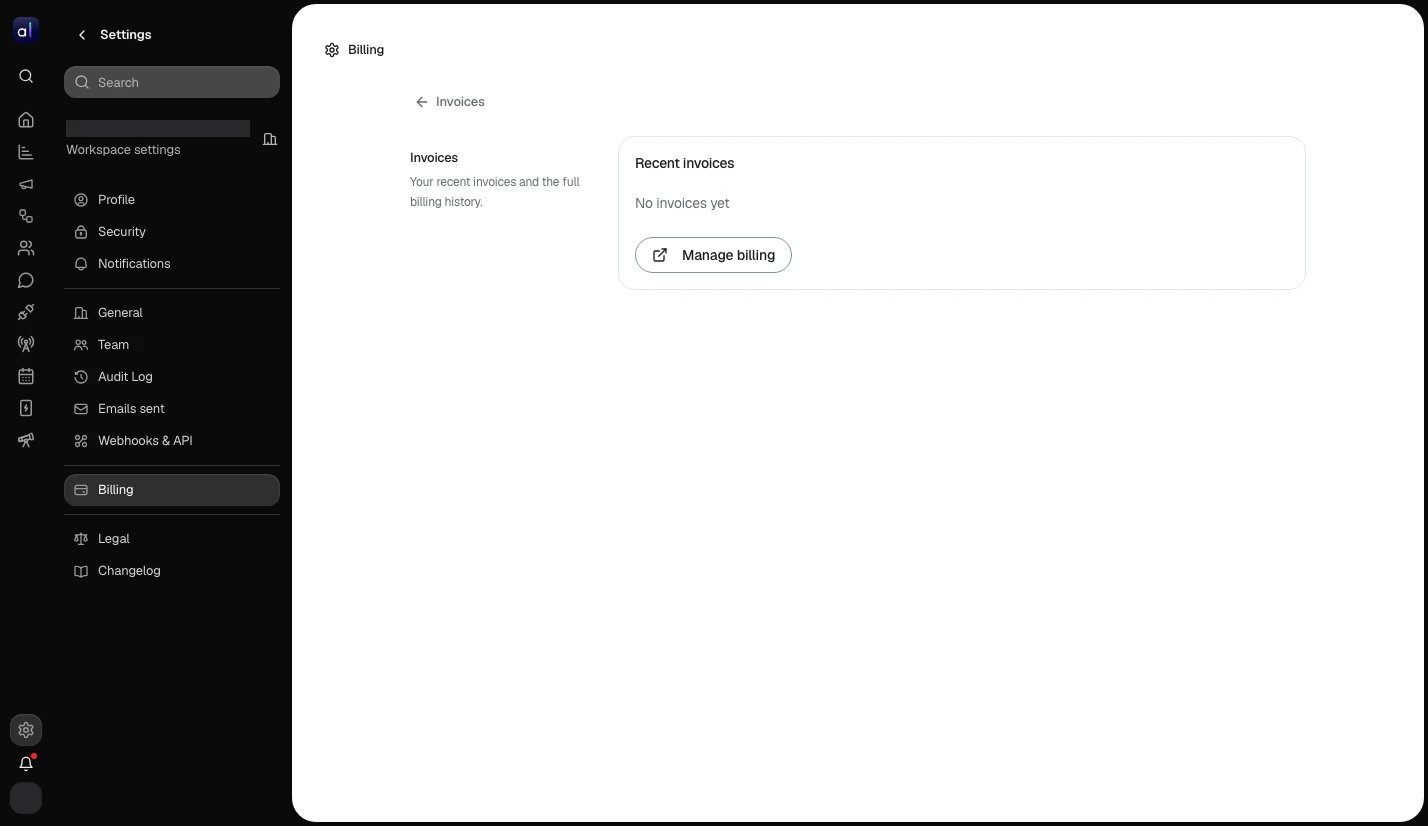
Open your invoices
Go to Settings → Billing, open Records, then Invoices.
Click PDF to open an invoice or receipt
2
Download one
Recent invoices lists your three latest payments, invoices and card receipts, with their date and amount. Click PDF to open one in a new tab. Older ones are in Manage billing.
3
Change your billing details
Click Manage billing to open the secure billing portal in a new tab and update your billing details.
Each wallet charge is also its own line in Records → Statement, with the date and what it was for.
How you pay
Card: all major credit and debit cards, on every self-serve plan. Add, remove or choose your default card under Payment → Payment method.
Invoice: Enterprise customers can be billed by invoice or bank transfer under their contract. The Billing page then says “Billed by invoice under your contract” and has no Payment part. Your account manager makes plan changes.
Card details are taken on a secure payment page. SmartAlex never stores your full card number.
If a payment fails
What you see
What to do
Payment Failed: “Your last payment failed. Please update your payment method.”
Click Update Card or Pay Invoice and pay with a working card.
Account Suspended
Click Update Payment to pay what is owed.
”Your wallet balance is too low. Please add funds to continue.”
Top up your wallet.
When a plan payment fails, the card is tried again. If it keeps failing, the account is suspended until the payment is made.
Price changes
A price change is announced at least 30 days before it applies to you. If a change in law or a sudden change by a provider makes that impractical, the notice is at least 15 days and says why. A yearly subscription keeps its price until its next renewal. If you do not accept a change, you can cancel before it takes effect.If you joined on an earlier price, you keep it. Settings → Billing always shows the price you pay.
Questions people ask
When will I be charged?
Your plan is charged in advance on the date you subscribed, or the date your trial ended. After that it is charged on the same date every month or year. Phone numbers are charged from your wallet on the 1st of each month.
Which currency am I billed in?
US dollars. If your card is in another currency, your bank converts the charge.
Do your prices include VAT?
No. Prices exclude VAT, GST and sales tax. Where SmartAlex must collect a tax, it is added to your invoice.
How do I add my VAT or tax number?
Add it on the secure payment page when you subscribe or top up. To update your billing details later, click Manage billing under Records → Invoices.
I think a charge is wrong. What do I do?
Tell SmartAlex within 30 days of the invoice or charge date, with the details, at legal@getsmartalex.com. The charge is investigated and any error corrected. See Refunds.
Can someone else on my team manage billing?
No. Only the workspace owner can. Others see Email the owner on the Billing page.
Related
Wallet and top-ups
How the wallet pays for usage.
Change or cancel
Upgrade, downgrade or cancel your plan.
Refunds
What the terms say about refunds.
Billing and top-ups, step by step
Every button on the Billing page.
Last modified on November 27, 2026
{"docsConfig":{"theme":"sequoia","$schema":"https://mintlify.com/docs.json","name":"SmartAlex Documentation","description":"Documentation for SmartAlex, the AI voice assistant platform for businesses. Build voice agents, run outbound campaigns, manage contacts and call analytics, and connect your own systems through the MCP server.","colors":{"primary":"#010033","light":"#8B93E6","dark":"#5E6AD2"},"logo":{"light":"https://mintcdn.com/smartalex/qlHSvs0nyK6c2s5R/logo/light.png?fit=max\u0026auto=format\u0026n=qlHSvs0nyK6c2s5R\u0026q=85\u0026s=f2b8d4b820c7af262103f73350d3cc4e","dark":"https://mintcdn.com/smartalex/qlHSvs0nyK6c2s5R/logo/dark.png?fit=max\u0026auto=format\u0026n=qlHSvs0nyK6c2s5R\u0026q=85\u0026s=a98ea864686586154e8b6398c073d378"},"favicon":"https://mintcdn.com/smartalex/aHrSp8SKq40Ip2qH/favicon.png?fit=max\u0026auto=format\u0026n=aHrSp8SKq40Ip2qH\u0026q=85\u0026s=00fe0a5429a5be6c7a7d76dfef957afa","background":{"color":{"light":"#FFFFFF","dark":"#08090A"}},"navbar":{"links":[{"href":"/pricing","label":"Pricing"},{"href":"/faq","label":"Help"},{"href":"https://getsmartalex.com","label":"Website"},{"href":"https://getsmartalex.com/login","label":"Sign in"}],"primary":{"type":"button","label":"Start free","href":"https://getsmartalex.com/instant"}},"footer":{"socials":{"x":"https://x.com/smartalexhq","linkedin":"https://www.linkedin.com/company/smartalexhq","instagram":"https://www.instagram.com/smartalexhq","youtube":"https://www.youtube.com/@smartalexhq"},"links":[{"header":"Product","items":[{"label":"Pricing","href":"/pricing"},{"label":"Price list","href":"https://getsmartalex.com/legal/smartalex-usage-pricing-schedule"},{"label":"Integrations","href":"/integrations"},{"label":"Telephony","href":"/telephony/overview"},{"label":"MCP server","href":"/mcp/overview"}]},{"header":"Help","items":[{"label":"Quickstart","href":"/quickstart"},{"label":"FAQ","href":"/faq"},{"label":"Help centre","href":"https://getsmartalex.com/help"},{"label":"Email support","href":"mailto:support@getsmartalex.com"},{"label":"System status","href":"https://status.getsmartalex.com"}]},{"header":"Legal","items":[{"label":"Security","href":"/security"},{"label":"Trust and compliance","href":"/trust/compliance"},{"label":"Terms of Service","href":"https://getsmartalex.com/legal/smartalex-terms-of-services"},{"label":"Privacy Policy","href":"https://getsmartalex.com/legal/smartalex-privacy-policy"},{"label":"All legal documents","href":"https://getsmartalex.com/legal"}]},{"header":"Company","items":[{"label":"Website","href":"https://getsmartalex.com"},{"label":"Start free","href":"https://getsmartalex.com/instant"},{"label":"Sign in","href":"https://getsmartalex.com/login"},{"label":"Compare","href":"/comparisons/overview"}]}]},"seo":{"organization":{"id":"https://getsmartalex.com/#organization","name":"SmartAlex","url":"https://getsmartalex.com"},"indexing":"all"},"fonts":{"family":"Geist"},"errors":{"404":{"redirect":false,"title":"We could not find that page","description":"The link may be old, or the page has moved. Search with the bar at the top, or start from [Home](/), the [Quickstart](/quickstart) or [Help](/faq). Still stuck? Email [support@getsmartalex.com](mailto:support@getsmartalex.com)."}},"contextual":{"options":["assistant","copy","view","chatgpt","claude","perplexity","aistudio","mcp","add-mcp","cursor","vscode"],"display":"header"},"metadata":{"timestamp":true},"markdown":{"instructions":["For short, quotable answers about SmartAlex (what it is, who it is for, what it costs, where it runs, how it keeps data safe, which apps it connects to), read the facts page at /ai/facts on this site first, then the page it links to. Its last table maps every section of these docs.","For how to do something, use the step-by-step pages: /learn for whole paths, and each section's first-time pages such as /calls/buy-your-first-number, /agents/create-an-agent or /campaigns/import-your-first-contacts. Give the click path exactly as written there, for example Calls, then Numbers, then Buy number, with the bold button labels unchanged.","Prices come from the Pricing page at /pricing and the pages under /pricing. Quote a price exactly as written there, with its currency and unit.","Short answers to common questions are under /help, grouped by section. Legal documents are summarised under /legal; each summary links to the binding text, which prevails over the summary.","If a feature or screen is not described in these docs, say that you could not find it rather than guessing.","Pages under /comparisons describe other companies' products as of the date on each page. For SmartAlex's own features and prices, use the product pages.","The MCP server at /mcp on this site only searches this documentation. To work inside your own SmartAlex workspace (agents, calls, campaigns, contacts), use the SmartAlex MCP server described at /mcp/overview."]},"styling":{"latex":false},"navigation":{"global":{"anchors":[{"anchor":"Dashboard","icon":"gauge","href":"https://app.getsmartalex.com"}]},"pages":[]}},"deployment":{"deploymentMetadataValue":{"subdomain":"smartalex","hasAudioNarration":false,"actualSubdomain":"smartalex","customDomains":["docs.getsmartalex.com"],"gitSource":{"type":"github","owner":"the-rcs-group","repo":"docs","deployBranch":"main","contentDirectory":"","isPrivate":true,"mountPath":"","label":""},"feedback":{"agentFeedback":true},"entitlements":{},"buildId":"6b0beea7d4f92785796ee5a7","clientVersion":"0.0.4344","searchFilterCounts":[{"language":"default","tag":"Product","count":204},{"language":"default","tag":"Developers","count":128},{"language":"default","tag":"REST API","count":99},{"language":"default","tag":"Endpoints","count":95},{"language":"default","tag":"Start here","count":81},{"language":"default","tag":"Trust","count":63},{"language":"default","tag":"Agents","count":51},{"language":"default","tag":"Legal","count":49},{"language":"default","tag":"Learn","count":46},{"language":"default","tag":"Telephony","count":42}]},"assistantConfig":{"enableAskAiButton":false,"enableStarterQuestions":false,"enableAskAiSearchBar":true},"basePath":"","hasChatPermissions":false,"hasWebMcpPermissions":false,"toggles":[{"name":"kill-isr","enabled":true,"variant":{"name":"disabled","enabled":false,"feature_enabled":true},"impressionData":false},{"name":"custom-rbac-roles","enabled":true,"variant":{"name":"disabled","enabled":false,"feature_enabled":true},"impressionData":false},{"name":"agent-mintlify-slack","enabled":true,"variant":{"name":"disabled","enabled":false,"feature_enabled":true},"impressionData":false},{"name":"agent-integrations-settings","enabled":true,"variant":{"name":"disabled","enabled":false,"feature_enabled":true},"impressionData":false},{"name":"rbac-expansion","enabled":true,"variant":{"name":"disabled","enabled":false,"feature_enabled":true},"impressionData":false},{"name":"automations-pr-grouping","enabled":true,"variant":{"name":"disabled","enabled":false,"feature_enabled":true},"impressionData":false},{"name":"custom-prefix","enabled":true,"variant":{"name":"disabled","enabled":false,"feature_enabled":true},"impressionData":false},{"name":"analytics-v7","enabled":true,"variant":{"name":"disabled","enabled":false,"feature_enabled":true},"impressionData":false},{"name":"user-flows-analytics","enabled":true,"variant":{"name":"disabled","enabled":false,"feature_enabled":true},"impressionData":false},{"name":"no-publish-flow","enabled":true,"variant":{"name":"disabled","enabled":false,"feature_enabled":true},"impressionData":false},{"name":"snapshot-serving-live","enabled":true,"variant":{"name":"disabled","enabled":false,"feature_enabled":true},"impressionData":false},{"name":"stripTemperatureMiddleware","enabled":true,"variant":{"name":"disabled","enabled":false,"feature_enabled":true},"impressionData":false},{"name":"support-platform-pylon-zendesk","enabled":true,"variant":{"name":"disabled","enabled":false,"feature_enabled":true},"impressionData":false},{"name":"snapshot-serving","enabled":true,"variant":{"name":"disabled","enabled":false,"feature_enabled":true},"impressionData":false},{"name":"instant-rollback","enabled":true,"variant":{"name":"disabled","enabled":false,"feature_enabled":true},"impressionData":false},{"name":"granular-notifications-server","enabled":true,"variant":{"name":"disabled","enabled":false,"feature_enabled":true},"impressionData":false},{"name":"granular-notifications","enabled":true,"variant":{"name":"disabled","enabled":false,"feature_enabled":true},"impressionData":false},{"name":"automations-fable","enabled":true,"variant":{"name":"disabled","enabled":false,"feature_enabled":true},"impressionData":false},{"name":"fixed-ai-action-pricing","enabled":true,"variant":{"name":"disabled","enabled":false,"feature_enabled":true},"impressionData":false},{"name":"site-roles","enabled":true,"variant":{"name":"disabled","enabled":false,"feature_enabled":true},"impressionData":false},{"name":"automation-resolve-merge-conflict","enabled":true,"variant":{"name":"disabled","enabled":false,"feature_enabled":true},"impressionData":false},{"name":"scoped-publishing","enabled":true,"variant":{"name":"disabled","enabled":false,"feature_enabled":true},"impressionData":false},{"name":"mintql","enabled":true,"variant":{"name":"disabled","enabled":false,"feature_enabled":true},"impressionData":false},{"name":"page-level-analytics","enabled":true,"variant":{"name":"disabled","enabled":false,"feature_enabled":true},"impressionData":false},{"name":"editor-version-history-v2","enabled":true,"variant":{"name":"disabled","enabled":false,"feature_enabled":true},"impressionData":false},{"name":"billing-page-v2","enabled":true,"variant":{"name":"disabled","enabled":false,"feature_enabled":true},"impressionData":false},{"name":"full-page-search","enabled":true,"variant":{"name":"disabled","enabled":false,"feature_enabled":true},"impressionData":false},{"name":"workspace-projects","enabled":true,"variant":{"name":"disabled","enabled":false,"feature_enabled":true},"impressionData":false},{"name":"fork-pr-previews","enabled":true,"variant":{"name":"disabled","enabled":false,"feature_enabled":true},"impressionData":false},{"name":"revalidation-jwt","enabled":true,"variant":{"name":"disabled","enabled":false,"feature_enabled":true},"impressionData":false},{"name":"hobby-abuse-scan","enabled":true,"variant":{"name":"disabled","enabled":false,"feature_enabled":true},"impressionData":false},{"name":"dashboard-inbox","enabled":true,"variant":{"name":"disabled","enabled":false,"feature_enabled":true},"impressionData":false},{"name":"turbopuffer-dual-write","enabled":true,"variant":{"name":"disabled","enabled":false,"feature_enabled":true},"impressionData":false},{"name":"approve-review-flow","enabled":true,"variant":{"name":"disabled","enabled":false,"feature_enabled":true},"impressionData":false},{"name":"editor-metadata","enabled":true,"variant":{"name":"disabled","enabled":false,"feature_enabled":true},"impressionData":false},{"name":"turbopuffer-serve","enabled":true,"variant":{"name":"disabled","enabled":false,"feature_enabled":true},"impressionData":false},{"name":"live-agents","enabled":true,"variant":{"name":"disabled","enabled":false,"feature_enabled":true},"impressionData":false},{"name":"starter-pricing","enabled":true,"variant":{"name":"control","enabled":true,"payload":{"type":"string","value":"control"},"feature_enabled":true},"impressionData":false},{"name":"llms-txt-v2","enabled":true,"variant":{"name":"disabled","enabled":false,"feature_enabled":true},"impressionData":false},{"name":"wildcard-email-auth","enabled":true,"variant":{"name":"disabled","enabled":false,"feature_enabled":true},"impressionData":false}],"starterQuestions":[],"googleFontsInlined":true},"customCss":[{"filePath":"style.css","content":":root{--sa-radius: 12px;--sa-radius-sm: 10px;--sa-ease: cubic-bezier(0.2, 0, 0, 1);--sa-fast: 150ms;--sa-hairline: rgb(var(--gray-950) / 0.08);--sa-hairline-strong: rgb(var(--gray-950) / 0.14);--sa-well: rgb(var(--gray-50))}html.dark{--sa-hairline: rgb(255 255 255 / 0.08);--sa-hairline-strong: rgb(255 255 255 / 0.16);--sa-well: rgb(255 255 255 / 0.03)}h1{font-weight:400!important;letter-spacing:-0.025em!important;line-height:1.15!important}h2{font-weight:500!important;letter-spacing:-0.02em!important;line-height:1.25!important;margin-top:2.75rem!important}h3{font-weight:500!important;letter-spacing:-0.015em!important}.mdx-content p,.mdx-content li{line-height:1.7}button[class*=\"Button\"],button[class*=\"button\"],a[role=\"button\"],a[class*=\"Button\"],a[class*=\"button\"],[class*=\"btn\"],#navbar a[class*=\"bg-primary\"]{border-radius:9999px!important}#navbar a[class*=\"bg-primary\"]{padding-left:1rem!important;padding-right:1rem!important;box-shadow:none!important}input[type=\"search\"]{border-radius:9999px!important}#navbar img.nav-logo{height:40px!important}@media (max-width: 1023px){#navbar img.nav-logo,#mobile-nav img.nav-logo{height:34px!important;max-width:none!important}}#navbar:has(a[href*=\"getsmartalex\"]) img.nav-logo[class*=\"dark:hidden\"]{display:none!important}#navbar:has(a[href*=\"getsmartalex\"]) img.nav-logo[class*=\"dark:block\"]{display:block!important}#navbar:has(a[href*=\"getsmartalex\"]) img.nav-logo{aspect-ratio:2520 / 624}#navbar:has(a[href*=\"getsmartalex\"]){--sa-bar-fg: rgb(255 255 255 / 0.72);--sa-bar-dim: rgb(255 255 255 / 0.5);--sa-bar-line: rgb(255 255 255 / 0.12);--sa-bar-field: rgb(255 255 255 / 0.07);color-scheme:dark}#navbar:has(a[href*=\"getsmartalex\"])>div.absolute.inset-0,#navbar:has(a[href*=\"getsmartalex\"]) div[class*=\"bg-gray-50\"]{background:#000!important}#navbar:has(a[href*=\"getsmartalex\"])>div.absolute[class*=\"border-b\"]{border-color:var(--sa-bar-line)!important}#navbar:has(a[href*=\"getsmartalex\"]) div[class*=\"bg-gray-50\"]{border-top:1px solid var(--sa-bar-line)}#navbar:has(a[href*=\"getsmartalex\"]) div[class*=\"bg-gray-50\"] span,#navbar:has(a[href*=\"getsmartalex\"]) div[class*=\"bg-gray-50\"] button{color:var(--sa-bar-fg)!important}#navbar:has(a[href*=\"getsmartalex\"]) div[class*=\"bg-gray-50\"] [class*=\"text-gray-900\"]{color:#fff!important}#navbar:has(a[href*=\"getsmartalex\"]) div[class*=\"bg-gray-50\"] svg[class*=\"fill-gray\"]{fill:var(--sa-bar-dim)!important}#navbar:has(a[href*=\"getsmartalex\"]) a.font-medium:not([class*=\"bg-primary\"]),#navbar:has(a[href*=\"getsmartalex\"]) .nav-tabs-item{color:var(--sa-bar-fg)!important;transition:color var(--sa-fast) var(--sa-ease)}#navbar:has(a[href*=\"getsmartalex\"]) a.font-medium:not([class*=\"bg-primary\"]):hover,#navbar:has(a[href*=\"getsmartalex\"]) .nav-tabs-item:hover,#navbar:has(a[href*=\"getsmartalex\"]) .nav-tabs-item[class*=\"text-shadow\"]{color:#fff!important}#navbar:has(a[href*=\"getsmartalex\"]) .nav-tabs-item>div[class*=\"bg-primary\"]{background:#fff!important}#navbar:has(a[href*=\"getsmartalex\"]) .nav-tabs-item:hover>div:not([class*=\"bg-primary\"]){background:rgb(255 255 255 / 0.3)!important}#navbar:has(a[href*=\"getsmartalex\"]) #search-bar-entry{background:var(--sa-bar-field)!important;border-color:var(--sa-bar-line)!important;color:var(--sa-bar-dim)!important;border-radius:9999px!important;padding-left:0.75rem!important}#navbar:has(a[href*=\"getsmartalex\"]) #search-bar-entry:hover{background:rgb(255 255 255 / 0.11)!important}#navbar:has(a[href*=\"getsmartalex\"]) #search-bar-entry *{color:var(--sa-bar-dim)!important}#navbar:has(a[href*=\"getsmartalex\"]) #search-bar-entry svg[class*=\"bg-gray\"]{background-color:var(--sa-bar-dim)!important}#navbar:has(a[href*=\"getsmartalex\"]) #search-bar-entry span[class*=\"bg-white\"]{background:rgb(255 255 255 / 0.1)!important;border-radius:9999px!important}#navbar:has(a[href*=\"getsmartalex\"]) button svg{color:var(--sa-bar-fg)!important}#navbar:has(a[href*=\"getsmartalex\"]) a[class*=\"bg-primary\"]{background:#fff!important;color:#000!important}#navbar:has(a[href*=\"getsmartalex\"]) a[class*=\"bg-primary\"]:hover{opacity:0.88!important}#navbar:has(a[href*=\"getsmartalex\"]) a:focus-visible,#navbar:has(a[href*=\"getsmartalex\"]) button:focus-visible{outline:2px solid #fff!important;outline-offset:2px}.card{border-radius:var(--sa-radius)!important;border:1px solid var(--sa-hairline-strong)!important;box-shadow:none!important;transition:border-color var(--sa-fast) var(--sa-ease),\n background-color var(--sa-fast) var(--sa-ease)!important}.card:hover{transform:none!important;box-shadow:none!important}a.card:hover,.card[href]:hover,.card:has(>a):hover,.card.cursor-pointer:hover{border-color:rgb(var(--primary) / 0.45)!important;background-color:var(--sa-well)!important}html.dark a.card:hover,html.dark .card[href]:hover,html.dark .card:has(>a):hover,html.dark .card.cursor-pointer:hover{border-color:rgb(var(--primary-light) / 0.5)!important}.card [data-component-part=\"card-icon\"]{color:rgb(var(--primary))!important;fill:rgb(var(--primary))!important}html.dark .card [data-component-part=\"card-icon\"]{color:rgb(var(--primary-light))!important;fill:rgb(var(--primary-light))!important}.card [data-component-part=\"card-title\"]{font-weight:500!important;letter-spacing:-0.01em}.card ul{margin-top:0.5rem;margin-bottom:0;padding-left:1.1rem}.card li{margin:0.2rem 0}.callout{border-radius:var(--sa-radius)!important}.accordion-group{border-radius:var(--sa-radius)!important;border-color:var(--sa-hairline-strong)!important}.accordion-group summary{transition:background-color var(--sa-fast) var(--sa-ease)}.accordion-group summary:hover{background-color:var(--sa-well)}.mdx-content table{font-size:0.925rem;border-collapse:separate;border-spacing:0;width:100%}.mdx-content thead th{font-size:0.75rem;font-weight:500;letter-spacing:0.02em;color:rgb(var(--gray-500));border-bottom:1px solid var(--sa-hairline-strong)!important;background:transparent;white-space:nowrap}html.dark .mdx-content thead th{color:rgb(var(--gray-400))}.mdx-content tbody td{border-bottom:1px solid var(--sa-hairline)!important;vertical-align:top}.mdx-content tbody tr:last-child td{border-bottom:0!important}.mdx-content table{display:block;overflow-x:auto;-webkit-overflow-scrolling:touch}@media (min-width: 768px){.mdx-content table{display:table;overflow-x:visible}}code,pre,kbd{font-family:\"Geist Mono\", ui-monospace, SFMono-Regular, \"SF Mono\", Menlo, monospace;font-feature-settings:\"liga\" 0}pre,.code-block,div[class*=\"codeblock\"],div[class*=\"code-block\"]{border-radius:var(--sa-radius-sm)!important}.code-block,div[class*=\"code-block\"]{border:1px solid var(--sa-hairline-strong)!important;box-shadow:none!important}.mdx-content :not(pre)>code{padding:0.12em 0.4em;border-radius:6px;background:var(--sa-well);font-size:0.875em}.mermaid{display:flex;justify-content:center;margin:1.5rem 0;padding:1rem;border:1px solid var(--sa-hairline);border-radius:var(--sa-radius);overflow-x:auto;-webkit-overflow-scrolling:touch}.mermaid svg{height:auto;font-family:inherit!important}@media (max-width: 767px){.mermaid{justify-content:flex-start}.mermaid svg{min-width:560px}}.mermaid .node rect,.mermaid .node polygon,.mermaid .node circle,.mermaid .node path.basic,.mermaid .node .label-container>path{fill:rgb(var(--background-light))!important;stroke:rgb(var(--primary) / 0.35)!important;stroke-width:1px!important}.mermaid .node rect{rx:8px;ry:8px}.mermaid .node.core rect,.mermaid .node.core polygon,.mermaid .node.core .label-container>path{fill:rgb(var(--primary) / 0.06)!important;stroke:rgb(var(--primary))!important;stroke-width:1.5px!important}html.dark .mermaid .node.core rect,html.dark .mermaid .node.core polygon,html.dark .mermaid .node.core .label-container>path{fill:rgb(var(--primary-light) / 0.12)!important;stroke:rgb(var(--primary-light))!important}.mermaid .cluster rect{fill:rgb(var(--gray-50))!important;stroke:rgb(var(--gray-200))!important;stroke-width:1px!important;rx:12px;ry:12px}.mermaid .nodeLabel,.mermaid .cluster-label,.mermaid .cluster-label span,.mermaid .label,.mermaid text{color:rgb(var(--gray-900))!important;fill:rgb(var(--gray-900))!important}.mermaid .cluster-label .nodeLabel,.mermaid .cluster-label span{color:rgb(var(--gray-500))!important;font-weight:500;font-size:0.85em}.mermaid .flowchart-link,.mermaid .edgePath path,.mermaid .messageLine0,.mermaid .messageLine1,.mermaid .actor-line,.mermaid .loopLine{stroke:rgb(var(--gray-400))!important}.mermaid .arrowMarkerPath,.mermaid marker path,.mermaid #arrowhead path,.mermaid .arrowheadPath{fill:rgb(var(--gray-400))!important;stroke:rgb(var(--gray-400))!important}.mermaid .edgeLabel,.mermaid .edgeLabel rect,.mermaid .labelBkg{background-color:rgb(var(--background-light))!important;fill:rgb(var(--background-light))!important}.mermaid rect.actor,.mermaid .actor-box{fill:rgb(var(--background-light))!important;stroke:rgb(var(--primary) / 0.35)!important}.mermaid .actor-man circle,.mermaid .actor-man line{fill:rgb(var(--background-light))!important;stroke:rgb(var(--primary) / 0.6)!important}.mermaid .messageText,.mermaid text.actor,.mermaid text.actor>tspan{fill:rgb(var(--gray-900))!important}.mermaid .note{fill:rgb(var(--gray-50))!important;stroke:rgb(var(--gray-200))!important}html.dark .mermaid .node rect,html.dark .mermaid .node polygon,html.dark .mermaid .node circle,html.dark .mermaid .node path.basic,html.dark .mermaid .node .label-container>path,html.dark .mermaid rect.actor,html.dark .mermaid .actor-box,html.dark .mermaid .actor-man circle{fill:rgb(var(--background-dark))!important;stroke:rgb(var(--primary-light) / 0.45)!important}html.dark .mermaid .cluster rect,html.dark .mermaid .note{fill:rgb(255 255 255 / 0.03)!important;stroke:rgb(255 255 255 / 0.1)!important}html.dark .mermaid .nodeLabel,html.dark .mermaid .label,html.dark .mermaid text,html.dark .mermaid .messageText,html.dark .mermaid text.actor,html.dark .mermaid text.actor>tspan{color:rgb(var(--gray-100))!important;fill:rgb(var(--gray-100))!important}html.dark .mermaid .cluster-label .nodeLabel,html.dark .mermaid .cluster-label span{color:rgb(var(--gray-400))!important}html.dark .mermaid .flowchart-link,html.dark .mermaid .edgePath path,html.dark .mermaid .messageLine0,html.dark .mermaid .messageLine1,html.dark .mermaid .actor-line,html.dark .mermaid .loopLine{stroke:rgb(var(--gray-500))!important}html.dark .mermaid .arrowMarkerPath,html.dark .mermaid marker path,html.dark .mermaid #arrowhead path,html.dark .mermaid .arrowheadPath{fill:rgb(var(--gray-500))!important;stroke:rgb(var(--gray-500))!important}html.dark .mermaid .edgeLabel,html.dark .mermaid .edgeLabel rect,html.dark .mermaid .labelBkg{background-color:rgb(var(--background-dark))!important;fill:rgb(var(--background-dark))!important}html.dark .mermaid .actor-man line{stroke:rgb(var(--primary-light) / 0.6)!important}@media (min-width: 1024px){html[data-page-mode=\"wide\"] #content-area{max-width:1040px!important}}a:focus-visible,button:focus-visible,summary:focus-visible,.card:focus-visible{outline:2px solid rgb(var(--primary))!important;outline-offset:2px}html.dark a:focus-visible,html.dark button:focus-visible,html.dark summary:focus-visible,html.dark .card:focus-visible{outline-color:rgb(var(--primary-light))!important}@media (prefers-reduced-motion: reduce){*,*::before,*::after{transition-duration:0ms!important;animation-duration:0ms!important}}.mdx-content[data-page-title=\"Integrations\"] [data-component-part=\"card-icon\"]{display:flex;align-items:center;justify-content:center;box-sizing:border-box;width:fit-content;min-width:48px;height:48px;padding:8px;background:#fff;border:1px solid rgb(var(--gray-950) / 0.1);border-radius:12px;color:rgb(var(--gray-800))!important;fill:rgb(var(--gray-800))!important}html.dark .mdx-content[data-page-title=\"Integrations\"] [data-component-part=\"card-icon\"]{border-color:rgb(255 255 255 / 0.14)}.mdx-content[data-page-title=\"Integrations\"] [data-component-part=\"card-icon\"]>img{width:auto;height:32px;max-width:96px;object-fit:contain}.mdx-content[data-page-title=\"Integrations\"] [data-component-part=\"card-icon\"]>svg{width:22px;height:22px;opacity:1}@media (min-width: 768px){#footer div[class*=\"sm:grid\"]{grid-template-columns:repeat(2, max-content)!important;column-gap:3rem!important;justify-content:end}#footer div[class*=\"sm:grid\"]>div{align-items:flex-start!important}}@media (min-width: 1280px){#footer div[class*=\"sm:grid\"]{grid-template-columns:none!important;grid-auto-flow:column;grid-auto-columns:max-content;column-gap:2.5rem!important}}"}]}
{"page":{"pagePath":"pricing/billing","slug":"/pricing/billing","pageMetadata":{"title":"How SmartAlex billing works","sidebarTitle":"How billing works","description":"Your plan and add-ons are charged to your card in advance each month or year. Usage comes from a prepaid wallet. Prices are in US dollars and exclude tax.","keywords":["smartalex billing","when am i charged","smartalex invoice","vat on smartalex","billing currency","payment failed","add tax number","pay by invoice"],"icon":"file-invoice-dollar","structuredData":{"@type":"FAQPage","mainEntity":[{"@type":"Question","name":"When will I be charged?","acceptedAnswer":{"@type":"Answer","text":"Your plan is charged in advance on the date you subscribed, or the date your trial ended. After that it is charged on the same date every month or year. Phone numbers are charged from your wallet on the 1st of each month."}},{"@type":"Question","name":"Which currency am I billed in?","acceptedAnswer":{"@type":"Answer","text":"US dollars. If your card is in another currency, your bank converts the charge."}},{"@type":"Question","name":"Do your prices include VAT?","acceptedAnswer":{"@type":"Answer","text":"No. Prices exclude VAT, GST and sales tax. Where SmartAlex must collect a tax, it is added to your invoice."}},{"@type":"Question","name":"How do I add my VAT or tax number?","acceptedAnswer":{"@type":"Answer","text":"Add it on the secure payment page when you subscribe or top up. To update your billing details later, click Manage billing under Records → Invoices."}},{"@type":"Question","name":"I think a charge is wrong. What do I do?","acceptedAnswer":{"@type":"Answer","text":"Tell SmartAlex within 30 days of the invoice or charge date, with the details, at legal@getsmartalex.com. The charge is investigated and any error corrected."}},{"@type":"Question","name":"Can someone else on my team manage billing?","acceptedAnswer":{"@type":"Answer","text":"No. Only the workspace owner can. Others see Email the owner on the Billing page."}}]},"href":"/pricing/billing"},"description":{"compiledSource":"\"use strict\";\nconst {jsx: _jsx} = arguments[0];\nconst {useMDXComponents: _provideComponents} = arguments[0];\nfunction _createMdxContent(props) {\n const _components = {\n p: \"p\",\n ..._provideComponents(),\n ...props.components\n };\n return _jsx(_components.p, {\n children: \"Your plan and add-ons are charged to your card in advance each month or year. Usage comes from a prepaid wallet. Prices are in US dollars and exclude tax.\"\n });\n}\nfunction MDXContent(props = {}) {\n const {wrapper: MDXLayout} = {\n ..._provideComponents(),\n ...props.components\n };\n return MDXLayout ? _jsx(MDXLayout, {\n ...props,\n children: _jsx(_createMdxContent, {\n ...props\n })\n }) : _createMdxContent(props);\n}\nreturn {\n default: MDXContent\n};\n","frontmatter":{},"scope":{}},"pageType":"default","mdx":{"mdxSource":{"compiledSource":"\"use strict\";const{Fragment:_Fragment,jsx:_jsx,jsxs:_jsxs}=arguments[0];const{useMDXComponents:_provideComponents}=arguments[0];function _createMdxContent(props){const _components={a:`a`,code:`code`,li:`li`,p:`p`,strong:`strong`,tbody:`tbody`,td:`td`,th:`th`,thead:`thead`,tr:`tr`,ul:`ul`,..._provideComponents(),...props.components},{Accordion,AccordionGroup,Card,CardGroup,Frame,Heading,Info,Mermaid,OptimizedImage,Step,Steps,Table}=_components;if(!Accordion)_missingMdxReference(`Accordion`,true);if(!AccordionGroup)_missingMdxReference(`AccordionGroup`,true);if(!Card)_missingMdxReference(`Card`,true);if(!CardGroup)_missingMdxReference(`CardGroup`,true);if(!Frame)_missingMdxReference(`Frame`,true);if(!Heading)_missingMdxReference(`Heading`,true);if(!Info)_missingMdxReference(`Info`,true);if(!Mermaid)_missingMdxReference(`Mermaid`,true);if(!OptimizedImage)_missingMdxReference(`OptimizedImage`,true);if(!Step)_missingMdxReference(`Step`,true);if(!Steps)_missingMdxReference(`Steps`,true);if(!Table)_missingMdxReference(`Table`,true);return _jsxs(_Fragment,{children:[_jsxs(_components.p,{children:[`SmartAlex bills you in two ways. Your `,_jsx(_components.strong,{children:`plan`}),`, add-ons, extra agents and extra calls at the same time are a subscription. It is charged to your card in advance each month or each year. Everything you `,_jsx(_components.strong,{children:`use`}),`, such as calls, phone numbers and messages, is paid from a prepaid `,_jsx(_components.strong,{children:`wallet`}),` that you top up. Every price is in US dollars and excludes tax.`]}),`\n`,_jsx(Info,{children:_jsxs(_components.p,{children:[`In the app: `,_jsx(_components.strong,{children:`Settings → Billing`}),` (`,_jsx(_components.code,{children:`/account?tab=billing`}),`). Only the workspace owner can manage billing. Anyone else sees “Only the workspace owner can manage billing” and can click `,_jsx(_components.strong,{children:`Email the owner`}),`.`]})}),`\n`,_jsx(Heading,{level:`2`,id:`what-is-charged-where`,children:`What is charged where`}),`\n`,_jsx(_components.p,{children:`Your card pays in advance for the plan, add-ons, extra capacity and wallet top-ups, and the wallet pays for usage as it happens.`}),`\n`,_jsx(Mermaid,{chart:`flowchart LR\n subgraph Card[\"Your card, in advance\"]\n P[\"Plan\"]\n A[\"Add-ons\"]\n X[\"Extra agents and calls\"]\n W[\"Wallet top-ups\"]\n end\n subgraph Wallet[\"Your wallet, as you use it\"]\n N[\"Phone numbers, on the 1st\"]\n C[\"Calls, after free credits\"]\n M[\"Messages, social accounts,\u003cbr/>AI replies, meetings\"]\n end\n W --> Wallet`}),`\n`,_jsxs(Table,{children:[_jsx(_components.thead,{children:_jsxs(_components.tr,{children:[_jsx(_components.th,{children:`What`}),_jsx(_components.th,{children:`When it is charged`}),_jsx(_components.th,{children:`Paid with`})]})}),_jsxs(_components.tbody,{children:[_jsxs(_components.tr,{children:[_jsx(_components.td,{children:`Plan, monthly`}),_jsx(_components.td,{children:`In advance, on the same date each month`}),_jsx(_components.td,{children:`Card`})]}),_jsxs(_components.tr,{children:[_jsx(_components.td,{children:`Plan, yearly`}),_jsx(_components.td,{children:`In advance, for the whole year`}),_jsx(_components.td,{children:`Card`})]}),_jsxs(_components.tr,{children:[_jsx(_components.td,{children:`Add-ons, extra agents and extra calls`}),_jsx(_components.td,{children:`With your plan, on the same cycle`}),_jsx(_components.td,{children:`Card`})]}),_jsxs(_components.tr,{children:[_jsx(_components.td,{children:`Wallet top-ups`}),_jsx(_components.td,{children:`When you top up, or automatically if you switch on auto top-up`}),_jsx(_components.td,{children:`Card`})]}),_jsxs(_components.tr,{children:[_jsx(_components.td,{children:`Phone numbers`}),_jsx(_components.td,{children:`When you buy one, then on the 1st of each month`}),_jsx(_components.td,{children:`Wallet`})]}),_jsxs(_components.tr,{children:[_jsx(_components.td,{children:`Calls, website chat and agent tests`}),_jsx(_components.td,{children:`As they happen, after your free credits`}),_jsx(_components.td,{children:`Wallet`})]}),_jsxs(_components.tr,{children:[_jsx(_components.td,{children:`Messages, social accounts, AI replies and meetings`}),_jsx(_components.td,{children:`As they happen`}),_jsx(_components.td,{children:`Wallet`})]})]})]}),`\n`,_jsx(_components.p,{children:`Your first plan charge is on the day your free trial ends, or the day you subscribe if you skip the trial. Your plan then renews on that date each month or year, at the price in force then, until you cancel.`}),`\n`,_jsx(Heading,{level:`2`,id:`is-smartalex-billed-per-agent-or-per-account`,children:`Is SmartAlex billed per agent or per account?`}),`\n`,_jsx(_components.p,{children:`Mostly per account. Your plan, add-ons, extra calls at the same time and wallet belong to the whole workspace. Only extra agents and Professional’s free credits are counted per agent.`}),`\n`,_jsxs(Table,{children:[_jsx(_components.thead,{children:_jsxs(_components.tr,{children:[_jsx(_components.th,{children:`What`}),_jsx(_components.th,{children:`Counted per`})]})}),_jsxs(_components.tbody,{children:[_jsxs(_components.tr,{children:[_jsx(_components.td,{children:`Plan`}),_jsx(_components.td,{children:`Workspace. Professional includes 1 agent`})]}),_jsxs(_components.tr,{children:[_jsx(_components.td,{children:`Extra AI agents`}),_jsx(_components.td,{children:`Agent, for each agent past the one your plan includes`})]}),_jsxs(_components.tr,{children:[_jsx(_components.td,{children:`Free credits on Professional`}),_jsx(_components.td,{children:`Agent, once, when each new agent starts`})]}),_jsxs(_components.tr,{children:[_jsx(_components.td,{children:`Free credits on Real Estate`}),_jsx(_components.td,{children:`Workspace, every calendar month`})]}),_jsxs(_components.tr,{children:[_jsx(_components.td,{children:`Add-ons`}),_jsx(_components.td,{children:`Workspace, however many agents use them`})]}),_jsxs(_components.tr,{children:[_jsx(_components.td,{children:`Extra calls at the same time`}),_jsx(_components.td,{children:`Workspace, shared by all agents`})]}),_jsxs(_components.tr,{children:[_jsx(_components.td,{children:`Phone numbers`}),_jsx(_components.td,{children:`Number`})]}),_jsxs(_components.tr,{children:[_jsx(_components.td,{children:`Calls, chat replies, messages and meetings`}),_jsx(_components.td,{children:`Each one, from the workspace wallet`})]})]})]}),`\n`,_jsxs(_components.p,{children:[`Your `,_jsx(_components.strong,{children:`Statement`}),` shows the workspace total. To see calls per agent, download `,_jsx(_components.strong,{children:`Call records`}),` from `,_jsx(_components.strong,{children:`Records → Statement → Download`}),`. Its `,_jsx(_components.strong,{children:`By agent`}),` sheet lists each agent’s calls, minutes, free credits used and charge. The `,_jsx(_components.strong,{children:`Costs and quality`}),` export in `,_jsx(_components.strong,{children:`Calls → Call Logs`}),` also has an `,_jsx(_components.strong,{children:`Agent`}),` column. Both cover calls only, not chat replies or messages.`]}),`\n`,_jsx(Heading,{level:`2`,id:`currency`,children:`Currency`}),`\n`,_jsxs(_components.p,{children:[`SmartAlex plans, the wallet and every price are in `,_jsx(_components.strong,{children:`US dollars`}),`, in every country. If your card is in another currency, your bank converts each charge at its own rate.`]}),`\n`,_jsx(Heading,{level:`2`,id:`tax`,children:`Tax`}),`\n`,_jsxs(_components.ul,{children:[`\n`,_jsx(_components.li,{children:`All prices exclude VAT, GST, sales tax and similar taxes.`}),`\n`,_jsx(_components.li,{children:`Where SmartAlex must collect a tax, it is added to your invoice.`}),`\n`,_jsx(_components.li,{children:`You can add your business’s tax number on the secure payment page when you subscribe or top up. You do not need one to sign up.`}),`\n`,_jsx(_components.li,{children:`If your business is exempt from a tax, send a valid exemption certificate before you are billed.`}),`\n`]}),`\n`,_jsx(Heading,{level:`2`,id:`invoices-and-receipts`,children:`Invoices and receipts`}),`\n`,_jsxs(Steps,{children:[_jsxs(Step,{title:`Open your invoices`,children:[_jsxs(_components.p,{children:[`Go to `,_jsx(_components.strong,{children:`Settings → Billing`}),`, open `,_jsx(_components.strong,{children:`Records`}),`, then `,_jsx(_components.strong,{children:`Invoices`}),`.`]}),_jsxs(Frame,{caption:`Click PDF to open an invoice or receipt`,children:[_jsx(OptimizedImage,{className:`mint-block dark:mint-hidden`,src:`https://mintcdn.com/smartalex/kH_ICIPoijeWBR2w/images/screens/pricing-plans/invoices.webp?fit=max\u0026auto=format\u0026n=kH_ICIPoijeWBR2w\u0026q=85\u0026s=209ebcc81061ef28a701942284f78a7b`,alt:`Invoices screen listing recent payments with a PDF button on each`,\"data-og-width\":`1428`,width:`1428`,\"data-og-height\":`826`,height:`826`,\"data-path\":`images/screens/pricing-plans/invoices.webp`,\"data-optimize\":`true`,\"data-opv\":`3`,srcset:`https://mintcdn.com/smartalex/kH_ICIPoijeWBR2w/images/screens/pricing-plans/invoices.webp?w=280\u0026fit=max\u0026auto=format\u0026n=kH_ICIPoijeWBR2w\u0026q=85\u0026s=9d2a8e9bce8ba30f5506dc80adce4620 280w, https://mintcdn.com/smartalex/kH_ICIPoijeWBR2w/images/screens/pricing-plans/invoices.webp?w=560\u0026fit=max\u0026auto=format\u0026n=kH_ICIPoijeWBR2w\u0026q=85\u0026s=0e27ec7c98e3b2c50859481caa0f5582 560w, https://mintcdn.com/smartalex/kH_ICIPoijeWBR2w/images/screens/pricing-plans/invoices.webp?w=840\u0026fit=max\u0026auto=format\u0026n=kH_ICIPoijeWBR2w\u0026q=85\u0026s=6bf84fa94e76d6c0be63b254ae691af1 840w, https://mintcdn.com/smartalex/kH_ICIPoijeWBR2w/images/screens/pricing-plans/invoices.webp?w=1100\u0026fit=max\u0026auto=format\u0026n=kH_ICIPoijeWBR2w\u0026q=85\u0026s=f07d5ba18b4f86ebced8ff488e08a36c 1100w, https://mintcdn.com/smartalex/kH_ICIPoijeWBR2w/images/screens/pricing-plans/invoices.webp?w=1650\u0026fit=max\u0026auto=format\u0026n=kH_ICIPoijeWBR2w\u0026q=85\u0026s=54b95ede8a2b5d023a662e725197970a 1650w, https://mintcdn.com/smartalex/kH_ICIPoijeWBR2w/images/screens/pricing-plans/invoices.webp?w=2500\u0026fit=max\u0026auto=format\u0026n=kH_ICIPoijeWBR2w\u0026q=85\u0026s=2b8f76e2ba0545bd565d35da54f6fc57 2500w`}),_jsx(OptimizedImage,{className:`mint-hidden dark:mint-block`,src:`https://mintcdn.com/smartalex/kH_ICIPoijeWBR2w/images/screens/pricing-plans/invoices.dark.webp?fit=max\u0026auto=format\u0026n=kH_ICIPoijeWBR2w\u0026q=85\u0026s=67e3591ce820c0f62f54db586b78e80b`,alt:`Invoices screen listing recent payments with a PDF button on each`,\"data-og-width\":`1428`,width:`1428`,\"data-og-height\":`826`,height:`826`,\"data-path\":`images/screens/pricing-plans/invoices.dark.webp`,\"data-optimize\":`true`,\"data-opv\":`3`,srcset:`https://mintcdn.com/smartalex/kH_ICIPoijeWBR2w/images/screens/pricing-plans/invoices.dark.webp?w=280\u0026fit=max\u0026auto=format\u0026n=kH_ICIPoijeWBR2w\u0026q=85\u0026s=aead6373357fc12c983aa03c5ea3c3e1 280w, https://mintcdn.com/smartalex/kH_ICIPoijeWBR2w/images/screens/pricing-plans/invoices.dark.webp?w=560\u0026fit=max\u0026auto=format\u0026n=kH_ICIPoijeWBR2w\u0026q=85\u0026s=7782e5f4ce0a3ed2cf31cccd4a4a03d1 560w, https://mintcdn.com/smartalex/kH_ICIPoijeWBR2w/images/screens/pricing-plans/invoices.dark.webp?w=840\u0026fit=max\u0026auto=format\u0026n=kH_ICIPoijeWBR2w\u0026q=85\u0026s=70629965721978e449f7010662a29b50 840w, https://mintcdn.com/smartalex/kH_ICIPoijeWBR2w/images/screens/pricing-plans/invoices.dark.webp?w=1100\u0026fit=max\u0026auto=format\u0026n=kH_ICIPoijeWBR2w\u0026q=85\u0026s=e6f1cfa98dd1cef32b3f138f1a83a16c 1100w, https://mintcdn.com/smartalex/kH_ICIPoijeWBR2w/images/screens/pricing-plans/invoices.dark.webp?w=1650\u0026fit=max\u0026auto=format\u0026n=kH_ICIPoijeWBR2w\u0026q=85\u0026s=2be2c19ac4a1e678d41b9161f2d9f622 1650w, https://mintcdn.com/smartalex/kH_ICIPoijeWBR2w/images/screens/pricing-plans/invoices.dark.webp?w=2500\u0026fit=max\u0026auto=format\u0026n=kH_ICIPoijeWBR2w\u0026q=85\u0026s=e5edced6b13571510e6a5673f24593b2 2500w`})]})]}),_jsx(Step,{title:`Download one`,children:_jsxs(_components.p,{children:[_jsx(_components.strong,{children:`Recent invoices`}),` lists your three latest payments, invoices and card receipts, with their date and amount. Click `,_jsx(_components.strong,{children:`PDF`}),` to open one in a new tab. Older ones are in `,_jsx(_components.strong,{children:`Manage billing`}),`.`]})}),_jsx(Step,{title:`Change your billing details`,children:_jsxs(_components.p,{children:[`Click `,_jsx(_components.strong,{children:`Manage billing`}),` to open the secure billing portal in a new tab and update your billing details.`]})})]}),`\n`,_jsxs(_components.p,{children:[`Each wallet charge is also its own line in `,_jsx(_components.strong,{children:`Records → Statement`}),`, with the date and what it was for.`]}),`\n`,_jsx(Heading,{level:`2`,id:`how-you-pay`,children:`How you pay`}),`\n`,_jsxs(_components.ul,{children:[`\n`,_jsxs(_components.li,{children:[_jsx(_components.strong,{children:`Card:`}),` all major credit and debit cards, on every self-serve plan. Add, remove or choose your default card under `,_jsx(_components.strong,{children:`Payment → Payment method`}),`.`]}),`\n`,_jsxs(_components.li,{children:[_jsx(_components.strong,{children:`Invoice:`}),` Enterprise customers can be billed by invoice or bank transfer under their contract. The Billing page then says “Billed by invoice under your contract” and has no `,_jsx(_components.strong,{children:`Payment`}),` part. Your account manager makes plan changes.`]}),`\n`]}),`\n`,_jsx(_components.p,{children:`Card details are taken on a secure payment page. SmartAlex never stores your full card number.`}),`\n`,_jsx(Heading,{level:`2`,id:`if-a-payment-fails`,children:`If a payment fails`}),`\n`,_jsxs(Table,{children:[_jsx(_components.thead,{children:_jsxs(_components.tr,{children:[_jsx(_components.th,{children:`What you see`}),_jsx(_components.th,{children:`What to do`})]})}),_jsxs(_components.tbody,{children:[_jsxs(_components.tr,{children:[_jsxs(_components.td,{children:[_jsx(_components.strong,{children:`Payment Failed`}),`: “Your last payment failed. Please update your payment method.”`]}),_jsxs(_components.td,{children:[`Click `,_jsx(_components.strong,{children:`Update Card`}),` or `,_jsx(_components.strong,{children:`Pay Invoice`}),` and pay with a working card.`]})]}),_jsxs(_components.tr,{children:[_jsx(_components.td,{children:_jsx(_components.strong,{children:`Account Suspended`})}),_jsxs(_components.td,{children:[`Click `,_jsx(_components.strong,{children:`Update Payment`}),` to pay what is owed.`]})]}),_jsxs(_components.tr,{children:[_jsx(_components.td,{children:`”Your wallet balance is too low. Please add funds to continue.”`}),_jsx(_components.td,{children:`Top up your wallet.`})]})]})]}),`\n`,_jsx(_components.p,{children:`When a plan payment fails, the card is tried again. If it keeps failing, the account is suspended until the payment is made.`}),`\n`,_jsx(Heading,{level:`2`,id:`price-changes`,children:`Price changes`}),`\n`,_jsx(_components.p,{children:`A price change is announced at least 30 days before it applies to you. If a change in law or a sudden change by a provider makes that impractical, the notice is at least 15 days and says why. A yearly subscription keeps its price until its next renewal. If you do not accept a change, you can cancel before it takes effect.`}),`\n`,_jsxs(_components.p,{children:[`If you joined on an earlier price, you keep it. `,_jsx(_components.strong,{children:`Settings → Billing`}),` always shows the price you pay.`]}),`\n`,_jsx(Heading,{level:`2`,id:`questions-people-ask`,children:`Questions people ask`}),`\n`,_jsxs(AccordionGroup,{children:[_jsx(Accordion,{title:`When will I be charged?`,id:`when-will-i-be-charged`,children:_jsx(_components.p,{children:`Your plan is charged in advance on the date you subscribed, or the date your trial ended. After that it is charged on the same date every month or year. Phone numbers are charged from your wallet on the 1st of each month.`})}),_jsx(Accordion,{title:`Which currency am I billed in?`,id:`which-currency-am-i-billed-in`,children:_jsx(_components.p,{children:`US dollars. If your card is in another currency, your bank converts the charge.`})}),_jsx(Accordion,{title:`Do your prices include VAT?`,id:`do-your-prices-include-vat`,children:_jsx(_components.p,{children:`No. Prices exclude VAT, GST and sales tax. Where SmartAlex must collect a tax, it is added to your invoice.`})}),_jsx(Accordion,{title:`How do I add my VAT or tax number?`,id:`how-do-i-add-my-vat-or-tax-number`,children:_jsxs(_components.p,{children:[`Add it on the secure payment page when you subscribe or top up. To update your billing details later, click `,_jsx(_components.strong,{children:`Manage billing`}),` under `,_jsx(_components.strong,{children:`Records → Invoices`}),`.`]})}),_jsx(Accordion,{title:`I think a charge is wrong. What do I do?`,id:`i-think-a-charge-is-wrong-what-do-i-do`,children:_jsxs(_components.p,{children:[`Tell SmartAlex within 30 days of the invoice or charge date, with the details, at `,_jsx(_components.a,{href:`mailto:legal@getsmartalex.com`,children:`legal@getsmartalex.com`}),`. The charge is investigated and any error corrected. See `,_jsx(_components.a,{href:`/pricing/refunds`,children:`Refunds`}),`.`]})}),_jsx(Accordion,{title:`Can someone else on my team manage billing?`,id:`can-someone-else-on-my-team-manage-billing`,children:_jsxs(_components.p,{children:[`No. Only the workspace owner can. Others see `,_jsx(_components.strong,{children:`Email the owner`}),` on the Billing page.`]})})]}),`\n`,_jsx(Heading,{level:`2`,id:`related`,children:`Related`}),`\n`,_jsxs(CardGroup,{cols:2,children:[_jsx(Card,{title:`Wallet and top-ups`,icon:`wallet`,href:`/pricing/wallet`,children:_jsx(_components.p,{children:`How the wallet pays for usage.`})}),_jsx(Card,{title:`Change or cancel`,icon:`arrow-right-arrow-left`,href:`/pricing/change-or-cancel`,children:_jsx(_components.p,{children:`Upgrade, downgrade or cancel your plan.`})}),_jsx(Card,{title:`Refunds`,icon:`rotate-left`,href:`/pricing/refunds`,children:_jsx(_components.p,{children:`What the terms say about refunds.`})}),_jsx(Card,{title:`Billing and top-ups, step by step`,icon:`list-check`,href:`/how-to/billing-and-top-ups`,children:_jsx(_components.p,{children:`Every button on the Billing page.`})})]})]})}function MDXContent(props={}){const{wrapper:MDXLayout}={..._provideComponents(),...props.components};return MDXLayout?_jsx(MDXLayout,{...props,children:_jsx(_createMdxContent,{...props})}):_createMdxContent(props)}return{default:MDXContent};function _missingMdxReference(id,component){throw new Error(`Expected `+(component?`component`:`object`)+\" `\"+id+\"` to be defined: you likely forgot to import, pass, or provide it.\")}","frontmatter":{},"scope":{"config":{},"pageMetadata":{"title":"How SmartAlex billing works","sidebarTitle":"How billing works","description":"Your plan and add-ons are charged to your card in advance each month or year. Usage comes from a prepaid wallet. Prices are in US dollars and exclude tax.","keywords":["smartalex billing","when am i charged","smartalex invoice","vat on smartalex","billing currency","payment failed","add tax number","pay by invoice"],"icon":"file-invoice-dollar","structuredData":{"@type":"FAQPage","mainEntity":[{"@type":"Question","name":"When will I be charged?","acceptedAnswer":{"@type":"Answer","text":"Your plan is charged in advance on the date you subscribed, or the date your trial ended. After that it is charged on the same date every month or year. Phone numbers are charged from your wallet on the 1st of each month."}},{"@type":"Question","name":"Which currency am I billed in?","acceptedAnswer":{"@type":"Answer","text":"US dollars. If your card is in another currency, your bank converts the charge."}},{"@type":"Question","name":"Do your prices include VAT?","acceptedAnswer":{"@type":"Answer","text":"No. Prices exclude VAT, GST and sales tax. Where SmartAlex must collect a tax, it is added to your invoice."}},{"@type":"Question","name":"How do I add my VAT or tax number?","acceptedAnswer":{"@type":"Answer","text":"Add it on the secure payment page when you subscribe or top up. To update your billing details later, click Manage billing under Records → Invoices."}},{"@type":"Question","name":"I think a charge is wrong. What do I do?","acceptedAnswer":{"@type":"Answer","text":"Tell SmartAlex within 30 days of the invoice or charge date, with the details, at legal@getsmartalex.com. The charge is investigated and any error corrected."}},{"@type":"Question","name":"Can someone else on my team manage billing?","acceptedAnswer":{"@type":"Answer","text":"No. Only the workspace owner can. Others see Email the owner on the Billing page."}}]},"href":"/pricing/billing"}}},"mdxSourceWithNoJs":null},"mdxExtracts":{"tableOfContents":[{"title":"What is charged where","slug":"what-is-charged-where","depth":2,"children":[]},{"title":"Is SmartAlex billed per agent or per account?","slug":"is-smartalex-billed-per-agent-or-per-account","depth":2,"children":[]},{"title":"Currency","slug":"currency","depth":2,"children":[]},{"title":"Tax","slug":"tax","depth":2,"children":[]},{"title":"Invoices and receipts","slug":"invoices-and-receipts","depth":2,"children":[]},{"title":"How you pay","slug":"how-you-pay","depth":2,"children":[]},{"title":"If a payment fails","slug":"if-a-payment-fails","depth":2,"children":[]},{"title":"Price changes","slug":"price-changes","depth":2,"children":[]},{"title":"Questions people ask","slug":"questions-people-ask","depth":2,"children":[]},{"title":"Related","slug":"related","depth":2,"children":[]}],"codeExamples":{}},"jsLinks":[],"dynamicCss":".mint-block {\n display: block\n}\n.mint-hidden {\n display: none\n}\n.dark\\:mint-block:is(.dark *) {\n display: block\n}\n.dark\\:mint-hidden:is(.dark *) {\n display: none\n}","subdomain":"smartalex","siteName":"SmartAlex Documentation","title":"How SmartAlex billing works - SmartAlex Documentation","contextualStarterQuestions":[],"navMaps":{"firstHrefInVersion":{},"firstHrefInLanguage":{}},"lastModified":"2026-11-27T04:05:46.132Z","gitLastModified":"2026-11-27T04:05:19.000Z","originalFileLocation":"pricing/billing.mdx"},"headHtml":"\u003cscript data-mint-head>(function(){var d=document.documentElement,p=null;if(!p){try{p=localStorage.getItem(\"isDarkMode\")}catch(e){}if(p==='true')p='dark';else if(p==='false')p='light';if(p!=='light'\u0026\u0026p!=='dark'\u0026\u0026p!=='system')p=\"system\"}var r=p==='system'?(matchMedia(\"(prefers-color-scheme: dark)\").matches?'dark':'light'):p;d.classList.remove(r==='dark'?'light':'dark');d.classList.add(r);d.setAttribute(\"data-theme-preference\",p)})();\u003c/script>\u003cmeta data-mint-head name=\"description\" content=\"Your plan and add-ons are charged to your card in advance each month or year. Usage comes from a prepaid wallet. Prices are in US dollars and exclude tax.\">\u003cmeta data-mint-head name=\"application-name\" content=\"SmartAlex Documentation\">\u003cmeta data-mint-head name=\"generator\" content=\"Mintlify\">\u003clink data-mint-head rel=\"icon\" type=\"image/png\" sizes=\"192x192\" href=\"/mintlify-assets/_mintlify/favicons/smartalex/NBkkhKCoVcXXvqQT/_generated/favicon/android-chrome-192x192.png\" media=\"(prefers-color-scheme: light)\">\u003clink data-mint-head rel=\"apple-touch-icon\" type=\"image/png\" sizes=\"180x180\" href=\"/mintlify-assets/_mintlify/favicons/smartalex/NBkkhKCoVcXXvqQT/_generated/favicon/apple-touch-icon.png\">\u003clink data-mint-head rel=\"icon\" type=\"image/png\" sizes=\"16x16\" href=\"/mintlify-assets/_mintlify/favicons/smartalex/NBkkhKCoVcXXvqQT/_generated/favicon/favicon-16x16.png\" media=\"(prefers-color-scheme: light)\">\u003clink data-mint-head rel=\"icon\" type=\"image/png\" sizes=\"32x32\" href=\"/mintlify-assets/_mintlify/favicons/smartalex/NBkkhKCoVcXXvqQT/_generated/favicon/favicon-32x32.png\" media=\"(prefers-color-scheme: light)\">\u003clink data-mint-head rel=\"shortcut icon\" type=\"image/x-icon\" href=\"/mintlify-assets/_mintlify/favicons/smartalex/NBkkhKCoVcXXvqQT/_generated/favicon/favicon.ico\" media=\"(prefers-color-scheme: light)\">\u003clink data-mint-head rel=\"icon\" type=\"image/png\" sizes=\"192x192\" href=\"/mintlify-assets/_mintlify/favicons/smartalex/NBkkhKCoVcXXvqQT/_generated/favicon-dark/android-chrome-192x192.png\" media=\"(prefers-color-scheme: dark)\">\u003clink data-mint-head rel=\"icon\" type=\"image/png\" sizes=\"16x16\" href=\"/mintlify-assets/_mintlify/favicons/smartalex/NBkkhKCoVcXXvqQT/_generated/favicon-dark/favicon-16x16.png\" media=\"(prefers-color-scheme: dark)\">\u003clink data-mint-head rel=\"icon\" type=\"image/png\" sizes=\"32x32\" href=\"/mintlify-assets/_mintlify/favicons/smartalex/NBkkhKCoVcXXvqQT/_generated/favicon-dark/favicon-32x32.png\" media=\"(prefers-color-scheme: dark)\">\u003clink data-mint-head rel=\"shortcut icon\" type=\"image/x-icon\" href=\"/mintlify-assets/_mintlify/favicons/smartalex/NBkkhKCoVcXXvqQT/_generated/favicon-dark/favicon.ico\" media=\"(prefers-color-scheme: dark)\">\u003cmeta data-mint-head property=\"og:title\" content=\"How SmartAlex billing works - SmartAlex Documentation\">\u003cmeta data-mint-head property=\"og:description\" content=\"Your plan and add-ons are charged to your card in advance each month or year. Usage comes from a prepaid wallet. Prices are in US dollars and exclude tax.\">\u003cmeta data-mint-head property=\"og:site_name\" content=\"SmartAlex Documentation\">\u003cmeta data-mint-head property=\"og:url\" content=\"https://docs.getsmartalex.com/pricing/billing\">\u003cmeta data-mint-head property=\"og:type\" content=\"website\">\u003cmeta data-mint-head property=\"og:image\" content=\"https://smartalex.mintlify.site/_mintlify/api/og/v2?division=Billing\u0026amp;title=How+SmartAlex+billing+works\u0026amp;description=Your+plan+and+add-ons+are+charged+to+your+card+in+advance+each+month+or+year.+Usage+comes+from+a+prepaid+wallet.+Prices+are+in+US+dollars+and+exclude+tax.\u0026amp;theme=179d14681dde27b354098b2e\u0026amp;signature=6166db62be8c039752e93c036b1887d996effc2c1eade327b3508e01b64bc92e\">\u003cmeta data-mint-head property=\"og:image:width\" content=\"1200\">\u003cmeta data-mint-head property=\"og:image:height\" content=\"630\">\u003cmeta data-mint-head name=\"twitter:card\" content=\"summary_large_image\">\u003cmeta data-mint-head name=\"twitter:title\" content=\"How SmartAlex billing works - SmartAlex Documentation\">\u003cmeta data-mint-head name=\"twitter:description\" content=\"Your plan and add-ons are charged to your card in advance each month or year. Usage comes from a prepaid wallet. Prices are in US dollars and exclude tax.\">\u003cmeta data-mint-head name=\"twitter:image\" content=\"https://smartalex.mintlify.site/_mintlify/api/og/v2?division=Billing\u0026amp;title=How+SmartAlex+billing+works\u0026amp;description=Your+plan+and+add-ons+are+charged+to+your+card+in+advance+each+month+or+year.+Usage+comes+from+a+prepaid+wallet.+Prices+are+in+US+dollars+and+exclude+tax.\u0026amp;theme=179d14681dde27b354098b2e\u0026amp;signature=6166db62be8c039752e93c036b1887d996effc2c1eade327b3508e01b64bc92e\">\u003cmeta data-mint-head name=\"twitter:image:width\" content=\"1200\">\u003cmeta data-mint-head name=\"twitter:image:height\" content=\"630\">\u003cmeta data-mint-head name=\"msapplication-config\" content=\"/mintlify-assets/_mintlify/favicons/smartalex/NBkkhKCoVcXXvqQT/_generated/favicon/browserconfig.xml\">\u003cmeta data-mint-head name=\"apple-mobile-web-app-title\" content=\"SmartAlex Documentation\">\u003cmeta data-mint-head name=\"msapplication-TileColor\" content=\"#010033\">\u003clink data-mint-head rel=\"canonical\" href=\"https://docs.getsmartalex.com/pricing/billing\">\u003clink data-mint-head rel=\"alternate\" type=\"application/xml\" href=\"/sitemap.xml\">\u003clink data-mint-head rel=\"alternate\" type=\"text/markdown\" href=\"/pricing/billing.md\">\u003cscript data-mint-head type=\"application/ld+json\">{\"@context\":\"https://schema.org\",\"@graph\":[{\"@type\":\"Organization\",\"@id\":\"https://getsmartalex.com/#organization\",\"name\":\"SmartAlex\",\"url\":\"https://getsmartalex.com\",\"logo\":{\"@type\":\"ImageObject\",\"url\":\"https://mintcdn.com/smartalex/qlHSvs0nyK6c2s5R/logo/light.png?fit=max\u0026auto=format\u0026n=qlHSvs0nyK6c2s5R\u0026q=85\u0026s=f2b8d4b820c7af262103f73350d3cc4e\"}},{\"@type\":\"WebSite\",\"@id\":\"https://docs.getsmartalex.com#website\",\"name\":\"SmartAlex Documentation\",\"url\":\"https://docs.getsmartalex.com\",\"publisher\":{\"@id\":\"https://getsmartalex.com/#organization\"}},{\"@type\":\"WebPage\",\"@id\":\"https://docs.getsmartalex.com/pricing/billing#webpage\",\"url\":\"https://docs.getsmartalex.com/pricing/billing\",\"name\":\"How SmartAlex billing works\",\"description\":\"Your plan and add-ons are charged to your card in advance each month or year. Usage comes from a prepaid wallet. Prices are in US dollars and exclude tax.\",\"dateModified\":\"2026-11-27T04:05:19.000Z\",\"isPartOf\":{\"@id\":\"https://docs.getsmartalex.com#website\"},\"breadcrumb\":{\"@id\":\"https://docs.getsmartalex.com/pricing/billing#breadcrumb\"}},{\"@type\":\"BreadcrumbList\",\"@id\":\"https://docs.getsmartalex.com/pricing/billing#breadcrumb\",\"itemListElement\":[{\"@type\":\"ListItem\",\"position\":1,\"name\":\"SmartAlex Documentation\",\"item\":\"https://docs.getsmartalex.com\"},{\"@type\":\"ListItem\",\"position\":2,\"name\":\"How SmartAlex billing works\",\"item\":\"https://docs.getsmartalex.com/pricing/billing\"}]},{\"@type\":[\"Article\",\"TechArticle\"],\"@id\":\"https://docs.getsmartalex.com/pricing/billing#article\",\"headline\":\"How SmartAlex billing works\",\"name\":\"How SmartAlex billing works\",\"description\":\"Your plan and add-ons are charged to your card in advance each month or year. Usage comes from a prepaid wallet. Prices are in US dollars and exclude tax.\",\"url\":\"https://docs.getsmartalex.com/pricing/billing\",\"mainEntityOfPage\":{\"@id\":\"https://docs.getsmartalex.com/pricing/billing#webpage\"},\"dateModified\":\"2026-11-27T04:05:19.000Z\",\"keywords\":\"smartalex billing, when am i charged, smartalex invoice, vat on smartalex, billing currency, payment failed, add tax number, pay by invoice\",\"publisher\":{\"@id\":\"https://getsmartalex.com/#organization\"},\"isPartOf\":{\"@id\":\"https://docs.getsmartalex.com#website\"}},{\"@type\":\"FAQPage\",\"mainEntity\":[{\"@type\":\"Question\",\"name\":\"When will I be charged?\",\"acceptedAnswer\":{\"@type\":\"Answer\",\"text\":\"Your plan is charged in advance on the date you subscribed, or the date your trial ended. After that it is charged on the same date every month or year. Phone numbers are charged from your wallet on the 1st of each month.\"}},{\"@type\":\"Question\",\"name\":\"Which currency am I billed in?\",\"acceptedAnswer\":{\"@type\":\"Answer\",\"text\":\"US dollars. If your card is in another currency, your bank converts the charge.\"}},{\"@type\":\"Question\",\"name\":\"Do your prices include VAT?\",\"acceptedAnswer\":{\"@type\":\"Answer\",\"text\":\"No. Prices exclude VAT, GST and sales tax. Where SmartAlex must collect a tax, it is added to your invoice.\"}},{\"@type\":\"Question\",\"name\":\"How do I add my VAT or tax number?\",\"acceptedAnswer\":{\"@type\":\"Answer\",\"text\":\"Add it on the secure payment page when you subscribe or top up. To update your billing details later, click Manage billing under Records → Invoices.\"}},{\"@type\":\"Question\",\"name\":\"I think a charge is wrong. What do I do?\",\"acceptedAnswer\":{\"@type\":\"Answer\",\"text\":\"Tell SmartAlex within 30 days of the invoice or charge date, with the details, at legal@getsmartalex.com. The charge is investigated and any error corrected.\"}},{\"@type\":\"Question\",\"name\":\"Can someone else on my team manage billing?\",\"acceptedAnswer\":{\"@type\":\"Answer\",\"text\":\"No. Only the workspace owner can. Others see Email the owner on the Billing page.\"}}]}]}\u003c/script>\u003cscript data-mint-head type=\"application/ld+json\">{\"@context\":\"https://schema.org\",\"@type\":\"WebSite\",\"name\":\"SmartAlex Documentation\",\"publisher\":{\"@type\":\"Organization\",\"name\":\"SmartAlex\"},\"provider\":{\"@type\":\"Organization\",\"name\":\"Mintlify\",\"url\":\"https://mintlify.com\"}}\u003c/script>","agentPointerHref":"/pricing/billing.md","siteName":"SmartAlex Documentation","nav":{"global":{"anchors":[{"anchor":"Dashboard","icon":"gauge","href":"https://app.getsmartalex.com"}]},"tabs":[{"tab":"Product","icon":"cube","pages":[{"title":"Product","href":""}]},{"tab":"Pricing","icon":"tag","groups":[{"group":"Start here","icon":"flag-checkered","pages":[{"title":"Start your SmartAlex free trial","sidebarTitle":"Start your free trial","icon":"gift","href":"/pricing/start/start-your-free-trial"},{"title":"Choose or change your SmartAlex plan","sidebarTitle":"Choose a plan","icon":"layer-group","href":"/pricing/start/choose-a-plan"},{"title":"Add an add-on, extra agent or extra calls","sidebarTitle":"Add an add-on","icon":"puzzle-piece","href":"/pricing/start/add-an-add-on"},{"title":"Top up your SmartAlex wallet","sidebarTitle":"Top up your wallet","icon":"wallet","href":"/pricing/start/top-up-your-wallet"},{"title":"Download a SmartAlex invoice","sidebarTitle":"Download an invoice","icon":"file-arrow-down","href":"/pricing/start/download-an-invoice"},{"title":"Cancel your SmartAlex plan","sidebarTitle":"Cancel your plan","icon":"circle-xmark","href":"/pricing/start/cancel-your-plan"}]},{"group":"Pricing","icon":"tags","pages":[{"title":"SmartAlex pricing","sidebarTitle":"Pricing overview","icon":"tags","href":"/pricing"},{"title":"SmartAlex plans and prices","sidebarTitle":"Plans","icon":"layer-group","href":"/pricing/plans"},{"title":"SmartAlex price sheet: every price in one table","sidebarTitle":"Full price sheet","icon":"table","href":"/pricing/price-sheet"},{"title":"What SmartAlex costs: every cost, with a worked example","sidebarTitle":"Every cost, worked out","icon":"calculator","href":"/pricing/what-you-pay"}]},{"group":"Free plan and trial","icon":"gift","pages":[{"title":"The SmartAlex Free plan","sidebarTitle":"Free plan","icon":"seedling","href":"/pricing/free-plan"},{"title":"SmartAlex free trial: what you get and what happens after","sidebarTitle":"Free trial","icon":"gift","href":"/pricing/free-trial"},{"title":"Free credits and allowances on each plan","sidebarTitle":"Free credits","icon":"coins","href":"/pricing/free-credits"}]},{"group":"Add-ons and capacity","icon":"puzzle-piece","pages":[{"title":"Add-ons","icon":"puzzle-piece","href":"/essentials/add-ons"},{"title":"Outbound Campaigns add-on: price and what it unlocks","sidebarTitle":"Outbound Campaigns","icon":"bullhorn","href":"/pricing/outbound-campaigns"},{"title":"Unified Inbox add-on: price and what it unlocks","sidebarTitle":"Unified Inbox","icon":"inbox","href":"/pricing/unified-inbox"},{"title":"Power Tools add-on: price and what it unlocks","sidebarTitle":"Power Tools","icon":"screwdriver-wrench","href":"/pricing/power-tools"},{"title":"Meeting Assistant add-on: price and what it unlocks","sidebarTitle":"Meeting Assistant","icon":"video","href":"/pricing/meeting-assistant"},{"title":"Extra agents and extra calls at the same time","sidebarTitle":"Extra agents and calls","icon":"users","href":"/pricing/extra-agents-and-calls"}]},{"group":"Usage","icon":"phone","pages":[{"title":"How a SmartAlex call is billed","sidebarTitle":"How calls are billed","icon":"phone","href":"/pricing/call-pricing"},{"title":"The SmartAlex wallet: top-ups, auto top-up and spend cap","sidebarTitle":"Wallet and top-ups","description":"The wallet is a prepaid US dollar balance that pays for calls, numbers and messages. Top up by card, switch on auto top-up, and set a monthly spend cap.","icon":"wallet","href":"/pricing/wallet"}]},{"group":"Billing","icon":"file-invoice-dollar","pages":[{"title":"How SmartAlex billing works","sidebarTitle":"How billing works","icon":"file-invoice-dollar","href":"/pricing/billing"},{"title":"The Billing page","sidebarTitle":"Billing","description":"Settings, Billing holds your plan, wallet, card, add-ons, calls at the same time, statement and invoices. Here is what each part shows and does.","icon":"credit-card","href":"/account/billing"},{"title":"Pay for SmartAlex: your plan, wallet, top-ups and invoices","sidebarTitle":"Billing and top-ups","icon":"list-check","href":"/how-to/billing-and-top-ups"},{"title":"Upgrade, downgrade or cancel your SmartAlex plan","sidebarTitle":"Change or cancel","icon":"arrow-right-arrow-left","href":"/pricing/change-or-cancel"},{"title":"SmartAlex refunds: what the terms say","sidebarTitle":"Refunds","icon":"rotate-left","href":"/pricing/refunds"}]}]},{"tab":"Help","icon":"circle-question","pages":[{"title":"Help","href":"/faq"}]},{"tab":"Social","icon":"comments","pages":[{"title":"Social","href":"/meta/overview"}]},{"tab":"Telephony","icon":"tower-broadcast","pages":[{"title":"Telephony","href":"/telephony/connect-your-first-phone-system"}]},{"tab":"Developers","icon":"code","pages":[{"title":"Developers","href":"/mcp/overview"}]},{"tab":"Build","icon":"hammer","pages":[{"title":"Build","href":"/build-with/overview"}]},{"tab":"Trust","icon":"shield-check","pages":[{"title":"Trust","href":"/trust/find-a-legal-document"}]},{"tab":"Learn","icon":"graduation-cap","pages":[{"title":"Learn","href":"/learn"}]},{"tab":"Compare","icon":"scale-balanced","pages":[{"title":"Compare","href":"/comparisons/overview"}]}]},"basePath":"","title":"How SmartAlex billing works - SmartAlex Documentation","deploymentId":"dpl_EwfxjeKENdVkfzdag8rM6mKzcTUJ","buildId":"dpl_EwfxjeKENdVkfzdag8rM6mKzcTUJ","dynamics":["07c022d89b","a74be98ba7"],"chunks":["Frame-CG7QalVD.js","DynamicMarkdown-B_9ywLDq.js","zoom-image-lightbox-uS0aI388.js","lightbox-handle-r17bVUz3.js"]}