Go from sign-up to your AI agent answering a real phone call in one hour: build, test, fix, buy a number, call it and find the call in Call Logs.
In your first hour with SmartAlex you sign up, build an agent from your website and talk to it. Then you fix what you heard and give it a phone number. Last, you ring it from your mobile and read the call back in Calls → Call Logs. This page takes you through it minute by minute, with every click written out.
In the app: you build the agent on Home (/home). The number is under Calls → Numbers (/phone-numbers) and the result under Calls → Call Logs (/call-logs).
What you need
You need
Why
A computer with a microphone and a web browser
You talk to your agent in the browser
Your website address, or two lines about your business
Your agent is built from it
A mobile phone
To call your agent like a customer would
The free trial or a paid plan, from minute 35
Phone numbers are not on the Free plan. See Pricing
The hour at a glance
Each block below is one part of the hour. The first four work on any plan; the number and the phone call need the free trial or a paid plan.
Minutes 0 to 5: create your account
1
Open the sign-up window
Go to getsmartalex.com and click Get started. The Create free account window opens.
2
Sign up
Click Continue with Google. Or type your email, click Continue, and choose a password of at least 8 characters under Create a password and Confirm password. Then click Create free account.
3
Land on Home
SmartAlex creates your account and your own workspace, signs you in and opens Home. You are the owner of the workspace. No card is needed.
Invited by a colleague instead? Use the Accept invitation button in their email, not Get started. See Accept an invitation.
Minutes 5 to 15: build your agent
1
Find the Create a new agent card
On Home, Alex shows the Create a new agent card on its own. Its top line reads Step 1 of 3 · Your business.
2
Your business
Type your address in Business website and wait for “Found” and your business name. No website? Click I don’t have a website and fill in Business name and What does your business do?.
3
Your agent
Fill in Agent name, the name you see, such as “Front Desk”. Then fill in Main goal, the one outcome every call should drive toward, such as “book a free consultation”. Add What it calls itself, an Opening line and an Accent if you want them now.
4
Create it
Check each row on the review step and click Create agent. You see “Your agent is ready!” with a Test agent button.
Minutes 15 to 25: talk to your agent
1
Start a browser test
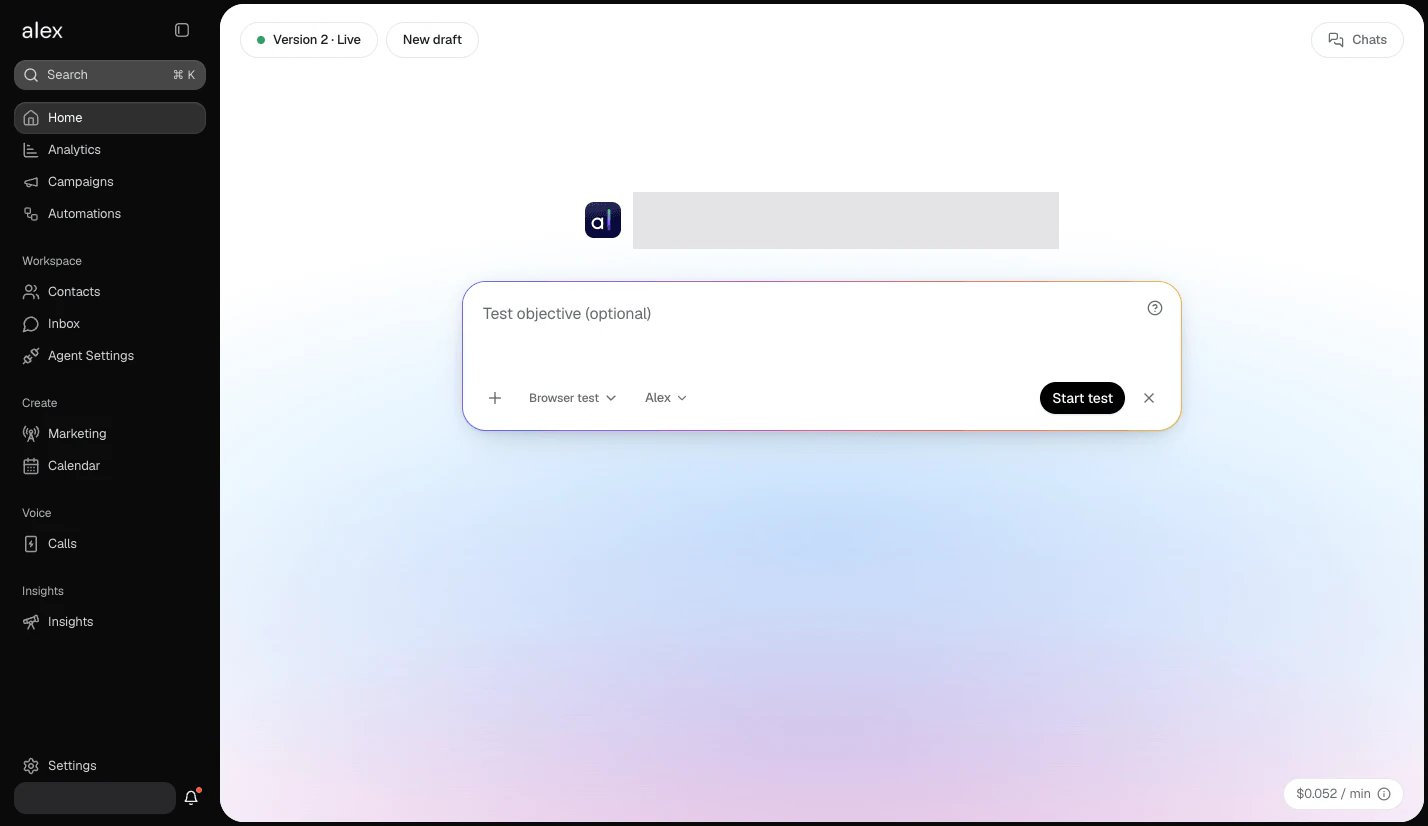
Click Test agent, or the waveform icon in the message box on Home. The box switches to Browser test. Click Start test and allow your microphone.
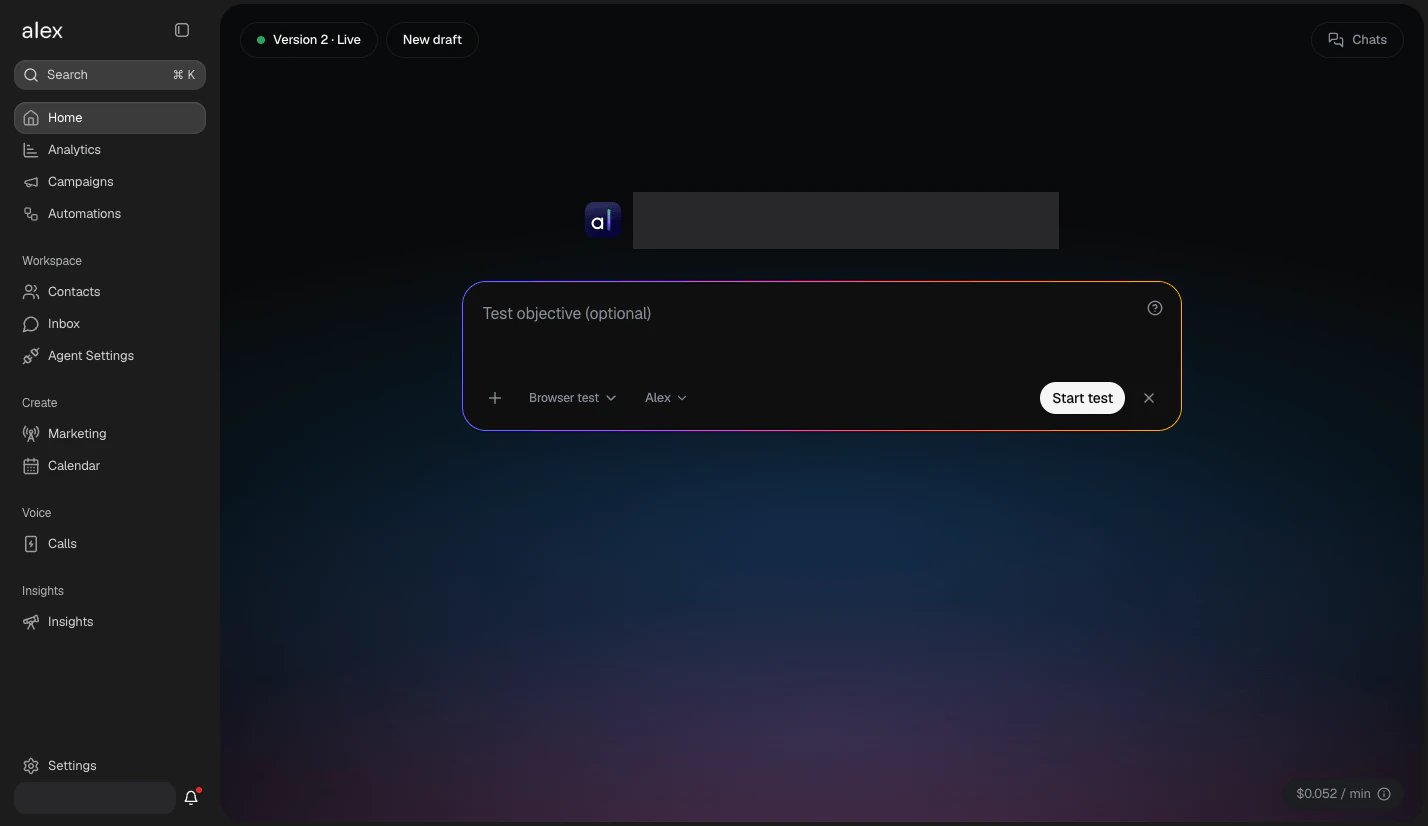
Click the waveform icon, then Start test
2
Be a real caller
Ask what a customer would ask: your opening hours, a price, how to book. Then ask for something it should not know, and ask to speak to a person.
3
End the call and read the score
Click the red square (End voice call). The transcript appears in the chat. Your first test also gets How your test call went. It shows a summary, a score out of 100, whether the agent reached its goal, and up to three changes worth making.
Minutes 25 to 35: fix what you heard
1
Ask for the change
Type the change in plain words in the message box. For example: “Always ask for the caller’s postcode” or “Add that we’re closed on public holidays”. Alex answers with a review card, such as Update instructions.
2
Review and test it
Click Review to see what is Added, Changed or Removed. Click Test first, choose Quick test, describe a caller and click Run test.
3
Apply
When the test shows Passed, click Apply tested change. The agent uses it from its next call. If the button reads Save to draft instead, the change goes into a draft. Click Publish at the top of Home, then Publish again in Publish your changes? Callers hear it from their next call.
Do this for each of the suggested changes from your first test, then run one more browser test.
Minutes 35 to 45: give your agent a phone number
From here you need the free trial or a paid plan. Already have a business number you want to keep? Skip to Forward your number and come back for minute 45.
1
Open Numbers
In the sidebar, open Calls → Numbers and click Buy number. The Buy a number window opens.
2
Pick a country and a number
Choose a Country. In the United States, type an Area code, ZIP or city; in South Africa, choose an Area. Elsewhere SmartAlex finds a number for you.
3
Give it your agent
Under Assign to agent (optional), choose the agent you just built.
4
Buy it
Check the Wallet balance and click Buy number. Keep the window open while you see Getting your number ready. When you see Number purchased, click Done.
If the window says “Add credits to your wallet before buying a number.”, top up first in Settings → Billing: under Wallet, click Top up.
Minutes 45 to 55: call your agent
1
Let your agent call you
On Home, click the phone icon in the message box (Test by phone call). Type Your phone number and click Call my phone. Answer, and talk to your agent on a real line.
2
Call it like a customer
From your mobile, ring the number you just bought. Your agent answers with its greeting. Ask one question and hang up.
Minutes 55 to 60: read the call
1
Open Call Logs
In the sidebar, open Calls → Call Logs. Your call is at the top.
2
Open the call
Click the call to read its summary and transcript, and play the recording.
Check it worked
You are done when all three are true:
Agent Settings → Profile → Phone numbers shows your number under Phone number.
Ringing that number from your mobile reaches your agent.
The call shows in Calls → Call Logs with a transcript.
Before real customers call, work through the go-live checklist: business hours, transfers to your team and your wallet.
Questions people ask
Can I do the first hour on the Free plan?
The first 35 minutes, yes: you can create one agent and test it in your browser. The phone number and the phone call need the free trial or a paid plan.
The phone icon is missing or greyed out. Why?
Phone tests need a paid plan and at least one phone number in your workspace. Use the browser test until then.
My mobile call did not reach the agent. What do I check?
Check that the number is assigned to the agent in Agent Settings → Profile → Phone numbers. Then check that Active is on in Agent Settings → Profile → Name and workspace, and that your wallet is not empty.
Next
The go-live checklist
Everything to check before real customers call.
Answer your calls
Business hours, transfers, messages and call logs.
Last modified on November 29, 2026
{"docsConfig":{"theme":"sequoia","$schema":"https://mintlify.com/docs.json","name":"SmartAlex Documentation","description":"Documentation for SmartAlex, the AI voice assistant platform for businesses. Build voice agents, run outbound campaigns, manage contacts and call analytics, and connect your own systems through the MCP server.","colors":{"primary":"#010033","light":"#8B93E6","dark":"#5E6AD2"},"logo":{"light":"https://mintcdn.com/smartalex/qlHSvs0nyK6c2s5R/logo/light.png?fit=max\u0026auto=format\u0026n=qlHSvs0nyK6c2s5R\u0026q=85\u0026s=f2b8d4b820c7af262103f73350d3cc4e","dark":"https://mintcdn.com/smartalex/qlHSvs0nyK6c2s5R/logo/dark.png?fit=max\u0026auto=format\u0026n=qlHSvs0nyK6c2s5R\u0026q=85\u0026s=a98ea864686586154e8b6398c073d378"},"favicon":"https://mintcdn.com/smartalex/aHrSp8SKq40Ip2qH/favicon.png?fit=max\u0026auto=format\u0026n=aHrSp8SKq40Ip2qH\u0026q=85\u0026s=00fe0a5429a5be6c7a7d76dfef957afa","background":{"color":{"light":"#FFFFFF","dark":"#08090A"}},"navbar":{"links":[{"href":"/pricing","label":"Pricing"},{"href":"/faq","label":"Help"},{"href":"https://getsmartalex.com","label":"Website"},{"href":"https://getsmartalex.com/login","label":"Sign in"}],"primary":{"type":"button","label":"Start free","href":"https://getsmartalex.com/instant"}},"footer":{"socials":{"x":"https://x.com/smartalexhq","linkedin":"https://www.linkedin.com/company/smartalexhq","instagram":"https://www.instagram.com/smartalexhq","youtube":"https://www.youtube.com/@smartalexhq"},"links":[{"header":"Product","items":[{"label":"Pricing","href":"/pricing"},{"label":"Price list","href":"https://getsmartalex.com/legal/smartalex-usage-pricing-schedule"},{"label":"Integrations","href":"/integrations"},{"label":"Telephony","href":"/telephony/overview"},{"label":"MCP server","href":"/mcp/overview"}]},{"header":"Help","items":[{"label":"Quickstart","href":"/quickstart"},{"label":"FAQ","href":"/faq"},{"label":"Help centre","href":"https://getsmartalex.com/help"},{"label":"Email support","href":"mailto:support@getsmartalex.com"},{"label":"System status","href":"https://status.getsmartalex.com"}]},{"header":"Legal","items":[{"label":"Security","href":"/security"},{"label":"Trust and compliance","href":"/trust/compliance"},{"label":"Terms of Service","href":"https://getsmartalex.com/legal/smartalex-terms-of-services"},{"label":"Privacy Policy","href":"https://getsmartalex.com/legal/smartalex-privacy-policy"},{"label":"All legal documents","href":"https://getsmartalex.com/legal"}]},{"header":"Company","items":[{"label":"Website","href":"https://getsmartalex.com"},{"label":"Start free","href":"https://getsmartalex.com/instant"},{"label":"Sign in","href":"https://getsmartalex.com/login"},{"label":"Compare","href":"/comparisons/overview"}]}]},"seo":{"organization":{"id":"https://getsmartalex.com/#organization","name":"SmartAlex","url":"https://getsmartalex.com"},"indexing":"all"},"fonts":{"family":"Geist"},"errors":{"404":{"redirect":false,"title":"We could not find that page","description":"The link may be old, or the page has moved. Search with the bar at the top, or start from [Home](/), the [Quickstart](/quickstart) or [Help](/faq). Still stuck? Email [support@getsmartalex.com](mailto:support@getsmartalex.com)."}},"contextual":{"options":["assistant","copy","view","chatgpt","claude","perplexity","aistudio","mcp","add-mcp","cursor","vscode"],"display":"header"},"metadata":{"timestamp":true},"markdown":{"instructions":["For short, quotable answers about SmartAlex (what it is, who it is for, what it costs, where it runs, how it keeps data safe, which apps it connects to), read the facts page at /ai/facts on this site first, then the page it links to. Its last table maps every section of these docs.","For how to do something, use the step-by-step pages: /learn for whole paths, and each section's first-time pages such as /calls/buy-your-first-number, /agents/create-an-agent or /campaigns/import-your-first-contacts. Give the click path exactly as written there, for example Calls, then Numbers, then Buy number, with the bold button labels unchanged.","Prices come from the Pricing page at /pricing and the pages under /pricing. Quote a price exactly as written there, with its currency and unit.","Short answers to common questions are under /help, grouped by section. Legal documents are summarised under /legal; each summary links to the binding text, which prevails over the summary.","If a feature or screen is not described in these docs, say that you could not find it rather than guessing.","Pages under /comparisons describe other companies' products as of the date on each page. For SmartAlex's own features and prices, use the product pages.","The MCP server at /mcp on this site only searches this documentation. To work inside your own SmartAlex workspace (agents, calls, campaigns, contacts), use the SmartAlex MCP server described at /mcp/overview."]},"styling":{"latex":false},"navigation":{"global":{"anchors":[{"anchor":"Dashboard","icon":"gauge","href":"https://app.getsmartalex.com"}]},"pages":[]}},"deployment":{"deploymentMetadataValue":{"subdomain":"smartalex","hasAudioNarration":false,"actualSubdomain":"smartalex","customDomains":["docs.getsmartalex.com"],"gitSource":{"type":"github","owner":"the-rcs-group","repo":"docs","deployBranch":"main","contentDirectory":"","isPrivate":true,"mountPath":"","label":""},"feedback":{"agentFeedback":true},"entitlements":{},"buildId":"6b0beea7d4f92785796ee5a7","clientVersion":"0.0.4344","searchFilterCounts":[{"language":"default","tag":"Product","count":204},{"language":"default","tag":"Developers","count":128},{"language":"default","tag":"REST API","count":99},{"language":"default","tag":"Endpoints","count":95},{"language":"default","tag":"Start here","count":81},{"language":"default","tag":"Trust","count":63},{"language":"default","tag":"Agents","count":51},{"language":"default","tag":"Legal","count":49},{"language":"default","tag":"Learn","count":46},{"language":"default","tag":"Telephony","count":42}]},"assistantConfig":{"enableAskAiButton":false,"enableStarterQuestions":false,"enableAskAiSearchBar":true},"basePath":"","hasChatPermissions":false,"hasWebMcpPermissions":false,"toggles":[{"name":"kill-isr","enabled":true,"variant":{"name":"disabled","enabled":false,"feature_enabled":true},"impressionData":false},{"name":"custom-rbac-roles","enabled":true,"variant":{"name":"disabled","enabled":false,"feature_enabled":true},"impressionData":false},{"name":"agent-mintlify-slack","enabled":true,"variant":{"name":"disabled","enabled":false,"feature_enabled":true},"impressionData":false},{"name":"agent-integrations-settings","enabled":true,"variant":{"name":"disabled","enabled":false,"feature_enabled":true},"impressionData":false},{"name":"rbac-expansion","enabled":true,"variant":{"name":"disabled","enabled":false,"feature_enabled":true},"impressionData":false},{"name":"automations-pr-grouping","enabled":true,"variant":{"name":"disabled","enabled":false,"feature_enabled":true},"impressionData":false},{"name":"custom-prefix","enabled":true,"variant":{"name":"disabled","enabled":false,"feature_enabled":true},"impressionData":false},{"name":"analytics-v7","enabled":true,"variant":{"name":"disabled","enabled":false,"feature_enabled":true},"impressionData":false},{"name":"user-flows-analytics","enabled":true,"variant":{"name":"disabled","enabled":false,"feature_enabled":true},"impressionData":false},{"name":"no-publish-flow","enabled":true,"variant":{"name":"disabled","enabled":false,"feature_enabled":true},"impressionData":false},{"name":"snapshot-serving-live","enabled":true,"variant":{"name":"disabled","enabled":false,"feature_enabled":true},"impressionData":false},{"name":"stripTemperatureMiddleware","enabled":true,"variant":{"name":"disabled","enabled":false,"feature_enabled":true},"impressionData":false},{"name":"support-platform-pylon-zendesk","enabled":true,"variant":{"name":"disabled","enabled":false,"feature_enabled":true},"impressionData":false},{"name":"snapshot-serving","enabled":true,"variant":{"name":"disabled","enabled":false,"feature_enabled":true},"impressionData":false},{"name":"instant-rollback","enabled":true,"variant":{"name":"disabled","enabled":false,"feature_enabled":true},"impressionData":false},{"name":"granular-notifications-server","enabled":true,"variant":{"name":"disabled","enabled":false,"feature_enabled":true},"impressionData":false},{"name":"granular-notifications","enabled":true,"variant":{"name":"disabled","enabled":false,"feature_enabled":true},"impressionData":false},{"name":"automations-fable","enabled":true,"variant":{"name":"disabled","enabled":false,"feature_enabled":true},"impressionData":false},{"name":"fixed-ai-action-pricing","enabled":true,"variant":{"name":"disabled","enabled":false,"feature_enabled":true},"impressionData":false},{"name":"site-roles","enabled":true,"variant":{"name":"disabled","enabled":false,"feature_enabled":true},"impressionData":false},{"name":"automation-resolve-merge-conflict","enabled":true,"variant":{"name":"disabled","enabled":false,"feature_enabled":true},"impressionData":false},{"name":"scoped-publishing","enabled":true,"variant":{"name":"disabled","enabled":false,"feature_enabled":true},"impressionData":false},{"name":"mintql","enabled":true,"variant":{"name":"disabled","enabled":false,"feature_enabled":true},"impressionData":false},{"name":"page-level-analytics","enabled":true,"variant":{"name":"disabled","enabled":false,"feature_enabled":true},"impressionData":false},{"name":"editor-version-history-v2","enabled":true,"variant":{"name":"disabled","enabled":false,"feature_enabled":true},"impressionData":false},{"name":"billing-page-v2","enabled":true,"variant":{"name":"disabled","enabled":false,"feature_enabled":true},"impressionData":false},{"name":"full-page-search","enabled":true,"variant":{"name":"disabled","enabled":false,"feature_enabled":true},"impressionData":false},{"name":"workspace-projects","enabled":true,"variant":{"name":"disabled","enabled":false,"feature_enabled":true},"impressionData":false},{"name":"fork-pr-previews","enabled":true,"variant":{"name":"disabled","enabled":false,"feature_enabled":true},"impressionData":false},{"name":"revalidation-jwt","enabled":true,"variant":{"name":"disabled","enabled":false,"feature_enabled":true},"impressionData":false},{"name":"hobby-abuse-scan","enabled":true,"variant":{"name":"disabled","enabled":false,"feature_enabled":true},"impressionData":false},{"name":"dashboard-inbox","enabled":true,"variant":{"name":"disabled","enabled":false,"feature_enabled":true},"impressionData":false},{"name":"turbopuffer-dual-write","enabled":true,"variant":{"name":"disabled","enabled":false,"feature_enabled":true},"impressionData":false},{"name":"approve-review-flow","enabled":true,"variant":{"name":"disabled","enabled":false,"feature_enabled":true},"impressionData":false},{"name":"editor-metadata","enabled":true,"variant":{"name":"disabled","enabled":false,"feature_enabled":true},"impressionData":false},{"name":"turbopuffer-serve","enabled":true,"variant":{"name":"disabled","enabled":false,"feature_enabled":true},"impressionData":false},{"name":"live-agents","enabled":true,"variant":{"name":"disabled","enabled":false,"feature_enabled":true},"impressionData":false},{"name":"starter-pricing","enabled":true,"variant":{"name":"control","enabled":true,"payload":{"type":"string","value":"control"},"feature_enabled":true},"impressionData":false},{"name":"llms-txt-v2","enabled":true,"variant":{"name":"disabled","enabled":false,"feature_enabled":true},"impressionData":false},{"name":"wildcard-email-auth","enabled":true,"variant":{"name":"disabled","enabled":false,"feature_enabled":true},"impressionData":false}],"starterQuestions":[],"googleFontsInlined":true},"customCss":[{"filePath":"style.css","content":":root{--sa-radius: 12px;--sa-radius-sm: 10px;--sa-ease: cubic-bezier(0.2, 0, 0, 1);--sa-fast: 150ms;--sa-hairline: rgb(var(--gray-950) / 0.08);--sa-hairline-strong: rgb(var(--gray-950) / 0.14);--sa-well: rgb(var(--gray-50))}html.dark{--sa-hairline: rgb(255 255 255 / 0.08);--sa-hairline-strong: rgb(255 255 255 / 0.16);--sa-well: rgb(255 255 255 / 0.03)}h1{font-weight:400!important;letter-spacing:-0.025em!important;line-height:1.15!important}h2{font-weight:500!important;letter-spacing:-0.02em!important;line-height:1.25!important;margin-top:2.75rem!important}h3{font-weight:500!important;letter-spacing:-0.015em!important}.mdx-content p,.mdx-content li{line-height:1.7}button[class*=\"Button\"],button[class*=\"button\"],a[role=\"button\"],a[class*=\"Button\"],a[class*=\"button\"],[class*=\"btn\"],#navbar a[class*=\"bg-primary\"]{border-radius:9999px!important}#navbar a[class*=\"bg-primary\"]{padding-left:1rem!important;padding-right:1rem!important;box-shadow:none!important}input[type=\"search\"]{border-radius:9999px!important}#navbar img.nav-logo{height:40px!important}@media (max-width: 1023px){#navbar img.nav-logo,#mobile-nav img.nav-logo{height:34px!important;max-width:none!important}}#navbar:has(a[href*=\"getsmartalex\"]) img.nav-logo[class*=\"dark:hidden\"]{display:none!important}#navbar:has(a[href*=\"getsmartalex\"]) img.nav-logo[class*=\"dark:block\"]{display:block!important}#navbar:has(a[href*=\"getsmartalex\"]) img.nav-logo{aspect-ratio:2520 / 624}#navbar:has(a[href*=\"getsmartalex\"]){--sa-bar-fg: rgb(255 255 255 / 0.72);--sa-bar-dim: rgb(255 255 255 / 0.5);--sa-bar-line: rgb(255 255 255 / 0.12);--sa-bar-field: rgb(255 255 255 / 0.07);color-scheme:dark}#navbar:has(a[href*=\"getsmartalex\"])>div.absolute.inset-0,#navbar:has(a[href*=\"getsmartalex\"]) div[class*=\"bg-gray-50\"]{background:#000!important}#navbar:has(a[href*=\"getsmartalex\"])>div.absolute[class*=\"border-b\"]{border-color:var(--sa-bar-line)!important}#navbar:has(a[href*=\"getsmartalex\"]) div[class*=\"bg-gray-50\"]{border-top:1px solid var(--sa-bar-line)}#navbar:has(a[href*=\"getsmartalex\"]) div[class*=\"bg-gray-50\"] span,#navbar:has(a[href*=\"getsmartalex\"]) div[class*=\"bg-gray-50\"] button{color:var(--sa-bar-fg)!important}#navbar:has(a[href*=\"getsmartalex\"]) div[class*=\"bg-gray-50\"] [class*=\"text-gray-900\"]{color:#fff!important}#navbar:has(a[href*=\"getsmartalex\"]) div[class*=\"bg-gray-50\"] svg[class*=\"fill-gray\"]{fill:var(--sa-bar-dim)!important}#navbar:has(a[href*=\"getsmartalex\"]) a.font-medium:not([class*=\"bg-primary\"]),#navbar:has(a[href*=\"getsmartalex\"]) .nav-tabs-item{color:var(--sa-bar-fg)!important;transition:color var(--sa-fast) var(--sa-ease)}#navbar:has(a[href*=\"getsmartalex\"]) a.font-medium:not([class*=\"bg-primary\"]):hover,#navbar:has(a[href*=\"getsmartalex\"]) .nav-tabs-item:hover,#navbar:has(a[href*=\"getsmartalex\"]) .nav-tabs-item[class*=\"text-shadow\"]{color:#fff!important}#navbar:has(a[href*=\"getsmartalex\"]) .nav-tabs-item>div[class*=\"bg-primary\"]{background:#fff!important}#navbar:has(a[href*=\"getsmartalex\"]) .nav-tabs-item:hover>div:not([class*=\"bg-primary\"]){background:rgb(255 255 255 / 0.3)!important}#navbar:has(a[href*=\"getsmartalex\"]) #search-bar-entry{background:var(--sa-bar-field)!important;border-color:var(--sa-bar-line)!important;color:var(--sa-bar-dim)!important;border-radius:9999px!important;padding-left:0.75rem!important}#navbar:has(a[href*=\"getsmartalex\"]) #search-bar-entry:hover{background:rgb(255 255 255 / 0.11)!important}#navbar:has(a[href*=\"getsmartalex\"]) #search-bar-entry *{color:var(--sa-bar-dim)!important}#navbar:has(a[href*=\"getsmartalex\"]) #search-bar-entry svg[class*=\"bg-gray\"]{background-color:var(--sa-bar-dim)!important}#navbar:has(a[href*=\"getsmartalex\"]) #search-bar-entry span[class*=\"bg-white\"]{background:rgb(255 255 255 / 0.1)!important;border-radius:9999px!important}#navbar:has(a[href*=\"getsmartalex\"]) button svg{color:var(--sa-bar-fg)!important}#navbar:has(a[href*=\"getsmartalex\"]) a[class*=\"bg-primary\"]{background:#fff!important;color:#000!important}#navbar:has(a[href*=\"getsmartalex\"]) a[class*=\"bg-primary\"]:hover{opacity:0.88!important}#navbar:has(a[href*=\"getsmartalex\"]) a:focus-visible,#navbar:has(a[href*=\"getsmartalex\"]) button:focus-visible{outline:2px solid #fff!important;outline-offset:2px}.card{border-radius:var(--sa-radius)!important;border:1px solid var(--sa-hairline-strong)!important;box-shadow:none!important;transition:border-color var(--sa-fast) var(--sa-ease),\n background-color var(--sa-fast) var(--sa-ease)!important}.card:hover{transform:none!important;box-shadow:none!important}a.card:hover,.card[href]:hover,.card:has(>a):hover,.card.cursor-pointer:hover{border-color:rgb(var(--primary) / 0.45)!important;background-color:var(--sa-well)!important}html.dark a.card:hover,html.dark .card[href]:hover,html.dark .card:has(>a):hover,html.dark .card.cursor-pointer:hover{border-color:rgb(var(--primary-light) / 0.5)!important}.card [data-component-part=\"card-icon\"]{color:rgb(var(--primary))!important;fill:rgb(var(--primary))!important}html.dark .card [data-component-part=\"card-icon\"]{color:rgb(var(--primary-light))!important;fill:rgb(var(--primary-light))!important}.card [data-component-part=\"card-title\"]{font-weight:500!important;letter-spacing:-0.01em}.card ul{margin-top:0.5rem;margin-bottom:0;padding-left:1.1rem}.card li{margin:0.2rem 0}.callout{border-radius:var(--sa-radius)!important}.accordion-group{border-radius:var(--sa-radius)!important;border-color:var(--sa-hairline-strong)!important}.accordion-group summary{transition:background-color var(--sa-fast) var(--sa-ease)}.accordion-group summary:hover{background-color:var(--sa-well)}.mdx-content table{font-size:0.925rem;border-collapse:separate;border-spacing:0;width:100%}.mdx-content thead th{font-size:0.75rem;font-weight:500;letter-spacing:0.02em;color:rgb(var(--gray-500));border-bottom:1px solid var(--sa-hairline-strong)!important;background:transparent;white-space:nowrap}html.dark .mdx-content thead th{color:rgb(var(--gray-400))}.mdx-content tbody td{border-bottom:1px solid var(--sa-hairline)!important;vertical-align:top}.mdx-content tbody tr:last-child td{border-bottom:0!important}.mdx-content table{display:block;overflow-x:auto;-webkit-overflow-scrolling:touch}@media (min-width: 768px){.mdx-content table{display:table;overflow-x:visible}}code,pre,kbd{font-family:\"Geist Mono\", ui-monospace, SFMono-Regular, \"SF Mono\", Menlo, monospace;font-feature-settings:\"liga\" 0}pre,.code-block,div[class*=\"codeblock\"],div[class*=\"code-block\"]{border-radius:var(--sa-radius-sm)!important}.code-block,div[class*=\"code-block\"]{border:1px solid var(--sa-hairline-strong)!important;box-shadow:none!important}.mdx-content :not(pre)>code{padding:0.12em 0.4em;border-radius:6px;background:var(--sa-well);font-size:0.875em}.mermaid{display:flex;justify-content:center;margin:1.5rem 0;padding:1rem;border:1px solid var(--sa-hairline);border-radius:var(--sa-radius);overflow-x:auto;-webkit-overflow-scrolling:touch}.mermaid svg{height:auto;font-family:inherit!important}@media (max-width: 767px){.mermaid{justify-content:flex-start}.mermaid svg{min-width:560px}}.mermaid .node rect,.mermaid .node polygon,.mermaid .node circle,.mermaid .node path.basic,.mermaid .node .label-container>path{fill:rgb(var(--background-light))!important;stroke:rgb(var(--primary) / 0.35)!important;stroke-width:1px!important}.mermaid .node rect{rx:8px;ry:8px}.mermaid .node.core rect,.mermaid .node.core polygon,.mermaid .node.core .label-container>path{fill:rgb(var(--primary) / 0.06)!important;stroke:rgb(var(--primary))!important;stroke-width:1.5px!important}html.dark .mermaid .node.core rect,html.dark .mermaid .node.core polygon,html.dark .mermaid .node.core .label-container>path{fill:rgb(var(--primary-light) / 0.12)!important;stroke:rgb(var(--primary-light))!important}.mermaid .cluster rect{fill:rgb(var(--gray-50))!important;stroke:rgb(var(--gray-200))!important;stroke-width:1px!important;rx:12px;ry:12px}.mermaid .nodeLabel,.mermaid .cluster-label,.mermaid .cluster-label span,.mermaid .label,.mermaid text{color:rgb(var(--gray-900))!important;fill:rgb(var(--gray-900))!important}.mermaid .cluster-label .nodeLabel,.mermaid .cluster-label span{color:rgb(var(--gray-500))!important;font-weight:500;font-size:0.85em}.mermaid .flowchart-link,.mermaid .edgePath path,.mermaid .messageLine0,.mermaid .messageLine1,.mermaid .actor-line,.mermaid .loopLine{stroke:rgb(var(--gray-400))!important}.mermaid .arrowMarkerPath,.mermaid marker path,.mermaid #arrowhead path,.mermaid .arrowheadPath{fill:rgb(var(--gray-400))!important;stroke:rgb(var(--gray-400))!important}.mermaid .edgeLabel,.mermaid .edgeLabel rect,.mermaid .labelBkg{background-color:rgb(var(--background-light))!important;fill:rgb(var(--background-light))!important}.mermaid rect.actor,.mermaid .actor-box{fill:rgb(var(--background-light))!important;stroke:rgb(var(--primary) / 0.35)!important}.mermaid .actor-man circle,.mermaid .actor-man line{fill:rgb(var(--background-light))!important;stroke:rgb(var(--primary) / 0.6)!important}.mermaid .messageText,.mermaid text.actor,.mermaid text.actor>tspan{fill:rgb(var(--gray-900))!important}.mermaid .note{fill:rgb(var(--gray-50))!important;stroke:rgb(var(--gray-200))!important}html.dark .mermaid .node rect,html.dark .mermaid .node polygon,html.dark .mermaid .node circle,html.dark .mermaid .node path.basic,html.dark .mermaid .node .label-container>path,html.dark .mermaid rect.actor,html.dark .mermaid .actor-box,html.dark .mermaid .actor-man circle{fill:rgb(var(--background-dark))!important;stroke:rgb(var(--primary-light) / 0.45)!important}html.dark .mermaid .cluster rect,html.dark .mermaid .note{fill:rgb(255 255 255 / 0.03)!important;stroke:rgb(255 255 255 / 0.1)!important}html.dark .mermaid .nodeLabel,html.dark .mermaid .label,html.dark .mermaid text,html.dark .mermaid .messageText,html.dark .mermaid text.actor,html.dark .mermaid text.actor>tspan{color:rgb(var(--gray-100))!important;fill:rgb(var(--gray-100))!important}html.dark .mermaid .cluster-label .nodeLabel,html.dark .mermaid .cluster-label span{color:rgb(var(--gray-400))!important}html.dark .mermaid .flowchart-link,html.dark .mermaid .edgePath path,html.dark .mermaid .messageLine0,html.dark .mermaid .messageLine1,html.dark .mermaid .actor-line,html.dark .mermaid .loopLine{stroke:rgb(var(--gray-500))!important}html.dark .mermaid .arrowMarkerPath,html.dark .mermaid marker path,html.dark .mermaid #arrowhead path,html.dark .mermaid .arrowheadPath{fill:rgb(var(--gray-500))!important;stroke:rgb(var(--gray-500))!important}html.dark .mermaid .edgeLabel,html.dark .mermaid .edgeLabel rect,html.dark .mermaid .labelBkg{background-color:rgb(var(--background-dark))!important;fill:rgb(var(--background-dark))!important}html.dark .mermaid .actor-man line{stroke:rgb(var(--primary-light) / 0.6)!important}@media (min-width: 1024px){html[data-page-mode=\"wide\"] #content-area{max-width:1040px!important}}a:focus-visible,button:focus-visible,summary:focus-visible,.card:focus-visible{outline:2px solid rgb(var(--primary))!important;outline-offset:2px}html.dark a:focus-visible,html.dark button:focus-visible,html.dark summary:focus-visible,html.dark .card:focus-visible{outline-color:rgb(var(--primary-light))!important}@media (prefers-reduced-motion: reduce){*,*::before,*::after{transition-duration:0ms!important;animation-duration:0ms!important}}.mdx-content[data-page-title=\"Integrations\"] [data-component-part=\"card-icon\"]{display:flex;align-items:center;justify-content:center;box-sizing:border-box;width:fit-content;min-width:48px;height:48px;padding:8px;background:#fff;border:1px solid rgb(var(--gray-950) / 0.1);border-radius:12px;color:rgb(var(--gray-800))!important;fill:rgb(var(--gray-800))!important}html.dark .mdx-content[data-page-title=\"Integrations\"] [data-component-part=\"card-icon\"]{border-color:rgb(255 255 255 / 0.14)}.mdx-content[data-page-title=\"Integrations\"] [data-component-part=\"card-icon\"]>img{width:auto;height:32px;max-width:96px;object-fit:contain}.mdx-content[data-page-title=\"Integrations\"] [data-component-part=\"card-icon\"]>svg{width:22px;height:22px;opacity:1}@media (min-width: 768px){#footer div[class*=\"sm:grid\"]{grid-template-columns:repeat(2, max-content)!important;column-gap:3rem!important;justify-content:end}#footer div[class*=\"sm:grid\"]>div{align-items:flex-start!important}}@media (min-width: 1280px){#footer div[class*=\"sm:grid\"]{grid-template-columns:none!important;grid-auto-flow:column;grid-auto-columns:max-content;column-gap:2.5rem!important}}"}]}
{"page":{"pagePath":"learn/your-first-hour","slug":"/learn/your-first-hour","pageMetadata":{"title":"Your first hour with SmartAlex","sidebarTitle":"Your first hour","description":"Go from sign-up to your AI agent answering a real phone call in one hour: build, test, fix, buy a number, call it and find the call in Call Logs.","keywords":["smartalex first hour","set up ai receptionist in an hour","smartalex walkthrough","smartalex getting started tutorial","first ai phone agent","first real call","smartalex beginner guide"],"icon":"hourglass-start","structuredData":{"@type":"FAQPage","mainEntity":[{"@type":"Question","name":"Can I do the first hour on the Free plan?","acceptedAnswer":{"@type":"Answer","text":"The first 35 minutes, yes: you can create one agent and test it in your browser. The phone number and the phone call need the free trial or a paid plan."}},{"@type":"Question","name":"The phone icon is missing or greyed out. Why?","acceptedAnswer":{"@type":"Answer","text":"Phone tests need a paid plan and at least one phone number in your workspace. Use the browser test until then."}},{"@type":"Question","name":"My mobile call did not reach the agent. What do I check?","acceptedAnswer":{"@type":"Answer","text":"Check that the number is assigned to the agent in Agent Settings → Profile → Phone numbers. Then check that Active is on in Agent Settings → Profile → Name and workspace, and that your wallet is not empty."}}]},"href":"/learn/your-first-hour"},"description":{"compiledSource":"\"use strict\";\nconst {jsx: _jsx} = arguments[0];\nconst {useMDXComponents: _provideComponents} = arguments[0];\nfunction _createMdxContent(props) {\n const _components = {\n p: \"p\",\n ..._provideComponents(),\n ...props.components\n };\n return _jsx(_components.p, {\n children: \"Go from sign-up to your AI agent answering a real phone call in one hour: build, test, fix, buy a number, call it and find the call in Call Logs.\"\n });\n}\nfunction MDXContent(props = {}) {\n const {wrapper: MDXLayout} = {\n ..._provideComponents(),\n ...props.components\n };\n return MDXLayout ? _jsx(MDXLayout, {\n ...props,\n children: _jsx(_createMdxContent, {\n ...props\n })\n }) : _createMdxContent(props);\n}\nreturn {\n default: MDXContent\n};\n","frontmatter":{},"scope":{}},"pageType":"default","mdx":{"mdxSource":{"compiledSource":"\"use strict\";const{Fragment:_Fragment,jsx:_jsx,jsxs:_jsxs}=arguments[0];const{useMDXComponents:_provideComponents}=arguments[0];function _createMdxContent(props){const _components={a:`a`,li:`li`,p:`p`,strong:`strong`,tbody:`tbody`,td:`td`,th:`th`,thead:`thead`,tr:`tr`,ul:`ul`,..._provideComponents(),...props.components},{Accordion,AccordionGroup,Card,CardGroup,Frame,Heading,Info,Mermaid,OptimizedImage,Step,Steps,Table}=_components;if(!Accordion)_missingMdxReference(`Accordion`,true);if(!AccordionGroup)_missingMdxReference(`AccordionGroup`,true);if(!Card)_missingMdxReference(`Card`,true);if(!CardGroup)_missingMdxReference(`CardGroup`,true);if(!Frame)_missingMdxReference(`Frame`,true);if(!Heading)_missingMdxReference(`Heading`,true);if(!Info)_missingMdxReference(`Info`,true);if(!Mermaid)_missingMdxReference(`Mermaid`,true);if(!OptimizedImage)_missingMdxReference(`OptimizedImage`,true);if(!Step)_missingMdxReference(`Step`,true);if(!Steps)_missingMdxReference(`Steps`,true);if(!Table)_missingMdxReference(`Table`,true);return _jsxs(_Fragment,{children:[_jsxs(_components.p,{children:[`In your first hour with SmartAlex you sign up, build an agent from your website and talk to it. Then you fix what you heard and give it a phone number. Last, you ring it from your mobile and read the call back in `,_jsx(_components.strong,{children:`Calls → Call Logs`}),`. This page takes you through it minute by minute, with every click written out.`]}),`\n`,_jsx(Info,{children:_jsxs(_components.p,{children:[`In the app: you build the agent on `,_jsx(_components.strong,{children:`Home`}),` (/home). The number is under `,_jsx(_components.strong,{children:`Calls → Numbers`}),` (/phone-numbers) and the result under `,_jsx(_components.strong,{children:`Calls → Call Logs`}),` (/call-logs).`]})}),`\n`,_jsx(Heading,{level:`2`,id:`what-you-need`,children:`What you need`}),`\n`,_jsxs(Table,{children:[_jsx(_components.thead,{children:_jsxs(_components.tr,{children:[_jsx(_components.th,{children:`You need`}),_jsx(_components.th,{children:`Why`})]})}),_jsxs(_components.tbody,{children:[_jsxs(_components.tr,{children:[_jsx(_components.td,{children:`A computer with a microphone and a web browser`}),_jsx(_components.td,{children:`You talk to your agent in the browser`})]}),_jsxs(_components.tr,{children:[_jsx(_components.td,{children:`Your website address, or two lines about your business`}),_jsx(_components.td,{children:`Your agent is built from it`})]}),_jsxs(_components.tr,{children:[_jsx(_components.td,{children:`A mobile phone`}),_jsx(_components.td,{children:`To call your agent like a customer would`})]}),_jsxs(_components.tr,{children:[_jsx(_components.td,{children:`The free trial or a paid plan, from minute 35`}),_jsxs(_components.td,{children:[`Phone numbers are not on the Free plan. See `,_jsx(_components.a,{href:`/pricing`,children:`Pricing`})]})]})]})]}),`\n`,_jsx(Heading,{level:`2`,id:`the-hour-at-a-glance`,children:`The hour at a glance`}),`\n`,_jsx(_components.p,{children:`Each block below is one part of the hour. The first four work on any plan; the number and the phone call need the free trial or a paid plan.`}),`\n`,_jsx(Mermaid,{chart:`flowchart LR\n A[\"0 to 5\u003cbr/>Sign up\"] --> B[\"5 to 15\u003cbr/>Build the agent\"]\n B --> C[\"15 to 25\u003cbr/>Talk to it\"]\n C --> D[\"25 to 35\u003cbr/>Fix what you heard\"]\n D --> E[\"35 to 45\u003cbr/>Get a number\"]\n E --> F[\"45 to 55\u003cbr/>Call it\"]\n F --> G[\"55 to 60\u003cbr/>Read the call\"]`}),`\n`,_jsx(Heading,{level:`2`,id:`minutes-0-to-5-create-your-account`,children:`Minutes 0 to 5: create your account`}),`\n`,_jsxs(Steps,{children:[_jsx(Step,{title:`Open the sign-up window`,children:_jsxs(_components.p,{children:[`Go to `,_jsx(_components.a,{href:`https://getsmartalex.com`,children:`getsmartalex.com`}),` and click `,_jsx(_components.strong,{children:`Get started`}),`. The `,_jsx(_components.strong,{children:`Create free account`}),` window opens.`]})}),_jsx(Step,{title:`Sign up`,children:_jsxs(_components.p,{children:[`Click `,_jsx(_components.strong,{children:`Continue with Google`}),`. Or type your email, click `,_jsx(_components.strong,{children:`Continue`}),`, and choose a password of at least 8 characters under `,_jsx(_components.strong,{children:`Create a password`}),` and `,_jsx(_components.strong,{children:`Confirm password`}),`. Then click `,_jsx(_components.strong,{children:`Create free account`}),`.`]})}),_jsx(Step,{title:`Land on Home`,children:_jsxs(_components.p,{children:[`SmartAlex creates your account and your own workspace, signs you in and opens `,_jsx(_components.strong,{children:`Home`}),`. You are the owner of the workspace. No card is needed.`]})})]}),`\n`,_jsxs(_components.p,{children:[`Invited by a colleague instead? Use the `,_jsx(_components.strong,{children:`Accept invitation`}),` button in their email, not `,_jsx(_components.strong,{children:`Get started`}),`. See `,_jsx(_components.a,{href:`/account/accept-an-invitation`,children:`Accept an invitation`}),`.`]}),`\n`,_jsx(Heading,{level:`2`,id:`minutes-5-to-15-build-your-agent`,children:`Minutes 5 to 15: build your agent`}),`\n`,_jsxs(Steps,{children:[_jsx(Step,{title:`Find the Create a new agent card`,children:_jsxs(_components.p,{children:[`On `,_jsx(_components.strong,{children:`Home`}),`, Alex shows the `,_jsx(_components.strong,{children:`Create a new agent`}),` card on its own. Its top line reads `,_jsx(_components.strong,{children:`Step 1 of 3 · Your business`}),`.`]})}),_jsx(Step,{title:`Your business`,children:_jsxs(_components.p,{children:[`Type your address in `,_jsx(_components.strong,{children:`Business website`}),` and wait for “Found” and your business name. No website? Click `,_jsx(_components.strong,{children:`I don’t have a website`}),` and fill in `,_jsx(_components.strong,{children:`Business name`}),` and `,_jsx(_components.strong,{children:`What does your business do?`}),`.`]})}),_jsx(Step,{title:`Your agent`,children:_jsxs(_components.p,{children:[`Fill in `,_jsx(_components.strong,{children:`Agent name`}),`, the name you see, such as “Front Desk”. Then fill in `,_jsx(_components.strong,{children:`Main goal`}),`, the one outcome every call should drive toward, such as “book a free consultation”. Add `,_jsx(_components.strong,{children:`What it calls itself`}),`, an `,_jsx(_components.strong,{children:`Opening line`}),` and an `,_jsx(_components.strong,{children:`Accent`}),` if you want them now.`]})}),_jsx(Step,{title:`Create it`,children:_jsxs(_components.p,{children:[`Check each row on the review step and click `,_jsx(_components.strong,{children:`Create agent`}),`. You see “Your agent is ready!” with a `,_jsx(_components.strong,{children:`Test agent`}),` button.`]})})]}),`\n`,_jsx(Heading,{level:`2`,id:`minutes-15-to-25-talk-to-your-agent`,children:`Minutes 15 to 25: talk to your agent`}),`\n`,_jsxs(Steps,{children:[_jsxs(Step,{title:`Start a browser test`,children:[_jsxs(_components.p,{children:[`Click `,_jsx(_components.strong,{children:`Test agent`}),`, or the waveform icon in the message box on Home. The box switches to `,_jsx(_components.strong,{children:`Browser test`}),`. Click `,_jsx(_components.strong,{children:`Start test`}),` and allow your microphone.`]}),_jsxs(Frame,{caption:`Click the waveform icon, then Start test`,children:[_jsx(OptimizedImage,{className:`mint-block dark:mint-hidden`,src:`https://mintcdn.com/smartalex/1aJfW-RE1YMT8lGO/images/screens/learning-studio/first-hour-browser-test.webp?fit=max\u0026auto=format\u0026n=1aJfW-RE1YMT8lGO\u0026q=85\u0026s=b2846322e54c0f8ca1f5fa472f1a8cdb`,alt:`Browser test panel in the Home message box with a Start test button`,\"data-og-width\":`1428`,width:`1428`,\"data-og-height\":`826`,height:`826`,\"data-path\":`images/screens/learning-studio/first-hour-browser-test.webp`,\"data-optimize\":`true`,\"data-opv\":`3`,srcset:`https://mintcdn.com/smartalex/1aJfW-RE1YMT8lGO/images/screens/learning-studio/first-hour-browser-test.webp?w=280\u0026fit=max\u0026auto=format\u0026n=1aJfW-RE1YMT8lGO\u0026q=85\u0026s=c19fad7e005bc19800aec659357550f3 280w, https://mintcdn.com/smartalex/1aJfW-RE1YMT8lGO/images/screens/learning-studio/first-hour-browser-test.webp?w=560\u0026fit=max\u0026auto=format\u0026n=1aJfW-RE1YMT8lGO\u0026q=85\u0026s=877d5ed21c95fac0a1fbbbf5f59e7110 560w, https://mintcdn.com/smartalex/1aJfW-RE1YMT8lGO/images/screens/learning-studio/first-hour-browser-test.webp?w=840\u0026fit=max\u0026auto=format\u0026n=1aJfW-RE1YMT8lGO\u0026q=85\u0026s=c2840b6542cae1067468a69d28d59c8d 840w, https://mintcdn.com/smartalex/1aJfW-RE1YMT8lGO/images/screens/learning-studio/first-hour-browser-test.webp?w=1100\u0026fit=max\u0026auto=format\u0026n=1aJfW-RE1YMT8lGO\u0026q=85\u0026s=118233db23a67053143b663130243425 1100w, https://mintcdn.com/smartalex/1aJfW-RE1YMT8lGO/images/screens/learning-studio/first-hour-browser-test.webp?w=1650\u0026fit=max\u0026auto=format\u0026n=1aJfW-RE1YMT8lGO\u0026q=85\u0026s=48ce5bd1d7cb811000023451dc2acdd2 1650w, https://mintcdn.com/smartalex/1aJfW-RE1YMT8lGO/images/screens/learning-studio/first-hour-browser-test.webp?w=2500\u0026fit=max\u0026auto=format\u0026n=1aJfW-RE1YMT8lGO\u0026q=85\u0026s=95037ac97e467e8a275f668b374d110c 2500w`}),_jsx(OptimizedImage,{className:`mint-hidden dark:mint-block`,src:`https://mintcdn.com/smartalex/1aJfW-RE1YMT8lGO/images/screens/learning-studio/first-hour-browser-test.dark.webp?fit=max\u0026auto=format\u0026n=1aJfW-RE1YMT8lGO\u0026q=85\u0026s=4f133b72b339a83d8a883a6c620501da`,alt:`Browser test panel in the Home message box with a Start test button`,\"data-og-width\":`1428`,width:`1428`,\"data-og-height\":`826`,height:`826`,\"data-path\":`images/screens/learning-studio/first-hour-browser-test.dark.webp`,\"data-optimize\":`true`,\"data-opv\":`3`,srcset:`https://mintcdn.com/smartalex/1aJfW-RE1YMT8lGO/images/screens/learning-studio/first-hour-browser-test.dark.webp?w=280\u0026fit=max\u0026auto=format\u0026n=1aJfW-RE1YMT8lGO\u0026q=85\u0026s=4c17730e643586b58ab5c0a5210f22a1 280w, https://mintcdn.com/smartalex/1aJfW-RE1YMT8lGO/images/screens/learning-studio/first-hour-browser-test.dark.webp?w=560\u0026fit=max\u0026auto=format\u0026n=1aJfW-RE1YMT8lGO\u0026q=85\u0026s=2e8768fe458fbfa2b8311434d5798015 560w, https://mintcdn.com/smartalex/1aJfW-RE1YMT8lGO/images/screens/learning-studio/first-hour-browser-test.dark.webp?w=840\u0026fit=max\u0026auto=format\u0026n=1aJfW-RE1YMT8lGO\u0026q=85\u0026s=65803366242687864c34b22bf26cd15c 840w, https://mintcdn.com/smartalex/1aJfW-RE1YMT8lGO/images/screens/learning-studio/first-hour-browser-test.dark.webp?w=1100\u0026fit=max\u0026auto=format\u0026n=1aJfW-RE1YMT8lGO\u0026q=85\u0026s=04dc03ec20450a742e62fcbf6fa7b24f 1100w, https://mintcdn.com/smartalex/1aJfW-RE1YMT8lGO/images/screens/learning-studio/first-hour-browser-test.dark.webp?w=1650\u0026fit=max\u0026auto=format\u0026n=1aJfW-RE1YMT8lGO\u0026q=85\u0026s=8377adf5bbba0b66b47e64f0e1d8910f 1650w, https://mintcdn.com/smartalex/1aJfW-RE1YMT8lGO/images/screens/learning-studio/first-hour-browser-test.dark.webp?w=2500\u0026fit=max\u0026auto=format\u0026n=1aJfW-RE1YMT8lGO\u0026q=85\u0026s=fe992a929a99e598bdc6afa142870439 2500w`})]})]}),_jsx(Step,{title:`Be a real caller`,children:_jsx(_components.p,{children:`Ask what a customer would ask: your opening hours, a price, how to book. Then ask for something it should not know, and ask to speak to a person.`})}),_jsx(Step,{title:`End the call and read the score`,children:_jsxs(_components.p,{children:[`Click the red square (`,_jsx(_components.strong,{children:`End voice call`}),`). The transcript appears in the chat. Your first test also gets `,_jsx(_components.strong,{children:`How your test call went`}),`. It shows a summary, a score out of 100, whether the agent reached its goal, and up to three changes worth making.`]})})]}),`\n`,_jsx(Heading,{level:`2`,id:`minutes-25-to-35-fix-what-you-heard`,children:`Minutes 25 to 35: fix what you heard`}),`\n`,_jsxs(Steps,{children:[_jsx(Step,{title:`Ask for the change`,children:_jsxs(_components.p,{children:[`Type the change in plain words in the message box. For example: “Always ask for the caller’s postcode” or “Add that we’re closed on public holidays”. Alex answers with a review card, such as `,_jsx(_components.strong,{children:`Update instructions`}),`.`]})}),_jsx(Step,{title:`Review and test it`,children:_jsxs(_components.p,{children:[`Click `,_jsx(_components.strong,{children:`Review`}),` to see what is `,_jsx(_components.strong,{children:`Added`}),`, `,_jsx(_components.strong,{children:`Changed`}),` or `,_jsx(_components.strong,{children:`Removed`}),`. Click `,_jsx(_components.strong,{children:`Test first`}),`, choose `,_jsx(_components.strong,{children:`Quick test`}),`, describe a caller and click `,_jsx(_components.strong,{children:`Run test`}),`.`]})}),_jsx(Step,{title:`Apply`,children:_jsxs(_components.p,{children:[`When the test shows `,_jsx(_components.strong,{children:`Passed`}),`, click `,_jsx(_components.strong,{children:`Apply tested change`}),`. The agent uses it from its next call. If the button reads `,_jsx(_components.strong,{children:`Save to draft`}),` instead, the change goes into a draft. Click `,_jsx(_components.strong,{children:`Publish`}),` at the top of `,_jsx(_components.strong,{children:`Home`}),`, then `,_jsx(_components.strong,{children:`Publish`}),` again in `,_jsx(_components.strong,{children:`Publish your changes?`}),` Callers hear it from their next call.`]})})]}),`\n`,_jsx(_components.p,{children:`Do this for each of the suggested changes from your first test, then run one more browser test.`}),`\n`,_jsx(Heading,{level:`2`,id:`minutes-35-to-45-give-your-agent-a-phone-number`,children:`Minutes 35 to 45: give your agent a phone number`}),`\n`,_jsxs(_components.p,{children:[`From here you need the free trial or a paid plan. Already have a business number you want to keep? Skip to `,_jsx(_components.a,{href:`/calls/forward-your-number`,children:`Forward your number`}),` and come back for minute 45.`]}),`\n`,_jsxs(Steps,{children:[_jsx(Step,{title:`Open Numbers`,children:_jsxs(_components.p,{children:[`In the sidebar, open `,_jsx(_components.strong,{children:`Calls → Numbers`}),` and click `,_jsx(_components.strong,{children:`Buy number`}),`. The `,_jsx(_components.strong,{children:`Buy a number`}),` window opens.`]})}),_jsx(Step,{title:`Pick a country and a number`,children:_jsxs(_components.p,{children:[`Choose a `,_jsx(_components.strong,{children:`Country`}),`. In the United States, type an `,_jsx(_components.strong,{children:`Area code, ZIP or city`}),`; in South Africa, choose an `,_jsx(_components.strong,{children:`Area`}),`. Elsewhere SmartAlex finds a number for you.`]})}),_jsx(Step,{title:`Give it your agent`,children:_jsxs(_components.p,{children:[`Under `,_jsx(_components.strong,{children:`Assign to agent (optional)`}),`, choose the agent you just built.`]})}),_jsx(Step,{title:`Buy it`,children:_jsxs(_components.p,{children:[`Check the `,_jsx(_components.strong,{children:`Wallet balance`}),` and click `,_jsx(_components.strong,{children:`Buy number`}),`. Keep the window open while you see `,_jsx(_components.strong,{children:`Getting your number ready`}),`. When you see `,_jsx(_components.strong,{children:`Number purchased`}),`, click `,_jsx(_components.strong,{children:`Done`}),`.`]})})]}),`\n`,_jsxs(_components.p,{children:[`If the window says “Add credits to your wallet before buying a number.”, top up first in `,_jsx(_components.strong,{children:`Settings → Billing`}),`: under `,_jsx(_components.strong,{children:`Wallet`}),`, click `,_jsx(_components.strong,{children:`Top up`}),`.`]}),`\n`,_jsx(Heading,{level:`2`,id:`minutes-45-to-55-call-your-agent`,children:`Minutes 45 to 55: call your agent`}),`\n`,_jsxs(Steps,{children:[_jsx(Step,{title:`Let your agent call you`,children:_jsxs(_components.p,{children:[`On `,_jsx(_components.strong,{children:`Home`}),`, click the phone icon in the message box (`,_jsx(_components.strong,{children:`Test by phone call`}),`). Type `,_jsx(_components.strong,{children:`Your phone number`}),` and click `,_jsx(_components.strong,{children:`Call my phone`}),`. Answer, and talk to your agent on a real line.`]})}),_jsx(Step,{title:`Call it like a customer`,children:_jsx(_components.p,{children:`From your mobile, ring the number you just bought. Your agent answers with its greeting. Ask one question and hang up.`})})]}),`\n`,_jsx(Heading,{level:`2`,id:`minutes-55-to-60-read-the-call`,children:`Minutes 55 to 60: read the call`}),`\n`,_jsxs(Steps,{children:[_jsx(Step,{title:`Open Call Logs`,children:_jsxs(_components.p,{children:[`In the sidebar, open `,_jsx(_components.strong,{children:`Calls → Call Logs`}),`. Your call is at the top.`]})}),_jsx(Step,{title:`Open the call`,children:_jsx(_components.p,{children:`Click the call to read its summary and transcript, and play the recording.`})})]}),`\n`,_jsx(Heading,{level:`2`,id:`check-it-worked`,children:`Check it worked`}),`\n`,_jsx(_components.p,{children:`You are done when all three are true:`}),`\n`,_jsxs(_components.ul,{children:[`\n`,_jsxs(_components.li,{children:[_jsx(_components.strong,{children:`Agent Settings → Profile → Phone numbers`}),` shows your number under `,_jsx(_components.strong,{children:`Phone number`}),`.`]}),`\n`,_jsx(_components.li,{children:`Ringing that number from your mobile reaches your agent.`}),`\n`,_jsxs(_components.li,{children:[`The call shows in `,_jsx(_components.strong,{children:`Calls → Call Logs`}),` with a transcript.`]}),`\n`]}),`\n`,_jsxs(_components.p,{children:[`Before real customers call, work through `,_jsx(_components.a,{href:`/learn/go-live-checklist`,children:`the go-live checklist`}),`: business hours, transfers to your team and your wallet.`]}),`\n`,_jsx(Heading,{level:`2`,id:`questions-people-ask`,children:`Questions people ask`}),`\n`,_jsxs(AccordionGroup,{children:[_jsx(Accordion,{title:`Can I do the first hour on the Free plan?`,id:`can-i-do-the-first-hour-on-the-free-plan`,children:_jsx(_components.p,{children:`The first 35 minutes, yes: you can create one agent and test it in your browser. The phone number and the phone call need the free trial or a paid plan.`})}),_jsx(Accordion,{title:`The phone icon is missing or greyed out. Why?`,id:`the-phone-icon-is-missing-or-greyed-out-why`,children:_jsx(_components.p,{children:`Phone tests need a paid plan and at least one phone number in your workspace. Use the browser test until then.`})}),_jsx(Accordion,{title:`My mobile call did not reach the agent. What do I check?`,id:`my-mobile-call-did-not-reach-the-agent-what-do-i-check`,children:_jsxs(_components.p,{children:[`Check that the number is assigned to the agent in `,_jsx(_components.strong,{children:`Agent Settings → Profile → Phone numbers`}),`. Then check that `,_jsx(_components.strong,{children:`Active`}),` is on in `,_jsx(_components.strong,{children:`Agent Settings → Profile → Name and workspace`}),`, and that your wallet is not empty.`]})})]}),`\n`,_jsx(Heading,{level:`2`,id:`next`,children:`Next`}),`\n`,_jsxs(CardGroup,{cols:2,children:[_jsx(Card,{title:`The go-live checklist`,icon:`list-check`,href:`/learn/go-live-checklist`,children:_jsx(_components.p,{children:`Everything to check before real customers call.`})}),_jsx(Card,{title:`Answer your calls`,icon:`phone-volume`,href:`/learn/answer-your-calls`,children:_jsx(_components.p,{children:`Business hours, transfers, messages and call logs.`})})]})]})}function MDXContent(props={}){const{wrapper:MDXLayout}={..._provideComponents(),...props.components};return MDXLayout?_jsx(MDXLayout,{...props,children:_jsx(_createMdxContent,{...props})}):_createMdxContent(props)}return{default:MDXContent};function _missingMdxReference(id,component){throw new Error(`Expected `+(component?`component`:`object`)+\" `\"+id+\"` to be defined: you likely forgot to import, pass, or provide it.\")}","frontmatter":{},"scope":{"config":{},"pageMetadata":{"title":"Your first hour with SmartAlex","sidebarTitle":"Your first hour","description":"Go from sign-up to your AI agent answering a real phone call in one hour: build, test, fix, buy a number, call it and find the call in Call Logs.","keywords":["smartalex first hour","set up ai receptionist in an hour","smartalex walkthrough","smartalex getting started tutorial","first ai phone agent","first real call","smartalex beginner guide"],"icon":"hourglass-start","structuredData":{"@type":"FAQPage","mainEntity":[{"@type":"Question","name":"Can I do the first hour on the Free plan?","acceptedAnswer":{"@type":"Answer","text":"The first 35 minutes, yes: you can create one agent and test it in your browser. The phone number and the phone call need the free trial or a paid plan."}},{"@type":"Question","name":"The phone icon is missing or greyed out. Why?","acceptedAnswer":{"@type":"Answer","text":"Phone tests need a paid plan and at least one phone number in your workspace. Use the browser test until then."}},{"@type":"Question","name":"My mobile call did not reach the agent. What do I check?","acceptedAnswer":{"@type":"Answer","text":"Check that the number is assigned to the agent in Agent Settings → Profile → Phone numbers. Then check that Active is on in Agent Settings → Profile → Name and workspace, and that your wallet is not empty."}}]},"href":"/learn/your-first-hour"}}},"mdxSourceWithNoJs":null},"mdxExtracts":{"tableOfContents":[{"title":"What you need","slug":"what-you-need","depth":2,"children":[]},{"title":"The hour at a glance","slug":"the-hour-at-a-glance","depth":2,"children":[]},{"title":"Minutes 0 to 5: create your account","slug":"minutes-0-to-5-create-your-account","depth":2,"children":[]},{"title":"Minutes 5 to 15: build your agent","slug":"minutes-5-to-15-build-your-agent","depth":2,"children":[]},{"title":"Minutes 15 to 25: talk to your agent","slug":"minutes-15-to-25-talk-to-your-agent","depth":2,"children":[]},{"title":"Minutes 25 to 35: fix what you heard","slug":"minutes-25-to-35-fix-what-you-heard","depth":2,"children":[]},{"title":"Minutes 35 to 45: give your agent a phone number","slug":"minutes-35-to-45-give-your-agent-a-phone-number","depth":2,"children":[]},{"title":"Minutes 45 to 55: call your agent","slug":"minutes-45-to-55-call-your-agent","depth":2,"children":[]},{"title":"Minutes 55 to 60: read the call","slug":"minutes-55-to-60-read-the-call","depth":2,"children":[]},{"title":"Check it worked","slug":"check-it-worked","depth":2,"children":[]},{"title":"Questions people ask","slug":"questions-people-ask","depth":2,"children":[]},{"title":"Next","slug":"next","depth":2,"children":[]}],"codeExamples":{}},"jsLinks":[],"dynamicCss":".mint-block {\n display: block\n}\n.mint-hidden {\n display: none\n}\n.dark\\:mint-block:is(.dark *) {\n display: block\n}\n.dark\\:mint-hidden:is(.dark *) {\n display: none\n}","subdomain":"smartalex","siteName":"SmartAlex Documentation","title":"Your first hour with SmartAlex - SmartAlex Documentation","contextualStarterQuestions":[],"navMaps":{"firstHrefInVersion":{},"firstHrefInLanguage":{}},"lastModified":"2026-11-29T09:21:51.684Z","gitLastModified":"2026-11-29T09:21:39.000Z","originalFileLocation":"learn/your-first-hour.mdx"},"headHtml":"\u003cscript data-mint-head>(function(){var d=document.documentElement,p=null;if(!p){try{p=localStorage.getItem(\"isDarkMode\")}catch(e){}if(p==='true')p='dark';else if(p==='false')p='light';if(p!=='light'\u0026\u0026p!=='dark'\u0026\u0026p!=='system')p=\"system\"}var r=p==='system'?(matchMedia(\"(prefers-color-scheme: dark)\").matches?'dark':'light'):p;d.classList.remove(r==='dark'?'light':'dark');d.classList.add(r);d.setAttribute(\"data-theme-preference\",p)})();\u003c/script>\u003cmeta data-mint-head name=\"description\" content=\"Go from sign-up to your AI agent answering a real phone call in one hour: build, test, fix, buy a number, call it and find the call in Call Logs.\">\u003cmeta data-mint-head name=\"application-name\" content=\"SmartAlex Documentation\">\u003cmeta data-mint-head name=\"generator\" content=\"Mintlify\">\u003clink data-mint-head rel=\"icon\" type=\"image/png\" sizes=\"192x192\" href=\"/mintlify-assets/_mintlify/favicons/smartalex/NBkkhKCoVcXXvqQT/_generated/favicon/android-chrome-192x192.png\" media=\"(prefers-color-scheme: light)\">\u003clink data-mint-head rel=\"apple-touch-icon\" type=\"image/png\" sizes=\"180x180\" href=\"/mintlify-assets/_mintlify/favicons/smartalex/NBkkhKCoVcXXvqQT/_generated/favicon/apple-touch-icon.png\">\u003clink data-mint-head rel=\"icon\" type=\"image/png\" sizes=\"16x16\" href=\"/mintlify-assets/_mintlify/favicons/smartalex/NBkkhKCoVcXXvqQT/_generated/favicon/favicon-16x16.png\" media=\"(prefers-color-scheme: light)\">\u003clink data-mint-head rel=\"icon\" type=\"image/png\" sizes=\"32x32\" href=\"/mintlify-assets/_mintlify/favicons/smartalex/NBkkhKCoVcXXvqQT/_generated/favicon/favicon-32x32.png\" media=\"(prefers-color-scheme: light)\">\u003clink data-mint-head rel=\"shortcut icon\" type=\"image/x-icon\" href=\"/mintlify-assets/_mintlify/favicons/smartalex/NBkkhKCoVcXXvqQT/_generated/favicon/favicon.ico\" media=\"(prefers-color-scheme: light)\">\u003clink data-mint-head rel=\"icon\" type=\"image/png\" sizes=\"192x192\" href=\"/mintlify-assets/_mintlify/favicons/smartalex/NBkkhKCoVcXXvqQT/_generated/favicon-dark/android-chrome-192x192.png\" media=\"(prefers-color-scheme: dark)\">\u003clink data-mint-head rel=\"icon\" type=\"image/png\" sizes=\"16x16\" href=\"/mintlify-assets/_mintlify/favicons/smartalex/NBkkhKCoVcXXvqQT/_generated/favicon-dark/favicon-16x16.png\" media=\"(prefers-color-scheme: dark)\">\u003clink data-mint-head rel=\"icon\" type=\"image/png\" sizes=\"32x32\" href=\"/mintlify-assets/_mintlify/favicons/smartalex/NBkkhKCoVcXXvqQT/_generated/favicon-dark/favicon-32x32.png\" media=\"(prefers-color-scheme: dark)\">\u003clink data-mint-head rel=\"shortcut icon\" type=\"image/x-icon\" href=\"/mintlify-assets/_mintlify/favicons/smartalex/NBkkhKCoVcXXvqQT/_generated/favicon-dark/favicon.ico\" media=\"(prefers-color-scheme: dark)\">\u003cmeta data-mint-head property=\"og:title\" content=\"Your first hour with SmartAlex - SmartAlex Documentation\">\u003cmeta data-mint-head property=\"og:description\" content=\"Go from sign-up to your AI agent answering a real phone call in one hour: build, test, fix, buy a number, call it and find the call in Call Logs.\">\u003cmeta data-mint-head property=\"og:site_name\" content=\"SmartAlex Documentation\">\u003cmeta data-mint-head property=\"og:url\" content=\"https://docs.getsmartalex.com/learn/your-first-hour\">\u003cmeta data-mint-head property=\"og:type\" content=\"website\">\u003cmeta data-mint-head property=\"og:image\" content=\"https://smartalex.mintlify.site/_mintlify/api/og/v2?division=Lessons\u0026amp;title=Your+first+hour+with+SmartAlex\u0026amp;description=Go+from+sign-up+to+your+AI+agent+answering+a+real+phone+call+in+one+hour%3A+build%2C+test%2C+fix%2C+buy+a+number%2C+call+it+and+find+the+call+in+Call+Logs.\u0026amp;theme=179d14681dde27b354098b2e\u0026amp;signature=c6f699f1255e2bbc1a9ae34b5221cd76a3d7cf203fa5265c842547c5499c1bd6\">\u003cmeta data-mint-head property=\"og:image:width\" content=\"1200\">\u003cmeta data-mint-head property=\"og:image:height\" content=\"630\">\u003cmeta data-mint-head name=\"twitter:card\" content=\"summary_large_image\">\u003cmeta data-mint-head name=\"twitter:title\" content=\"Your first hour with SmartAlex - SmartAlex Documentation\">\u003cmeta data-mint-head name=\"twitter:description\" content=\"Go from sign-up to your AI agent answering a real phone call in one hour: build, test, fix, buy a number, call it and find the call in Call Logs.\">\u003cmeta data-mint-head name=\"twitter:image\" content=\"https://smartalex.mintlify.site/_mintlify/api/og/v2?division=Lessons\u0026amp;title=Your+first+hour+with+SmartAlex\u0026amp;description=Go+from+sign-up+to+your+AI+agent+answering+a+real+phone+call+in+one+hour%3A+build%2C+test%2C+fix%2C+buy+a+number%2C+call+it+and+find+the+call+in+Call+Logs.\u0026amp;theme=179d14681dde27b354098b2e\u0026amp;signature=c6f699f1255e2bbc1a9ae34b5221cd76a3d7cf203fa5265c842547c5499c1bd6\">\u003cmeta data-mint-head name=\"twitter:image:width\" content=\"1200\">\u003cmeta data-mint-head name=\"twitter:image:height\" content=\"630\">\u003cmeta data-mint-head name=\"msapplication-config\" content=\"/mintlify-assets/_mintlify/favicons/smartalex/NBkkhKCoVcXXvqQT/_generated/favicon/browserconfig.xml\">\u003cmeta data-mint-head name=\"apple-mobile-web-app-title\" content=\"SmartAlex Documentation\">\u003cmeta data-mint-head name=\"msapplication-TileColor\" content=\"#010033\">\u003clink data-mint-head rel=\"canonical\" href=\"https://docs.getsmartalex.com/learn/your-first-hour\">\u003clink data-mint-head rel=\"alternate\" type=\"application/xml\" href=\"/sitemap.xml\">\u003clink data-mint-head rel=\"alternate\" type=\"text/markdown\" href=\"/learn/your-first-hour.md\">\u003cscript data-mint-head type=\"application/ld+json\">{\"@context\":\"https://schema.org\",\"@graph\":[{\"@type\":\"Organization\",\"@id\":\"https://getsmartalex.com/#organization\",\"name\":\"SmartAlex\",\"url\":\"https://getsmartalex.com\",\"logo\":{\"@type\":\"ImageObject\",\"url\":\"https://mintcdn.com/smartalex/qlHSvs0nyK6c2s5R/logo/light.png?fit=max\u0026auto=format\u0026n=qlHSvs0nyK6c2s5R\u0026q=85\u0026s=f2b8d4b820c7af262103f73350d3cc4e\"}},{\"@type\":\"WebSite\",\"@id\":\"https://docs.getsmartalex.com#website\",\"name\":\"SmartAlex Documentation\",\"url\":\"https://docs.getsmartalex.com\",\"publisher\":{\"@id\":\"https://getsmartalex.com/#organization\"}},{\"@type\":\"WebPage\",\"@id\":\"https://docs.getsmartalex.com/learn/your-first-hour#webpage\",\"url\":\"https://docs.getsmartalex.com/learn/your-first-hour\",\"name\":\"Your first hour with SmartAlex\",\"description\":\"Go from sign-up to your AI agent answering a real phone call in one hour: build, test, fix, buy a number, call it and find the call in Call Logs.\",\"dateModified\":\"2026-11-29T09:21:39.000Z\",\"isPartOf\":{\"@id\":\"https://docs.getsmartalex.com#website\"},\"breadcrumb\":{\"@id\":\"https://docs.getsmartalex.com/learn/your-first-hour#breadcrumb\"}},{\"@type\":\"BreadcrumbList\",\"@id\":\"https://docs.getsmartalex.com/learn/your-first-hour#breadcrumb\",\"itemListElement\":[{\"@type\":\"ListItem\",\"position\":1,\"name\":\"SmartAlex Documentation\",\"item\":\"https://docs.getsmartalex.com\"},{\"@type\":\"ListItem\",\"position\":2,\"name\":\"Your first hour with SmartAlex\",\"item\":\"https://docs.getsmartalex.com/learn/your-first-hour\"}]},{\"@type\":[\"Article\",\"TechArticle\"],\"@id\":\"https://docs.getsmartalex.com/learn/your-first-hour#article\",\"headline\":\"Your first hour with SmartAlex\",\"name\":\"Your first hour with SmartAlex\",\"description\":\"Go from sign-up to your AI agent answering a real phone call in one hour: build, test, fix, buy a number, call it and find the call in Call Logs.\",\"url\":\"https://docs.getsmartalex.com/learn/your-first-hour\",\"mainEntityOfPage\":{\"@id\":\"https://docs.getsmartalex.com/learn/your-first-hour#webpage\"},\"dateModified\":\"2026-11-29T09:21:39.000Z\",\"keywords\":\"smartalex first hour, set up ai receptionist in an hour, smartalex walkthrough, smartalex getting started tutorial, first ai phone agent, first real call, smartalex beginner guide\",\"publisher\":{\"@id\":\"https://getsmartalex.com/#organization\"},\"isPartOf\":{\"@id\":\"https://docs.getsmartalex.com#website\"}},{\"@type\":\"FAQPage\",\"mainEntity\":[{\"@type\":\"Question\",\"name\":\"Can I do the first hour on the Free plan?\",\"acceptedAnswer\":{\"@type\":\"Answer\",\"text\":\"The first 35 minutes, yes: you can create one agent and test it in your browser. The phone number and the phone call need the free trial or a paid plan.\"}},{\"@type\":\"Question\",\"name\":\"The phone icon is missing or greyed out. Why?\",\"acceptedAnswer\":{\"@type\":\"Answer\",\"text\":\"Phone tests need a paid plan and at least one phone number in your workspace. Use the browser test until then.\"}},{\"@type\":\"Question\",\"name\":\"My mobile call did not reach the agent. What do I check?\",\"acceptedAnswer\":{\"@type\":\"Answer\",\"text\":\"Check that the number is assigned to the agent in Agent Settings → Profile → Phone numbers. Then check that Active is on in Agent Settings → Profile → Name and workspace, and that your wallet is not empty.\"}}]}]}\u003c/script>\u003cscript data-mint-head type=\"application/ld+json\">{\"@context\":\"https://schema.org\",\"@type\":\"WebSite\",\"name\":\"SmartAlex Documentation\",\"publisher\":{\"@type\":\"Organization\",\"name\":\"SmartAlex\"},\"provider\":{\"@type\":\"Organization\",\"name\":\"Mintlify\",\"url\":\"https://mintlify.com\"}}\u003c/script>","agentPointerHref":"/learn/your-first-hour.md","siteName":"SmartAlex Documentation","nav":{"global":{"anchors":[{"anchor":"Dashboard","icon":"gauge","href":"https://app.getsmartalex.com"}]},"tabs":[{"tab":"Product","icon":"cube","pages":[{"title":"Product","href":""}]},{"tab":"Pricing","icon":"tag","pages":[{"title":"Pricing","href":"/pricing/start/start-your-free-trial"}]},{"tab":"Help","icon":"circle-question","pages":[{"title":"Help","href":"/faq"}]},{"tab":"Social","icon":"comments","pages":[{"title":"Social","href":"/meta/overview"}]},{"tab":"Telephony","icon":"tower-broadcast","pages":[{"title":"Telephony","href":"/telephony/connect-your-first-phone-system"}]},{"tab":"Developers","icon":"code","pages":[{"title":"Developers","href":"/mcp/overview"}]},{"tab":"Build","icon":"hammer","pages":[{"title":"Build","href":"/build-with/overview"}]},{"tab":"Trust","icon":"shield-check","pages":[{"title":"Trust","href":"/trust/find-a-legal-document"}]},{"tab":"Learn","icon":"graduation-cap","groups":[{"group":"Learning Studio","icon":"graduation-cap","pages":[{"title":"Learning Studio: learn SmartAlex step by step","sidebarTitle":"Learning Studio","icon":"graduation-cap","href":"/learn"},{"title":"All tutorials: every first-time SmartAlex tutorial","sidebarTitle":"All tutorials","icon":"list-ol","href":"/learn/all-tutorials"}]},{"group":"Learning paths","icon":"route","pages":[{"title":"Day one: set up your first SmartAlex agent","sidebarTitle":"Day one","icon":"flag-checkered","href":"/learn/day-one"},{"title":"Answer your calls: set up your AI receptionist","sidebarTitle":"Answer your calls","icon":"phone-volume","href":"/learn/answer-your-calls"},{"title":"Call your list: run your first outbound campaign","sidebarTitle":"Call your list","icon":"bullhorn","href":"/learn/call-your-list"},{"title":"Run your team: people, roles and billing in SmartAlex","sidebarTitle":"Run your team","icon":"users","href":"/learn/run-your-team"},{"title":"Connect your tools: calendar, CRM, WhatsApp and email","sidebarTitle":"Connect your tools","icon":"plug","href":"/learn/connect-your-tools"},{"title":"Build with AI: use SmartAlex from Claude, ChatGPT and code","sidebarTitle":"Build with AI","description":"The Build with AI path installs SmartAlex in Claude or ChatGPT, walks through your first request, and introduces the plugin and the API, in six lessons.","icon":"robot","href":"/learn/build-with-ai"}]},{"group":"Lessons","icon":"list-check","pages":[{"title":"Your first hour with SmartAlex","sidebarTitle":"Your first hour","icon":"hourglass-start","href":"/learn/your-first-hour"},{"title":"Test your agent before customers call","sidebarTitle":"Test before customers call","description":"Eight test calls to make before real customers reach your SmartAlex agent, what a good answer sounds like, and where to fix each one.","icon":"vial-circle-check","href":"/learn/test-before-customers-call"},{"title":"The go-live checklist for your SmartAlex agent","sidebarTitle":"The go-live checklist","icon":"list-check","href":"/learn/go-live-checklist"},{"title":"Before you call your list: get ready for your first campaign","sidebarTitle":"Before you call your list","icon":"clipboard-check","href":"/learn/before-you-call-your-list"}]},{"group":"Concepts","icon":"lightbulb","pages":[{"title":"What is an AI voice assistant?","icon":"microphone","href":"/guides/what-is-ai-voice-assistant"},{"title":"What is voice AI?","icon":"waveform-lines","href":"/guides/what-is-voice-ai"},{"title":"What is conversational AI?","icon":"comments","href":"/guides/what-is-conversational-ai"},{"title":"What is an AI phone agent?","icon":"phone-volume","href":"/guides/what-is-ai-phone-agent"},{"title":"What is an AI receptionist?","icon":"user-tie","href":"/guides/what-is-ai-receptionist"},{"title":"What is an AI answering service?","icon":"headset","href":"/guides/what-is-an-ai-answering-service"},{"title":"What is an AI SDR?","icon":"user-tie","href":"/guides/what-is-ai-sdr"},{"title":"What is AI cold calling?","icon":"bullhorn","href":"/guides/what-is-ai-cold-calling"},{"title":"What is an AI calling platform?","icon":"tower-broadcast","href":"/guides/what-is-ai-calling-platform"},{"title":"What is MCP (Model Context Protocol)?","icon":"plug","href":"/guides/what-is-mcp"}]},{"group":"Recipes","icon":"list-check","pages":[{"title":"Set up an AI receptionist in 10 minutes","icon":"headset","href":"/recipes/ai-receptionist-in-10-minutes"},{"title":"Book appointments live during a call","icon":"calendar-check","href":"/recipes/book-appointments-live"},{"title":"Qualify inbound leads and sync them to your CRM","icon":"filter","href":"/recipes/qualify-inbound-leads-to-crm"},{"title":"Take a card payment during a call","icon":"credit-card","href":"/recipes/take-payments-on-a-call"},{"title":"Run an outbound reactivation campaign","icon":"bullhorn","href":"/recipes/outbound-reactivation-campaign"},{"title":"Add an AI voice widget to your website","icon":"window-maximize","href":"/recipes/add-a-voice-widget-to-your-site"}]},{"group":"Use cases","icon":"briefcase","pages":[{"title":"AI Voice Agent for Small Business","icon":"store","href":"/use-cases/small-business"},{"title":"AI voice agent for real estate agencies","icon":"building","href":"/use-cases/real-estate"},{"title":"AI voice agent for retail and e-commerce","icon":"store","href":"/use-cases/retail"},{"title":"AI voice agent for car dealerships and service centres","icon":"car","href":"/use-cases/automotive"},{"title":"AI voice agent for hotels and restaurants","icon":"utensils","href":"/use-cases/hospitality"},{"title":"AI Voice Agent for Home Services","icon":"house-chimney-user","href":"/use-cases/home-services"},{"title":"AI Voice Agent for Healthcare Practices","icon":"stethoscope","href":"/use-cases/healthcare"},{"title":"AI Voice Agent for Dental Practices","icon":"tooth","href":"/use-cases/dental"},{"title":"AI voice agents for gyms, spas and wellness studios","icon":"spa","href":"/use-cases/health-and-wellness"},{"title":"AI Voice Agent for Law Firms","icon":"scale-balanced","href":"/use-cases/legal"},{"title":"AI voice agents for professional services","icon":"briefcase","href":"/use-cases/professional-services"},{"title":"AI Voice Agent for Insurance Agencies","icon":"umbrella","href":"/use-cases/insurance"},{"title":"AI voice agents for financial services","icon":"building-columns","href":"/use-cases/financial-services"},{"title":"AI voice agents for debt collection and arrears","icon":"money-check-dollar","href":"/use-cases/debt-collection"},{"title":"AI Voice Agent for Recruiting Agencies","icon":"user-tie","href":"/use-cases/recruiting"},{"title":"AI voice agents for contact centres and BPOs","icon":"headset","href":"/use-cases/contact-centres"},{"title":"AI voice agents for SaaS and tech companies","icon":"laptop-code","href":"/use-cases/saas-and-tech"},{"title":"Call your own list from ChatGPT or Claude","sidebarTitle":"Call your list from ChatGPT","icon":"comments","href":"/use-cases/call-your-list-from-chatgpt"}]}]},{"tab":"Compare","icon":"scale-balanced","pages":[{"title":"Compare","href":"/comparisons/overview"}]}]},"basePath":"","title":"Your first hour with SmartAlex - SmartAlex Documentation","deploymentId":"dpl_EwfxjeKENdVkfzdag8rM6mKzcTUJ","buildId":"dpl_EwfxjeKENdVkfzdag8rM6mKzcTUJ","dynamics":["07c022d89b","a74be98ba7"],"chunks":["Frame-CG7QalVD.js","DynamicMarkdown-B_9ywLDq.js","zoom-image-lightbox-uS0aI388.js","lightbox-handle-r17bVUz3.js"]}