

In the app: Sidebar → Insights → Reports → Settings (/reports?tab=settings). The tab only shows if your role can change reports.
When reports are sent
This diagram shows the three ways a campaign report is emailed and who receives each one.
Each email carries the PDF. A bell notification also links to each new report.
A campaign that finished that day gets its whole-campaign report, so it is left out of that day’s daily report.
Set it up
1
Open the settings
Click Sidebar → Insights → Reports, then the Settings tab (/reports?tab=settings). Find the Campaign reports panel. Its description reads: “A report on each campaign: who spoke to your agent, what they said and who to call next, with the PDF attached.”
2
Choose who receives them
Leave Send to each campaign’s report addresses on to use the addresses under each campaign’s Campaign settings → Emails. Add more under Also send campaign reports to and click Add. With no addresses in either place, the workspace owner receives them.
3
Choose when
Switch on the daily report and pick the time under Send at. Switch on the weekly summary and pick the day and time under Send on. Times are in your workspace’s time zone, and each switch shows “Next send” once saved. In a real estate workspace with Rex connected, the weekly summary goes with the weekly broker email, on its day and time.
4
Brand the report
Fill in Prepared for: “The line under each report’s title, for example the person and company it goes to.” Under Report logo, click Upload logo.
5
Leave out staff phones
Under Leave out calls to these numbers, enter staff and test phones in full, for example 082 123 4567, separated by commas. “Your own lines and your team’s numbers are left out already.”
6
Save
Click Save. You see “Report settings saved”.
Every setting on the Settings tab
The panels in screen order. Real estate workspaces with Rex connected also see Weekly broker email first and Brokers last; see Broker reports.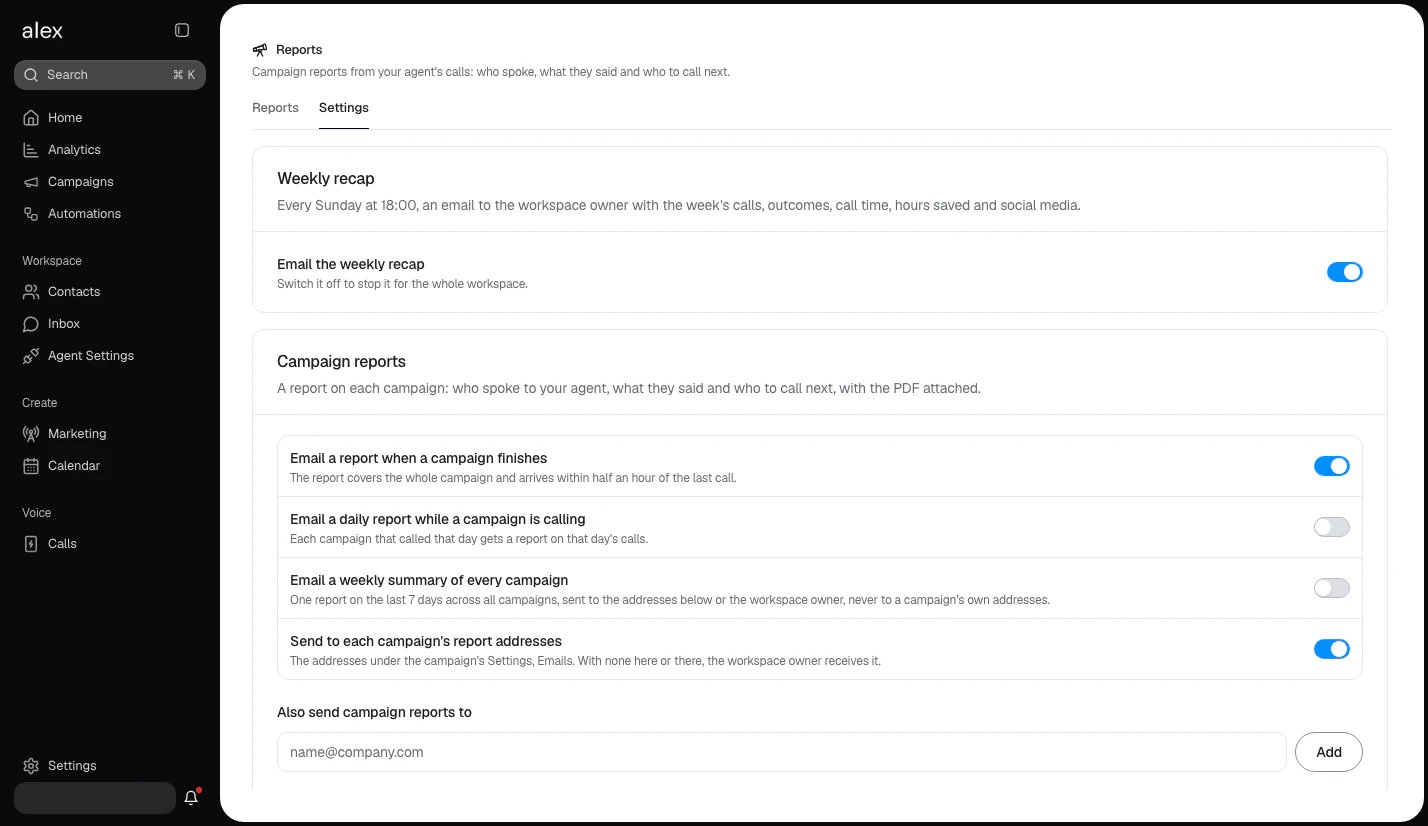
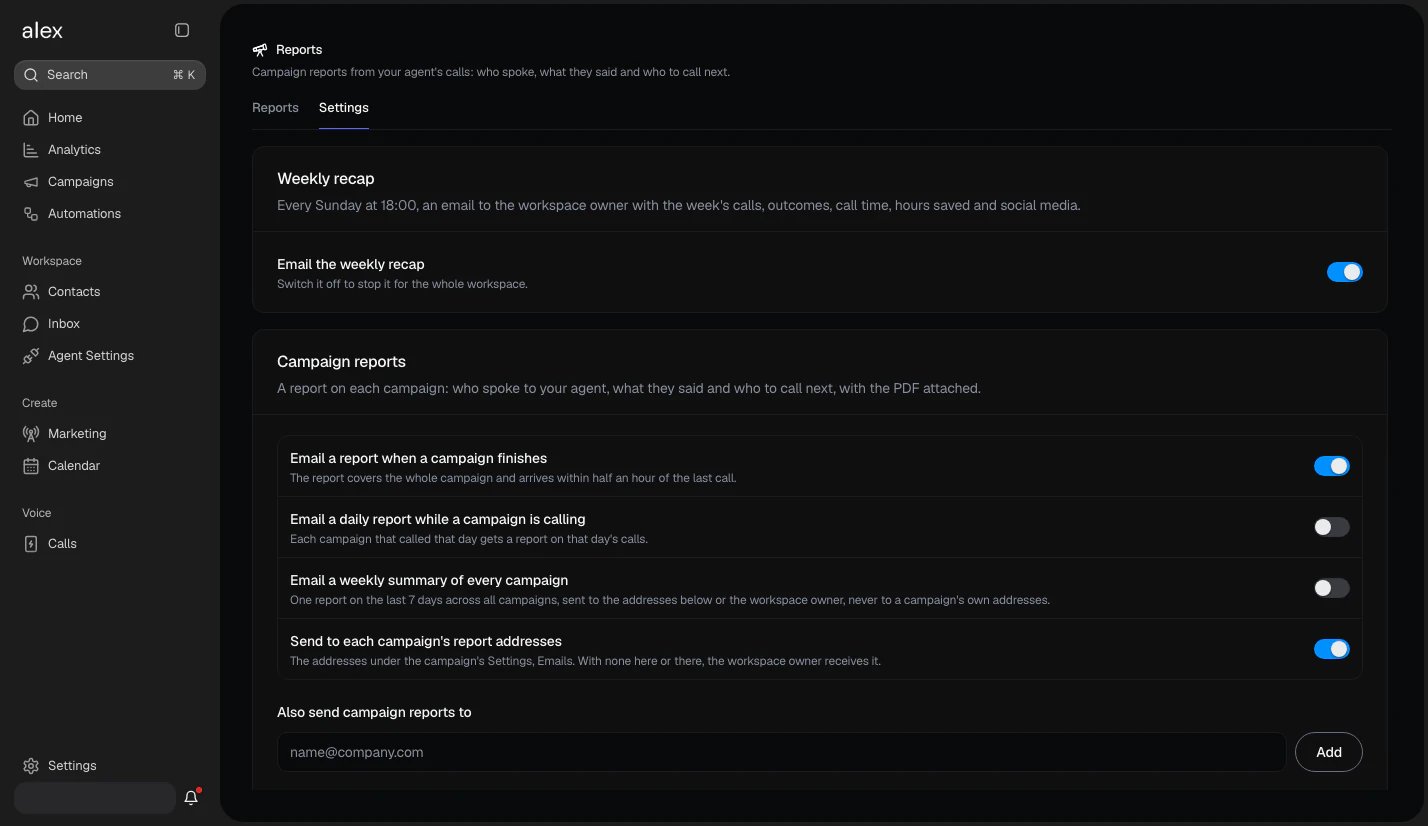
Every campaign report setting in one panel
Report logo
“Shown at the top right of every report and PDF.” Until you upload one, reports use your workspace logo, and with no logo at all they show your workspace name. Click Remove to go back.The weekly recap
“Every Sunday at 18:00, an email to the workspace owner with the week’s calls, outcomes, call time, hours saved and social media.” It is on for every workspace. Turn off Email the weekly recap to stop it for the whole workspace.Questions people ask
Will a client see other clients' campaigns in the weekly summary?
Will a client see other clients' campaigns in the weekly summary?
No. The weekly summary never goes to a campaign’s own report addresses. It goes only to Also send campaign reports to, or the owner, so an agency’s client sees only their own campaign’s reports.
I still get the old Campaign finished email
I still get the old Campaign finished email
The report replaces it once two switches are on. One is Email a report when a campaign finishes here. The other is the campaign’s own Campaign finished email, under its Campaign settings → Emails. If a report has not gone out within 90 minutes of the last call, the old email is sent so you still hear.
Why did the PDF not attach?
Why did the PDF not attach?
If the PDF has not printed within an hour, the email goes without it and links to the report instead. Open Reports and click View.
Can I get a test email?
Can I get a test email?
Make a report with New report, then click Email on its row.
The time zone is wrong
The time zone is wrong
Reports use your workspace’s time zone, saved when you save this panel. Change the workspace time zone under Settings, then save this panel again.
Related
Reports
Make, view and email reports.
What is in a campaign report
Every section explained.
Broker reports
The weekly broker email for real estate.
Campaigns
Set each campaign’s report addresses.