

In the app: Calls in the sidebar. It holds Numbers, Verification, PBX Extensions, Callbacks, Approvals, Call Logs, Blocked Callers and Meetings. Phone numbers come with paid plans and the free trial.
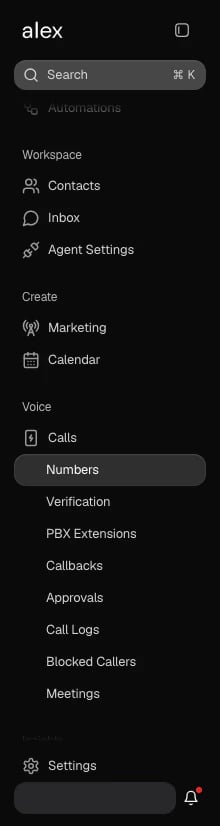
Everything about your phone lines sits under Calls
What each page is for
Numbers
Buy numbers, give each one an agent, choose which ones show as caller ID, and check a number’s health.
Verification
The identity check some countries need before a number is issued, and the business check before your first outbound call.
PBX Extensions
Connect your own phone system so an agent answers an extension or the calls your PBX sends it.
Callbacks
Every call your agents promised to make back, and every transfer your team missed.
Approvals
Payment and booking links that wait for a named person to approve them before they are sent.
Call Logs
Every call, with filters, recordings, transcripts, summaries, costs and exports.
Blocked Callers
Numbers that can never reach your agents. They hear an engaged tone and cost you nothing.
Meetings
The Meeting Assistant add-on: a note taker for Google Meet, Zoom and Teams.
How an incoming call travels
When someone rings one of your numbers, this is what happens, in order. The business hours you set decide whether a transfer or a booking can happen right now. The agent answers either way. See Inbound calls and business hours.How an outgoing call travels
Your agent calls out for a campaign, for a callback, or when you press Call on a callback. The caller ID rules are on Number health and caller ID. The business check is on The business check.Where the numbers come from
You have four ways to give an agent a phone line. You can mix them in one workspace.
Numbers are on sale in nine countries. See Countries and number types.
Questions people ask
Do I need a phone number to try SmartAlex?
Do I need a phone number to try SmartAlex?
No. On the Free plan you talk to your agent in the browser. A phone number comes with the free trial and the paid plans.
Does the agent answer at night and at weekends?
Does the agent answer at night and at weekends?
Yes. The agent answers every call to its number, open or closed. Your business hours only decide whether it may transfer a caller or book a meeting at that moment.
How many calls can run at once?
How many calls can run at once?
The limit is for your whole workspace, shared by all your agents, not set per agent. Professional includes 5 calls at once and Real Estate 20. Owners and admins see it in Settings → General → Concurrent Calls. Add Capacity adds more, and Inbound / Outbound Split keeps room for incoming calls so campaigns never crowd them out. Prices are on Pricing.
Can one agent answer several numbers?
Can one agent answer several numbers?
Yes. Give the agent as many numbers as you like, for example one per city. Each one rings the same agent, and the numbers in rotation take turns as its caller ID.
Where do I see what was said on a call?
Where do I see what was said on a call?
Open Calls → Call Logs and click the call. The Transcript tab has every line, and the Insights tab has the summary.
Can I stop a nuisance caller?
Can I stop a nuisance caller?
Yes. Add the number on Calls → Blocked Callers. It hears an engaged tone, never reaches the agent and never costs you a minute.
Related
Buy a phone number
Get a number and give it to an agent in about a minute.
Use your own number
Keep the number your customers already know.
Phone system guides
Step-by-step set-up for 3CX, Yeastar, Teams and more.
Pricing
Number prices and call rates.